
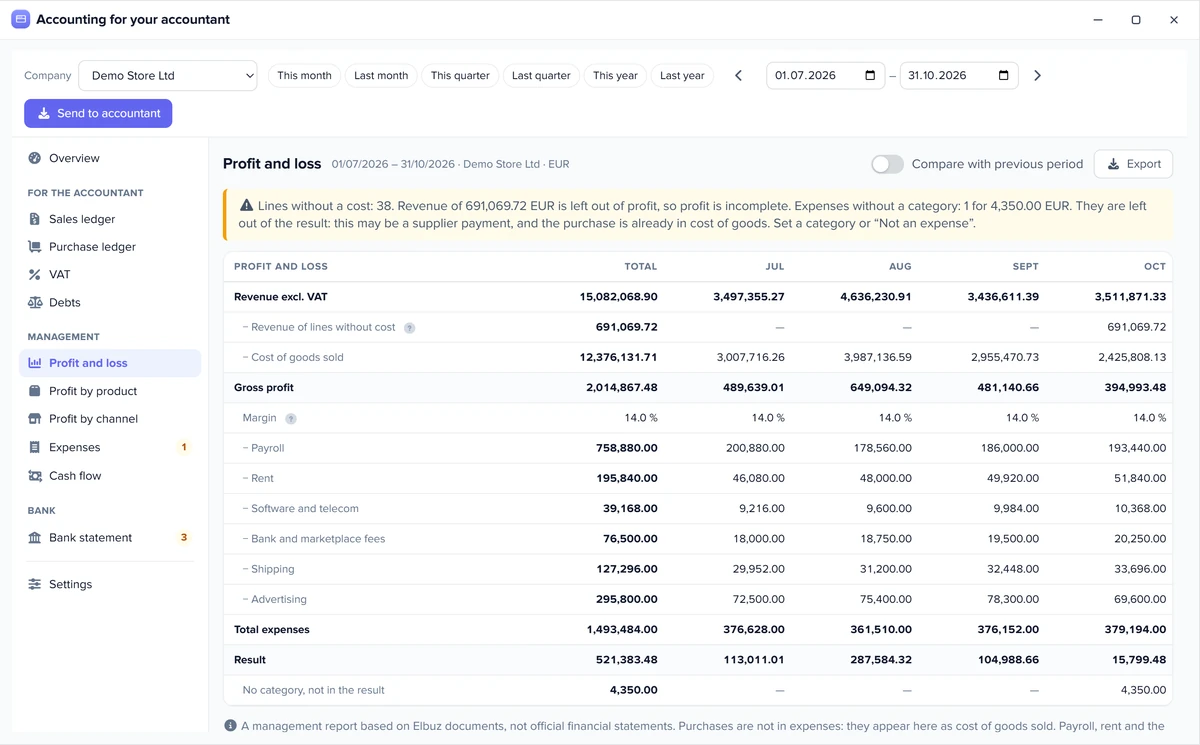
Management profit and loss
From the top down: revenue excluding VAT, cost of goods, gross profit, expenses by category, result. By month, with a comparison to the previous period of the same length.
Finance department one of the departments of your AI company
Elbuz shows what your store earned on each product and channel, where the money went and who owes whom, and prepares files for your accountant. It is a management report from your documents, not official financial statements.

Revenue grows, but there is no more money? The report shows what actually brings money and what runs at zero or at a loss.
From the top down: revenue excluding VAT, cost of goods, gross profit, expenses by category, result. By month, with a comparison to the previous period of the same length.
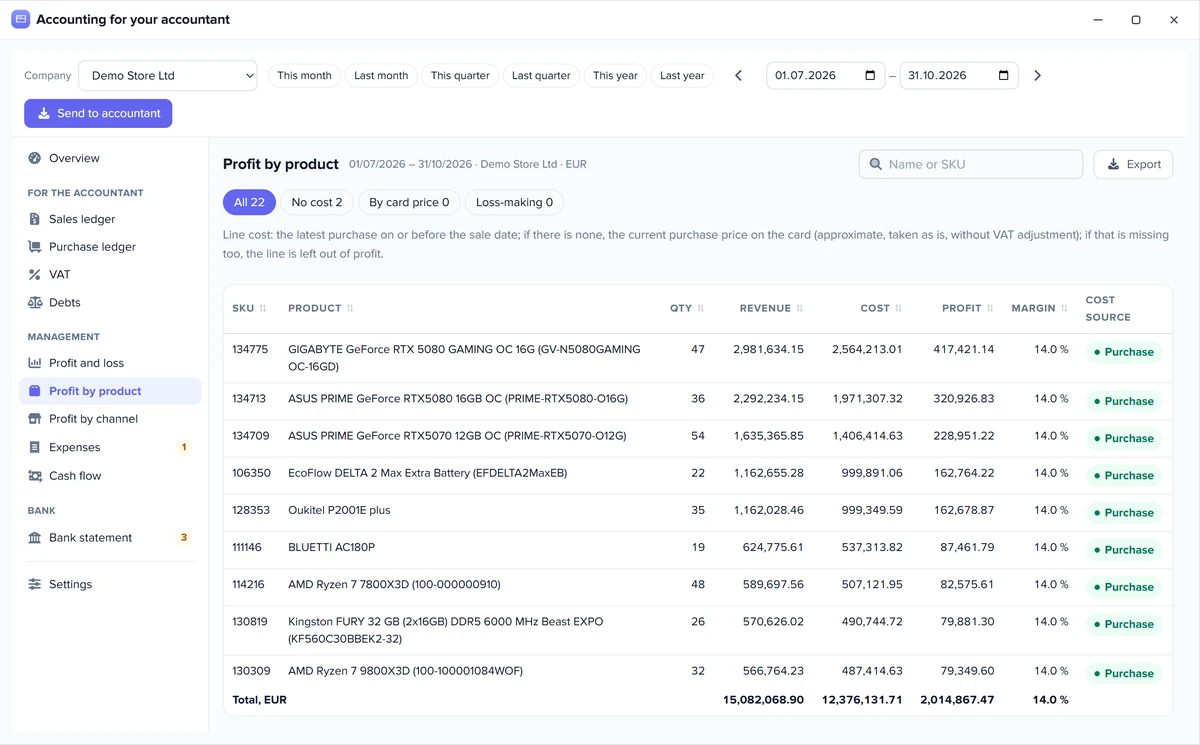
Quantity, revenue, cost, profit and margin for each product. Filters show loss-making products, lines without a cost and lines at the product card price.
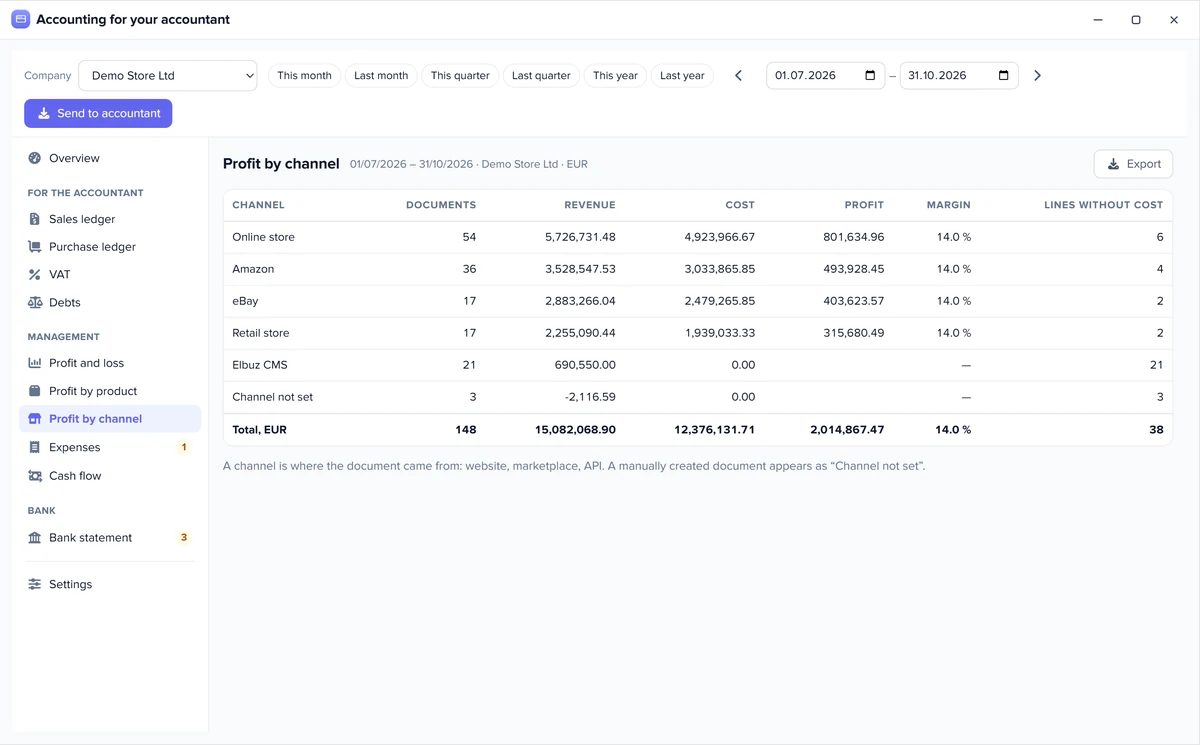
The same calculation by document source: website, marketplace, chat or API. One website can come from two sources, and then it is two lines.
Revenue, gross profit, expenses, result, debts and net cash by vouchers on one screen. “Needs attention” names what is missing for accurate numbers and leads to where you can fix it.
Revenue in the report always equals the sales ledger total excluding VAT, so your numbers and your accountant’s match. Need the formula? Try the free profit margin calculator.
Profit is only as good as its cost. So Elbuz shows where each number came from and does not invent what it does not know.
A line without a cost gives no profit: otherwise all of it would look like clean earnings. So margin is calculated only from revenue with a known cost, and incomplete profit is marked. This is not a FIFO calculation: a sale line has no link to a batch, and a stock adjustment does not count as a purchase. Shipping and a discount on the whole document enter profit with no cost.
By default the ledgers, VAT, profit, channels and the DATEV and FEC files count only posted documents, and the overview says how many unposted ones were left out and for how much. If you do not post documents, turn this switch off in the settings. Orders without a delivery note are also a separate switch for stores that do not issue notes. Ask your accountant first: this also changes their file.
Rent, payroll, ads, shipping: expenses count in the result as soon as the payment voucher has a category.
An expense is a payment voucher not linked to a document, and a person assigns the category. A voucher without a category is shown separately and stays out of the result: it may be a supplier payment, and the purchase is already in cost of goods. You can add your own categories.
Incoming and outgoing vouchers by month, net cash and statement lines still to review. Payment by document status is shown alongside and not added, so money is not counted twice.
Marketplace fees and ad spend are not pulled in automatically: add them as an expense with a category. The report has no account balance and no cash forecast, because the system has no opening balances.
Who owes you, whom you owe and which payments are not allocated yet.
Receivables and payables by counterparty at the end of the chosen day: by documents issued up to that date, with payments as of that date. The report can go to your accountant as a separate file.
Upload the file from your online bank. Elbuz allocates a payment itself when the amount matches and the reference has a document number, or the counterparty with this IBAN has only one such document. You review the rest, and an allocation can be undone.
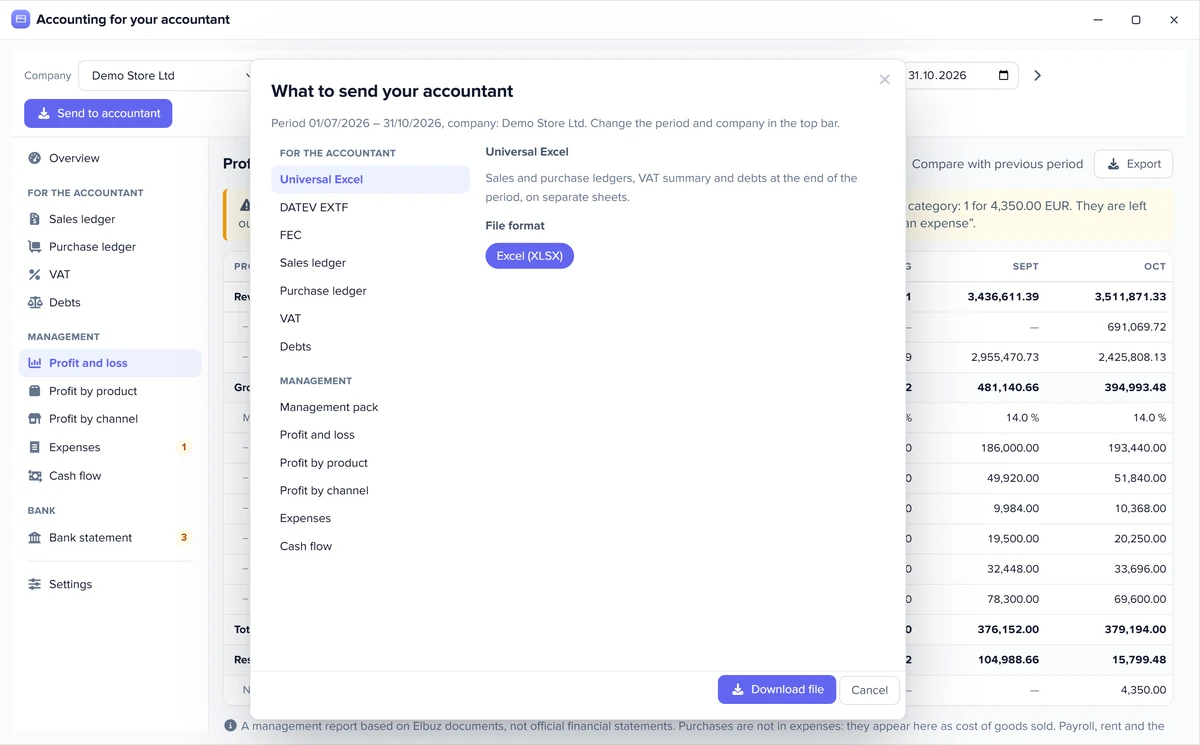
One file for the quarter instead of picking documents by hand. Your accountant loads it into their software and checks it.
Sales ledger, purchase ledger, VAT summary by rate and debts in Excel or CSV: each report on its own, or all in one file on separate sheets.
A DATEV booking batch for a tax adviser in Germany. A FEC file for an accountant in France: a draft with Elbuz transactions only, without opening balances, payroll or closing entries.
Separate rights for viewing reports and exporting, changing data (statements and expenses) and settings. Viewing is enough for your accountant: an export changes nothing.
The VAT summary is a total from Elbuz documents, not a tax return. The DATEV and FEC files have not been checked by official software, so agree on them with your accountant before the first handover.
Elbuz does not keep the books, file tax returns or run payroll. Your accountant prepares official statements in their own software.
| What we compare | Elbuz | Accounting software | Spreadsheet |
|---|---|---|---|
| Profit by product and channel | Yes, from store documents | Usually not, or with extra setup | By hand, while someone merges the data |
| Official statements and tax returns | No | Yes | No |
| Where the numbers come from | Documents and vouchers already in Elbuz | Entries your accountant makes | What someone typed |
| Payroll and fixed assets | No | Yes | No |
No. Elbuz does not keep the books, file tax returns or run payroll. It shows profit, expenses and debts from your documents and gives your accountant files to load into their own software.
No. The profit and loss report in Elbuz is a management report built only from Elbuz documents. The VAT summary is not a tax return either.
Line revenue excluding VAT minus cost. Lines without a cost stay out of profit and are shown separately, and margin is calculated only from revenue with a known cost.
First, the latest goods receipt for the product no later than the sale date. If there is none, the current purchase price from the product card, marked as such. If that is missing too, the line is shown as “no cost”. This is not FIFO: a sale has no link to a batch.
The “Profit by channel” report groups sales by document source: website, marketplace, chat or API. If one website comes from two sources, it will be two lines.
By default the ledgers count only posted documents, and orders without a delivery note stay out. The overview names what was left out, and both switches are in the settings.
Not automatically. Add them as an expense with a category, and they enter the result.
An expense is a payment voucher not linked to a document. Assign it a category, and it enters the result. A voucher without a category is shown separately, and the “Not an expense” category excludes it.
No. Cash flow is calculated from vouchers. There is no account balance because there are no opening balances, and Elbuz has no forecast or payment calendar.
In “Debts”, choose a date: the report shows who owes whom at the end of that day, by documents and payments as of that date.
CAMT.053, MT940 and CSV. For CSV you set the columns. Elbuz allocates exact matches itself, and you review the rest.
Sales and purchase ledgers, the VAT summary and debts in Excel or CSV, plus a DATEV booking batch or a FEC file. Your accountant loads them into their own software and checks them.
There are three rights: viewing and exporting, changing data, and settings. So an accountant can see reports and take files without changing anything.
There is no separate fee: accounting is part of one Elbuz plan, together with every department. Plans start at €87 a month. The price depends on the number of products and users: one user is included in the base plan, each additional user is paid separately. The first 14 days are free, and you get €50 on your balance after sign-up. See pricing.

14 days free
Accounting is part of one plan, together with every department of your AI company. €50 on your balance after sign-up and 14 days to check the numbers on your own documents.
Updated