
Your price next to competitor prices
The prices other stores charge for the same products sit in the product record, next to your cost and your selling price.
Purchasing and products department one of the departments in your AI company
Competitor price monitoring is daily collection of prices for your products from competitor websites and marketplaces, compared with yours — and repricing by your own rules.

Competitor price comparison and analysis in the same product record that holds your cost and selling price.
The prices other stores charge for the same products sit in the product record, next to your cost and your selling price.
You see where you are above the market and losing sales, and where you can raise the price without risk.
Along with the price the scraper picks up availability, so you know when a competitor runs out of a product.
Only the competitors you mark are counted, and you can keep an allow list and a block list of sellers.
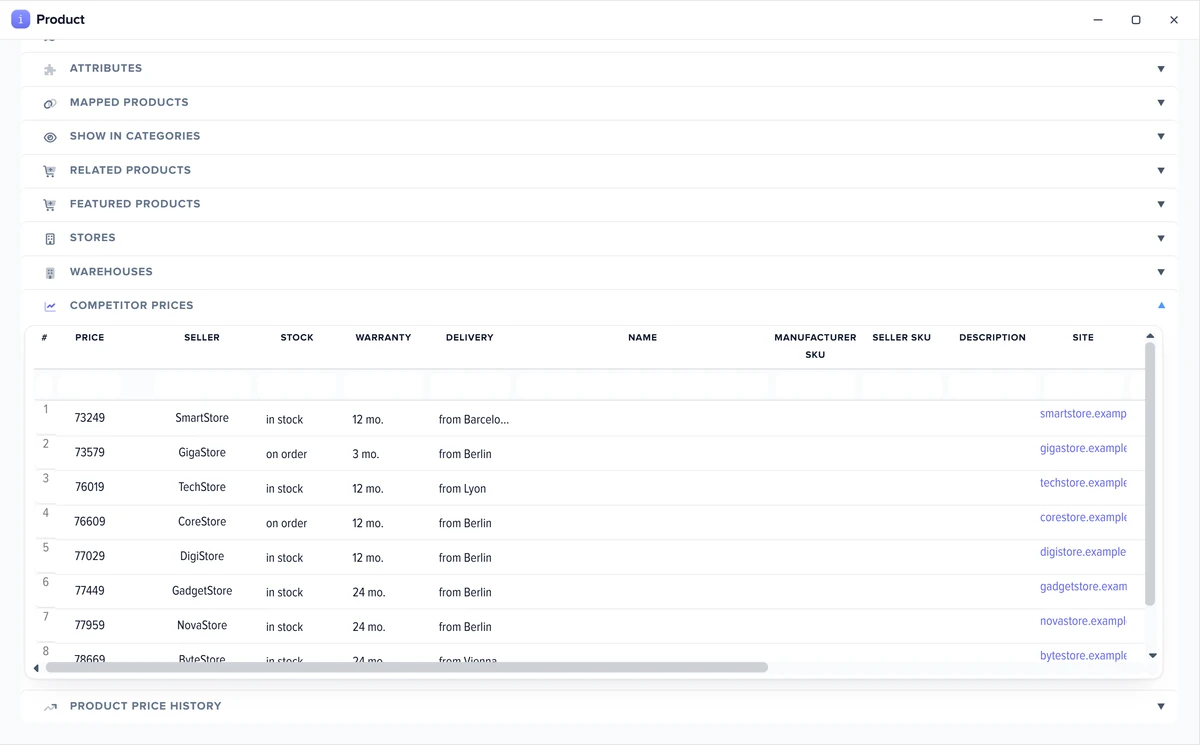
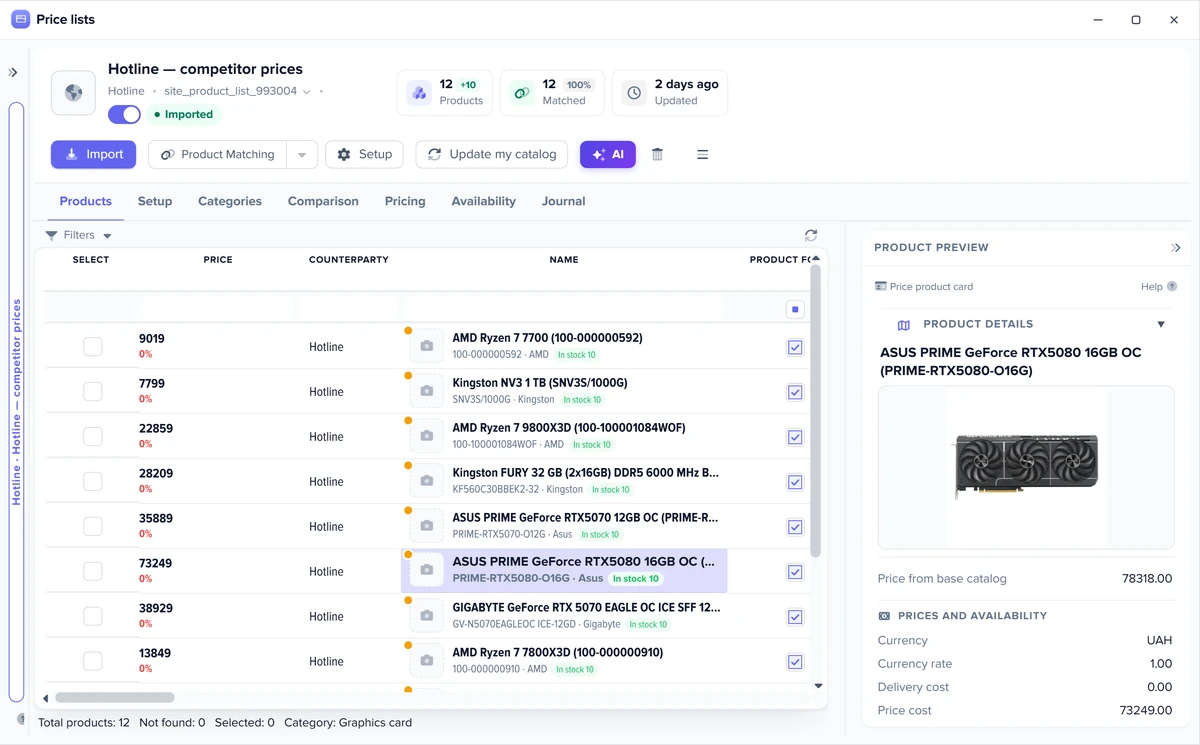
Competitor price tracking from websites and marketplaces, collected automatically on a schedule.
Any competitor site is collected by the website scraper from its address — the system tries to work out the parsing rules on its own.
Ready-made scrapers for Amazon and eBay listings: pick them in the wizard, no selectors to write.
Free extension for sites that block servers: it collects pages in your own browser.
The same engine as for supplier price lists: rules first, then AI or you.
A link is made once and used at every collection run. Without a pair in your catalog there is nothing to compare a competitor price with.
Repricing on your terms: compare and decide yourself, or set a rule that recalculates the price for you.
Competitor prices do not touch your catalog until the “Competitor” group is ticked in price selection, so they cannot spoil your prices. You look side by side and decide.
A formula on the “Price” field can use the lowest or the N-th competitor price, the minimum of the “Competitor” group or one specific competitor — for example, the lowest competitor price minus 1%. The formula recalculates prices at every catalog update; without it competitor prices never change yours.
Turn on “Do not drop the price below cost + N%”, and at every catalog update the price stays above your cost plus your margin, even if a competitor dumps prices.
Demo: a competitor cuts the price — your price follows it by your rule, and the floor keeps it above cost when someone dumps.
Elbuz · Catalogcompetitor prices side by side
| Product | Cost | Lowest rival | Your price | You |
|---|---|---|---|---|
| Lumo 14 laptop | €1,000 | €1,150 | €1,159 | pricier |
| Nova 12 smartphone | €480 | €509 | €504 | cheaper |
Price =lowest competitor price − 1%
Floornot below cost + 5%off
Lumo 14 laptop, 16 GB, 512 GB
€1,159
In stockYour price follows the market by your rule — and never drops below cost + 5%.
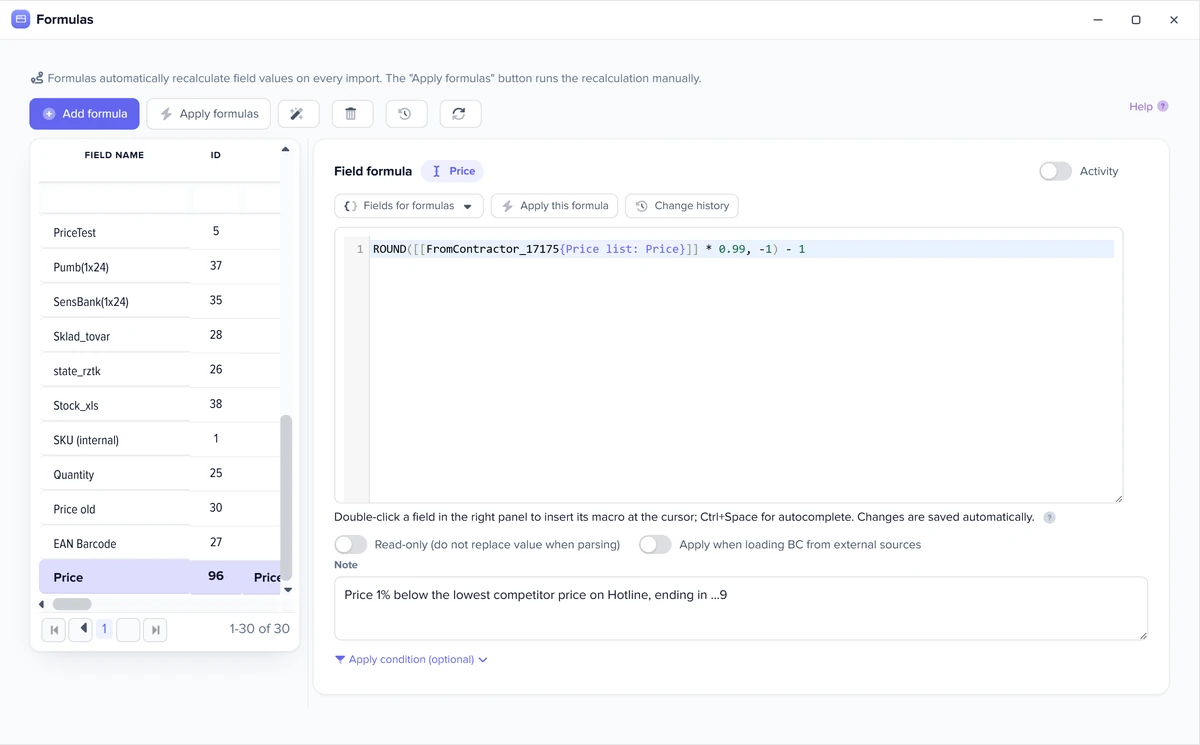
There is no “match competitors” button — the rule is always yours. How to build a price formula with markup and rounding.
Three cases: an online store, a marketplace seller and a brand watching its resellers.
Price intelligence software shows prices; what matters is what you can do with them next.
| What we compare | Monitoring in Elbuz | Standalone price monitoring tool |
|---|---|---|
| Where you see competitor prices | In the product record, next to your cost and price | In a separate dashboard |
| What happens to the price next | A price formula based on the competitor price | You copy it by hand or through an integration |
| Product matching | The same engine as for supplier feeds: rules + AI | Depends on the service |
| Catalog and feeds | In the same system | Separate |
Compared by way of working, without naming services.
Monitoring is part of the Elbuz plan together with supplier price lists and the catalog.
What it costs for your catalog — see pricing.
Real Elbuz windows on demo data.
It is regular collection of the prices other stores charge for the same products, compared with yours. It shows where you are above the market and losing sales, and where you can raise the price without risk. In Elbuz competitor prices are collected from their websites, Amazon and eBay, and sit next to yours in the product record.
Add the competitor as a contact in the “Competitor” group, connect their website as a source, link their products to your catalog and put collection on a schedule. Competitor prices do not reach your catalog until the “Competitor” group is ticked in price selection, so they will not spoil your prices.
One that collects prices on a schedule by itself, links other stores’ products to yours correctly and lets you use a competitor price in your own pricing. In Elbuz monitoring works in the same system as the catalog and supplier feeds.
Look at three things for each product: the lowest market price, the gap between it and your price, and whether competitors have the item in stock. In Elbuz all three are in the product record, and the comparison view shows the market minimum next to your catalog price.
Yes, without a developer: with a formula on the “Price” field. The formula can take the lowest or the N-th competitor price, the minimum of the whole “Competitor” group or one competitor’s price and calculate yours from it — for example, 1% below the cheapest. It recalculates at every catalog update. Turn on “Do not drop the price below cost + N%”, and the price never falls below your cost plus your margin, even if a competitor dumps prices.
Competition-based pricing: you set your price relative to the market — slightly below, level or above, depending on the product. In Elbuz this is a formula from the competitor price with a floor of cost plus your margin. More — markup and pricing.
As often as you set in the collection schedule — for example, every night on the server, with no app window open. Products already collected are not downloaded again, and an interrupted run continues from where it stopped.
There is no free-forever plan: monitoring is part of the Elbuz plan, and the first 14 days are free. See pricing.
Prices on websites and marketplaces are public data: the scraper sees the same as any visitor and breaks nothing. How you use what was collected is up to the store owner, and so is the responsibility.
The same way as supplier price list rows: by part number, by name, by your own rules, and what is left goes to AI or to you.
Partly. Reseller websites give each store’s price for your product, so you see who sells below the minimum advertised price, and you can keep allow and block lists of sellers. There is no separate “MAP violations” report: the comparison with MAP is made with your filter or a formula.
Monitoring tracks prices: what the same products cost in other stores. A scraper fills your catalog — products, photos, descriptions and specs, usually from supplier sites. In Elbuz both run on the same collection engine. More — ecommerce web scraper.

14 days free
The purchasing and products department joins your AI company along with every other department. €50 on your balance after sign-up and 14 days to test monitoring on your own competitors.
Updated