
Google Shopping
An XML feed in Google Merchant Center format with g:id, g:price, g:availability, g:gtin and photos.
Google Shopping feedWebsite and marketplaces department one of the departments in your AI company
Product feed management in Elbuz: one catalog, and a separate feed for Google Shopping, Meta, TikTok, ChatGPT and comparison shopping engines, each with its own selection, price and titles. If-then feed rules, error checks before sending and rollback.

Product feed management means keeping one catalog and letting software turn it into the file each channel expects, with its own selection, prices and texts.
Demo: one rule set updates the feeds of several channels.
Feed rulesshared set
| If | Then |
|---|---|
| all products | Title = {brand} {name} {sku} |
| all products | Price × 1.15, round to .99 |
| GTIN invalid | exclude from feed |
Feedsfixed URLs
Feed quality: invalid GTIN — 3
| Channel | Feed |
|---|---|
| Google Shopping | waiting |
| Meta | waiting |
| TikTok | waiting |
| waiting | |
| Microsoft | waiting |
One rule set — five feeds updated without touching the catalog.
The catalog itself stays as it is. A change for Google does not touch your Meta feed or your website.
Each channel is a ready template type in the “Data export” window. Pick the channel — the format is already set.
An XML feed in Google Merchant Center format with g:id, g:price, g:availability, g:gtin and photos.
Google Shopping feedA Meta catalog feed for Facebook and Instagram and a TikTok catalog feed, built on the same engine as Google.
The “OpenAI (ChatGPT Ads)” template builds a feed to OpenAI’s spec and sends it to the OpenAI SFTP server after every export.
Ready XML templates for the Pinterest catalog and Microsoft Merchant Center (Bing): availability and price already in the form each one accepts.
Amazon, eBay, Walmart, Etsy and other marketplaces take the same catalog through their APIs, with orders coming back.
Marketplace integrationA price list for partners and any XML layout you describe yourself, for a channel that has no ready template.
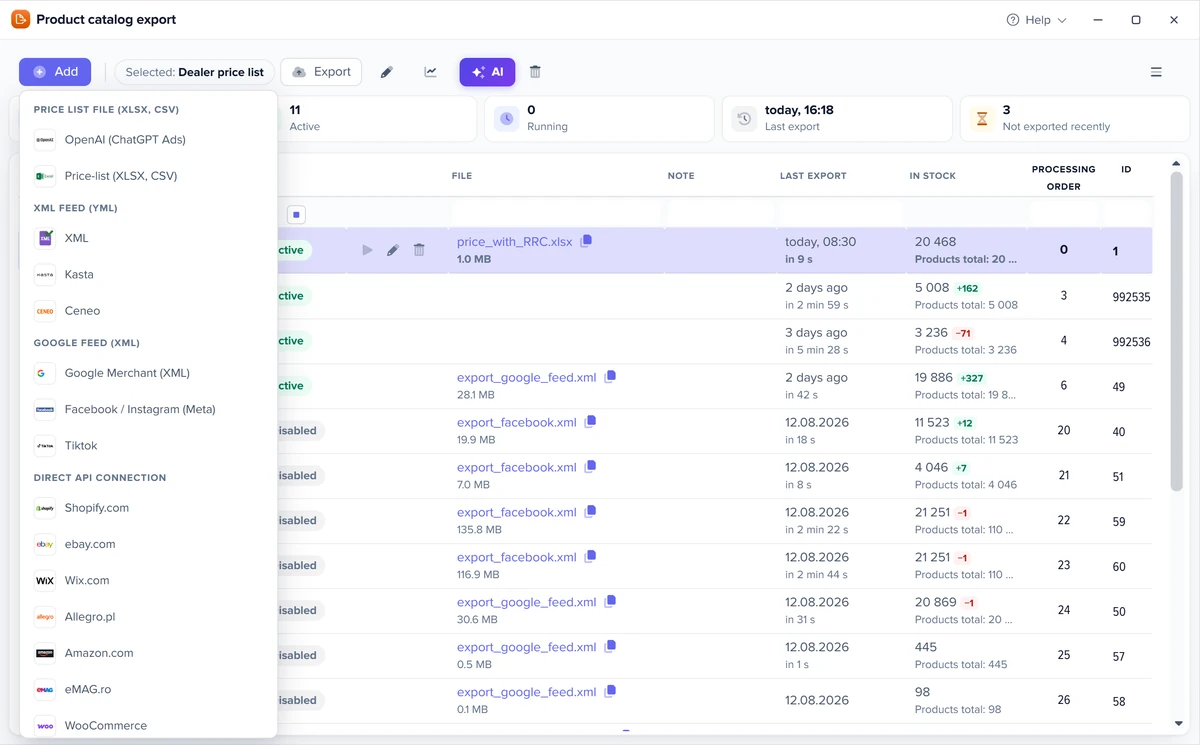
Choose the engine in the template list: columns, tags, separators and stock wording follow its spec. You add only what the store alone knows.
| Channel | Format | What you fill in |
|---|---|---|
| idealo | CSV | delivery time and shipping cost |
| billiger.de | CSV | delivery time and shipping cost |
| PriceRunner | CSV, tab-separated | shipping cost and lead time, with currency |
| Kelkoo | XML, Google format | the shipping line |
| Skroutz | XML | VAT for Cyprus (Greece is preset); a button opens the Skroutz validator |
| Heureka | XML | check the preset delivery days per stock status |
| XML, Google format | nothing extra | |
| Microsoft Merchant Center | XML, Google format | shipping for Germany and Austria |
Descriptions go out as plain text, without HTML. Prices leave in your catalog currency: for SEK, DKK, CZK or EUR add a rate in the column formula or in a feed rule.
Product feed optimization without touching the catalog: each rule says which products and what to do with them.
The same builder as in product filters, with AND/OR groups. An empty condition means all products. Rules run top to bottom, and each one sees the result of the previous ones.
Set, add to the start or end, find and replace, cut to N characters, multiply and add for numbers with rounding to .99, or exclude the product from the feed. {field} inserts the product’s own value.
The preview shows a summary and a table of what changes for each product, up to 2,000 products of the template, before anything is exported.
Every save is a version: compare two versions and roll back to the one that worked.
One markup or one title format connected to five templates at once. Shared sets run first, then the template’s own rules.
Title as “brand + name + SKU” cut to 150 characters; a 15% markup with prices ending in .99; drop products with an invalid GTIN.
Rules work in XML feeds: Google, Meta, TikTok, Pinterest, Microsoft, Kelkoo, Skroutz, Heureka and XML marketplace feeds. In CSV feeds (idealo, billiger.de, PriceRunner) the same is done with column formulas.
The “Feed quality” window lists every product a channel is likely to refuse, per feed template, before you send the file.
One row is a product in a template with all of its errors. Tiles by error type filter the list, and a row opens the product card.
Length, digits only, check digit, and internal or coupon codes that look like barcodes but are not. Free single-code check: the EAN-13 tool.
Required fields and title length are set per channel: Google, Facebook, OpenAI and marketplaces connected by API.
Products refused by Mirakl marketplaces, Cdiscount, OTTO and Newegg show up in the same report as separate rows.
The “AI readiness” tab scores the catalog and every category from 0 to 100 and shows where the points are lost.
| Criterion | Points | Full score when |
|---|---|---|
| GTIN barcode | 20 | a valid GTIN and no invalid one; MPN only — 10 |
| Photos | 15 | 3 or more; 1–2 photos — 8 |
| Description | 15 | 500+ characters of text; 150–499 — 8 |
| Attributes | 15 | required attributes of the category filled, or 5+ attributes |
| Brand | 10 | manufacturer filled in |
| Price | 10 | above zero |
| Google category | 10 | main category mapped to the Google taxonomy |
| Availability | 5 | stock status set |
A product is ready at 80 points with a price and a photo. Categories are sorted by gain — how much the whole catalog score grows if you complete that category. From a row you open the weak products, start AI descriptions for the category, or map it to Google, where AI suggests marketplace categories with a confidence score and you apply the ones you accept.
Elbuz calculates five labels at every export and writes them to custom_label_0…4 — one checkbox in the feed template.
| Label | Values | How it is set |
|---|---|---|
| Margin | high mid low loss no_cost | from price and cost price: high from 30%, mid from 15% |
| Stock | in_stock low_stock preorder out | low stock — 1 to 5 units |
| ABC by sales | A B C none | revenue over 90 days: A up to 80% of the total, B up to 95% |
| New | new regular | added within the last 30 days |
| Price segment | low mid high | thirds of prices in the product’s category, or your own two limits |
All thresholds can be changed in the template. Combine labels with feed rules: “if margin = high and ABC = A → custom_label_0 = hero”. In Google Ads, Meta Advantage+ or TikTok you then bid more on high-margin best-sellers and stop paying for products that are out of stock.
Feeds, rules, feed quality and labels are not separate modules — they come with one Elbuz plan.
What it costs for your catalog — see pricing.
Keeping one product catalog and building from it the feed each channel expects — Google Shopping, Meta, TikTok, comparison engines. In Elbuz every channel is a feed template with its own selection, price, rules and schedule, published at a fixed URL.
Google Shopping, Facebook and Instagram (Meta catalog), TikTok, ChatGPT (OpenAI), Pinterest, Microsoft Merchant Center, and comparison shopping engines idealo, billiger.de, PriceRunner, Kelkoo, Skroutz, Heureka and Ceneo. Marketplaces connect by API — see marketplace integration.
Yes, with feed rules in that channel’s template: “if <condition> → then <action>”. The catalog and your other feeds stay as they are. Rules work in XML feeds; in CSV feeds column formulas do the same.
Yes. Every save of the rules is a version in the change history: compare two versions and roll back to the one you need. The before → after preview shows the result before anything is exported.
Open “Feed quality” on the template: it lists products with errors — invalid GTIN, empty required fields, titles that are too long — and products marketplaces have already refused.
custom_label_0…4 are fields Google, Meta and TikTok use to group products in campaigns. Elbuz fills them at every export — margin, stock, ABC by sales, new arrival and price segment — so you do not maintain them by hand.
Check the “AI readiness” tab: a 0–100 score for the catalog and every category based on GTIN, photos, description, attributes, brand, price, Google category and availability. A product is ready at 80 points with a price and a photo.
It is not sold separately: every feed, rule, quality check and label is part of one Elbuz plan from €87 a month, together with the catalog and orders. The first 14 days are free — see pricing.

14 days free
The website and marketplaces department joins your AI company along with every other department. €50 on your balance after sign-up and 14 days to build feeds from your own products.