
Amazon
Listings come from your catalog, prices and inventory sync by SKU, and Amazon orders land in the same list as your website orders.
Amazon integrationWebsite and marketplaces department one of the departments in your AI company
Marketplace integration connects one product catalog to every marketplace you sell on: listings go out, prices and stock stay in sync, and orders come back into one list.

One marketplace can be run from its seller account. With every next one the manual work multiplies.
Products live in one catalog, and each marketplace gets its own template.
Products and prices come from supplier price lists and the product catalog (PIM); orders go to order management.
Marketplaces in Europe and the US plus every marketplace on Mirakl, each with its own page: what it requires and how it connects.
Listings come from your catalog, prices and inventory sync by SKU, and Amazon orders land in the same list as your website orders.
Amazon integrationListings come from your catalog with the category’s item specifics, a product family as one listing with variations, prices and stock update on a schedule, and eBay orders arrive in one list with your own statuses.
eBay integrationActive listings become product cards, Etsy orders arrive with the buyer and address, and prices and inventory go back to Etsy on a schedule. New listings are created from your catalog with the taxonomy properties — colour, size, material — you map once.
Etsy integrationOffers come in with category parameters and EAN, prices and stock go back in batches, and orders arrive with payment and delivery details.
Allegro integrationOffers come into one catalog per country, prices and stock go back in batches, and eMAG orders are confirmed from Elbuz.
eMAG integrationOffers and orders come into Elbuz, posted orders reserve stock, and prices and stock go back to each storefront.
Kaufland integrationProducts and orders from OTTO Market come into Elbuz, new products go to otto.de with category, brand, required attributes and GPSR details, and your status sends shipments, cancellations and return decisions.
OTTO Market integrationProducts and orders come in, new products are published with photos, and prices and stock go back to the warehouse you choose.
TikTok Shop integrationOffers by EAN, new product content when bol does not know the EAN yet, prices and stock from your catalog, and bol orders in your order list.
Bol integrationOffers by EAN and new product sheets, stock in batches, orders accepted automatically and shipments confirmed with a parcel number.
Cdiscount integrationOffers by GTIN or full items by feed, inventory that follows your warehouse, and orders acknowledged on Walmart automatically.
Walmart integrationNewegg.com, Newegg.ca and Neweggbusiness.com: items linked by SKU, orders confirmed from Elbuz, prices and inventory as feeds, and new items as offers by UPC or full listings.
Newegg integrationArticles with an EAN per size, attributes and size data, prices per country, stock sync and Zalando orders in one list. Required attributes and size data are matched once in the category mapping window, and the readiness check shows what is still unmapped before export.
Zalando integrationLeroy Merlin, Conforama, BUT, Maisons du Monde, Vente-unique, home24, ePrice or any other Mirakl marketplace through one connector: offers by EAN, prices and stock, orders accepted automatically, tracking and cancellations sent back.
Mirakl integrationThe DIY, home and garden marketplace in the UK, France, Spain, Italy and Germany: offers by EAN on existing product pages, prices and stock in batches, orders accepted automatically, tracking, refusals and refunds sent back.
ManoMano integrationYou do not have to move your store. It becomes one more channel of the same catalog.
Shopify and WooCommerce connect by API: catalog, orders, prices and stock in both directions. Wix updates prices and stock of linked products and brings orders. OpenCart, PrestaShop and Magento work through the Elbuz Tunnel module. See Shopify integration and WooCommerce integration.
The same catalog, as a feed at a permanent link.
Ads and shopping channels take a product feed rather than an API connection. Elbuz builds feeds for Google Merchant Center, Facebook and Instagram catalogs, TikTok and ChatGPT shopping from the same catalog and rebuilds them on schedule — see product feeds.
Prices and stock on marketplaces follow your catalog — without manual updates.
Each template takes its own price field or calculates the price by formula, for example a markup that covers the marketplace commission. The catalog does not change. Markup rules.
Prices and stock go out on each template’s schedule. Supplier price lists are scheduled too, so new prices reach the marketplaces without you.
Stock comes from your warehouses and suppliers, and posted orders from every channel reserve it in one place, so available stock can go out to every marketplace.
One template per country or account, prices from a template field or a formula with the exchange rate, product texts in the language chosen in the template.
One product card, one export template per channel and one order list for every marketplace.
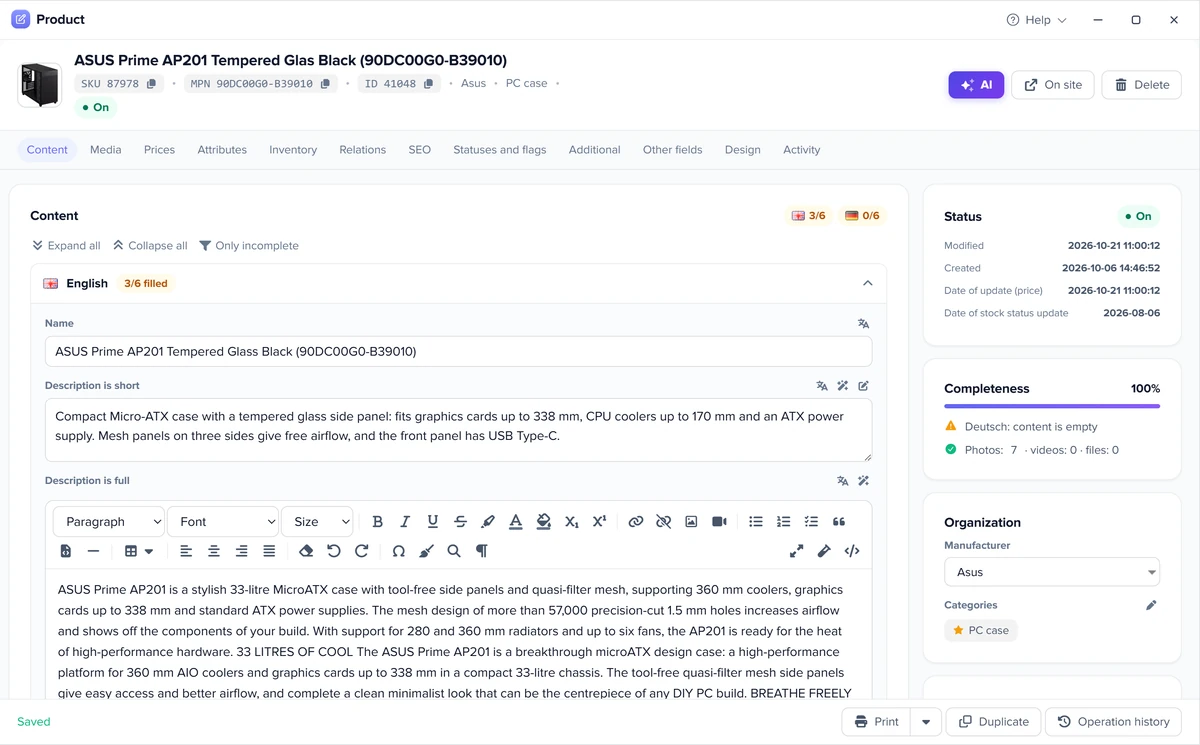
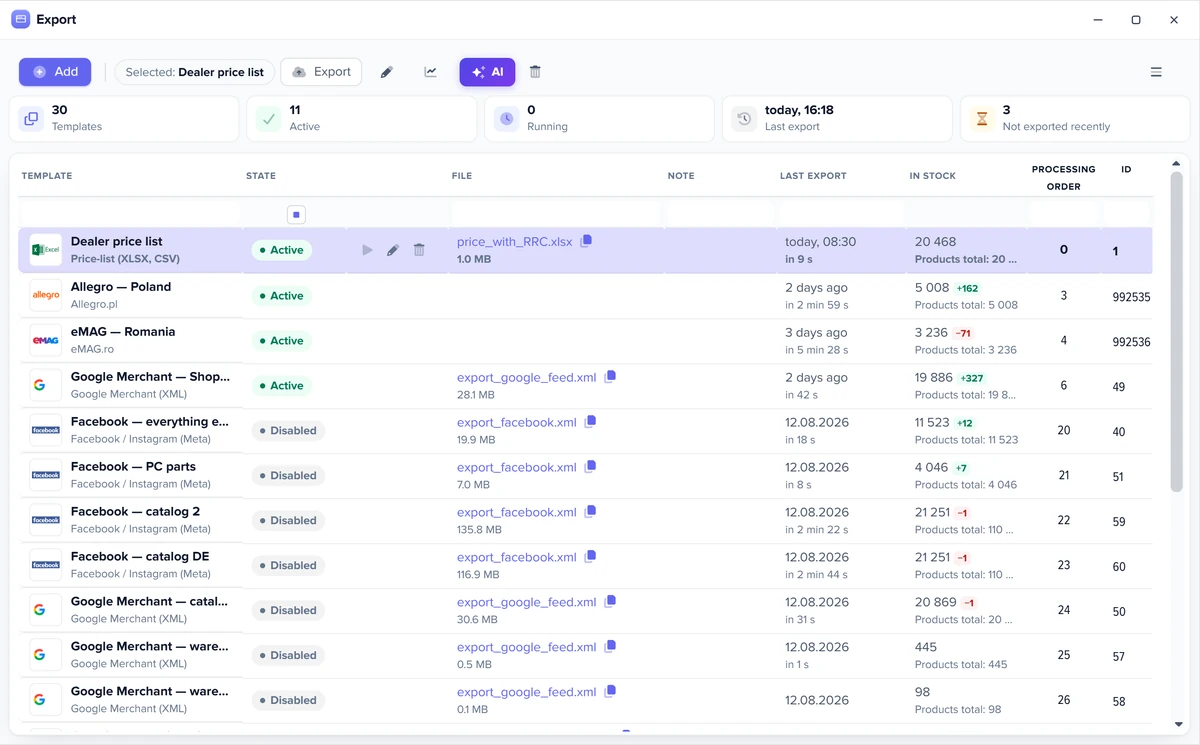
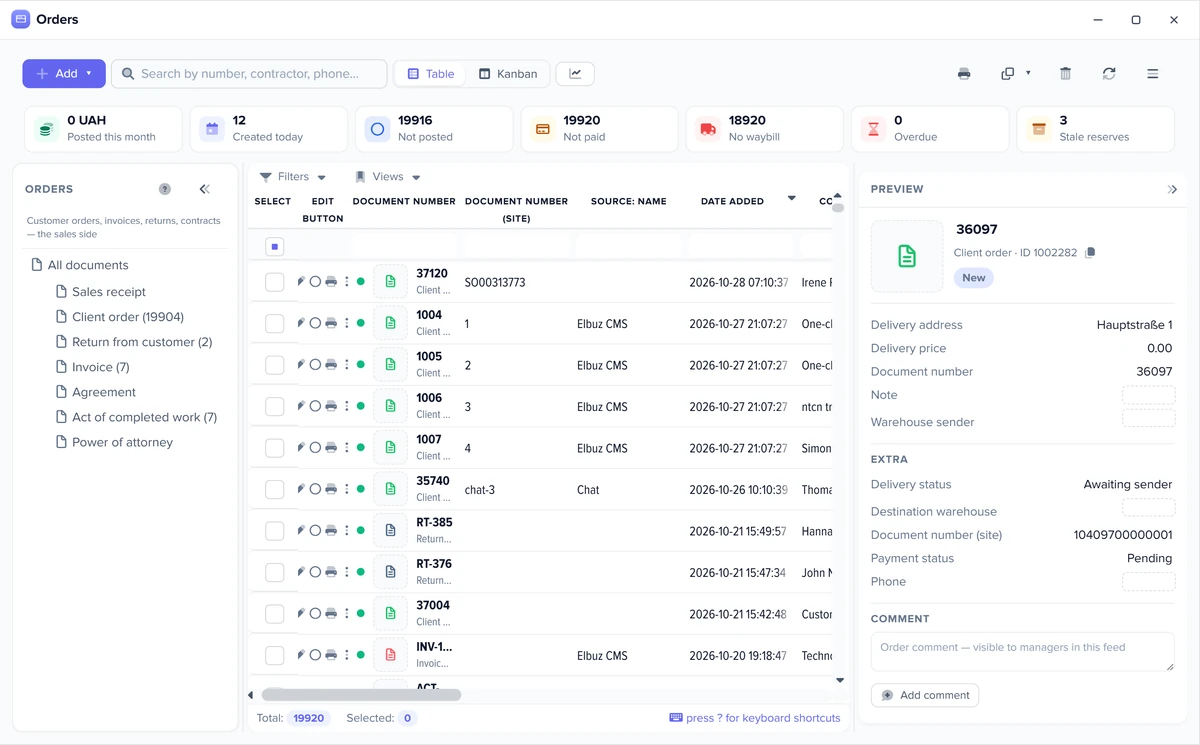
Every marketplace connects the same way.
No coding is needed. Support moves your data from another program or website free of charge. Selling in the EU: every listing needs the manufacturer and safety details required by GPSR.
Set up the template once: exports and checks then run on their own, and you step in only where a decision is needed.
Before each run Elbuz counts how many products will go out and how many are in stock, and compares that with the previous run. A stock drop over 30%, a product count drop over 50% or an empty selection triggers a warning or stops the export, as you choose, for all templates or for one.
A template option sends only new and updated products: those changed in the card, by a price list or through the API since the last successful send, not the whole catalog every time.
If you keep warehouse records, a setting exports available stock: the marketplace gets the quantity minus stock reserved by posted orders and blocked goods. The physical stock in the database does not change.
Each template runs on its own schedule. A process (Flows) chains the steps: load price lists, update the catalog, export to marketplaces and send a notification with the result. Workflow automation.
A new order, or a change to an order during import, runs a rule: event, condition, action. The customer gets an email or SMS, a manager gets a task, and a document is created on its own. Marketplace orders follow the same rules as website orders.
A button in the mapping window picks the marketplace category with the same name, when its list has only one category with that name. The rest you map by hand once.
You can also give these jobs to an AI agent in plain words: load price lists, update the catalog, run an export, fill product cards. AI agents.
The pre-export check, available stock, schedules and Flows work on every marketplace. Only changed products: Allegro, Amazon, Bol, Cdiscount, eBay, eMAG, Etsy, Kaufland, OLX, TikTok Shop, Walmart, Zalando. Automatic rules: every marketplace that sends orders. Automatic category matching: Allegro, Amazon, Bol, Cdiscount, eBay, eMAG, Etsy, Kaufland, Newegg, OLX, OTTO, TikTok Shop, Walmart, Zalando.
Marketplace integration connects your own catalog and order system to a marketplace through its API, so listings, prices, stock and orders move automatically. In Elbuz every marketplace is one template that reads listings and orders and one that sends prices and stock back — all from one catalog.
Software that publishes the same products to several marketplaces from one catalog and keeps stock in sync, so a sale on one channel lowers the quantity everywhere. Elbuz does this together with supplier price lists, orders and CRM in one system.
Amazon, eBay, Etsy, Allegro, eMAG, Kaufland, TikTok Shop, Bol, Cdiscount, Walmart, Zalando and marketplaces on Mirakl (Leroy Merlin, Conforama, home24 and others), plus product feeds for Google Shopping, Meta (Facebook and Instagram), TikTok and ChatGPT shopping.
Keep stock in one catalog and let every marketplace template send it on a schedule. Posted orders from all channels reserve stock in Elbuz, and with available stock export on, each marketplace gets the reduced quantity at its next update.
Yes. Every export template takes its own price field or calculates the price by formula — for example a markup that covers that marketplace’s commission — while the catalog price stays the same. See markup and pricing rules.
Into one order list together with your website orders, with marketplace statuses mapped to your own — see order management.
No. Catalog, prices and orders can live in Elbuz only. If you have a store on OpenCart, WooCommerce, PrestaShop or another CMS, it works from the same catalog.
No. A marketplace connects through its template: you confirm access in the seller account or paste its API keys, check the connection and set a schedule. Support moves your data from another program free of charge.

14 days free
The website and marketplaces department joins your AI company along with every other department. €50 on your balance after sign-up and 14 days to test it on your own products.
Updated