OpenCart marketplace integration: your store and every channel from one catalog
OpenCart integration connects your store to one Elbuz catalog: products, prices and stock go straight into the store database through the Elbuz Tunnel module, orders reach Elbuz within seconds, and Amazon, eBay, Etsy and Google Shopping run from the same catalog. You do not have to move away from OpenCart.
Your store stays on OpenCart. Elbuz takes over the catalog, supplier price lists, marketplaces and one order list.
Your OpenCart catalog in Elbuz
The tunnel reads categories, products, manufacturers, attributes, options and photos from the OpenCart database. A repeat run updates cards by store IDs without duplicates, and mirror mode removes what is no longer in the store. From there you keep products in the product catalog (PIM).
Products, prices and stock into the store
Elbuz Tunnel writes straight into the store database: products, categories, manufacturers, attributes, options, photos, languages, stores, warehouses, articles, reviews and product families. There is no file or manual import, and “only new data” mode sends just what changed since the last run.
Orders within seconds
The Elbuz API Sync extension for OpenCart 3 sends an order right after checkout and again after every status change, mapped to your statuses. If Elbuz is unreachable, the order waits in the extension’s queue. On OpenCart 2 the tunnel collects orders on schedule. From there — order management.
Prices from suppliers
Prices and availability come from supplier price lists, and markup rules calculate the selling price. The store gets the catalog price or the RRP, and each marketplace gets its own price from its template formula.
A database copy before every merge
Before writing, the tunnel copies the store’s catalog tables. If a run spoils data, the store is restored from the copy in one action. Switching off products that are missing from the export is a separate rule that you turn on yourself.
Marketplaces next to your store
The same catalog feeds Amazon, eBay, Etsy, TikTok Shop and the Google Shopping feed. You do not need a separate OpenCart extension per marketplace: a new channel is one more template.
2
Elbuz Tunnel: an OpenCart module instead of files and API code
The tunnel is a small module on your store’s hosting. Through it Elbuz works with the OpenCart database directly, so you need neither the store API nor import files.
Modulefolder in the site rootthe “Download module” button in the template gives the archive; Elbuz reads the module password and database access from the OpenCart config itself and installs new versions with an “Update” button
Mergein portionsdata goes into temporary tables of the store database in portions of 50 rows, no longer than 15 seconds each, so the hosting does not cut the run; merge queries then move it into the OpenCart tables
Hostingcheck“Check connection” lists PHP extensions, memory_limit and the module version, and the log names what to enable when the hosting blocks the tunnel: local_infile, zip or timeouts
Versions: OpenCart 2.x and 3.x, including ocStore. For a store with its own tables there is a “MySQL (SQL custom query)” mode.
3
How it works: OpenCart as one channel of your catalog
Products live in one catalog, and the store and each marketplace get their own template.
Catalogimported from OpenCart, supplier price lists and your warehouse
Tunnel templateits own selection, data set and schedule
Elbuz Tunnelcards, prices and stock go straight into the store database
Orders backby the extension right after checkout, in one list with marketplaces
Demo: a new price reaches OpenCart on its own, and a store order lands in Elbuz and updates stock on every channel.
Result: prices and stock in OpenCart update on their own, and store orders sit in one list with your marketplaces.
Elbuz does not replace your theme or checkout. Moving to Elbuz CMS is not required.
4
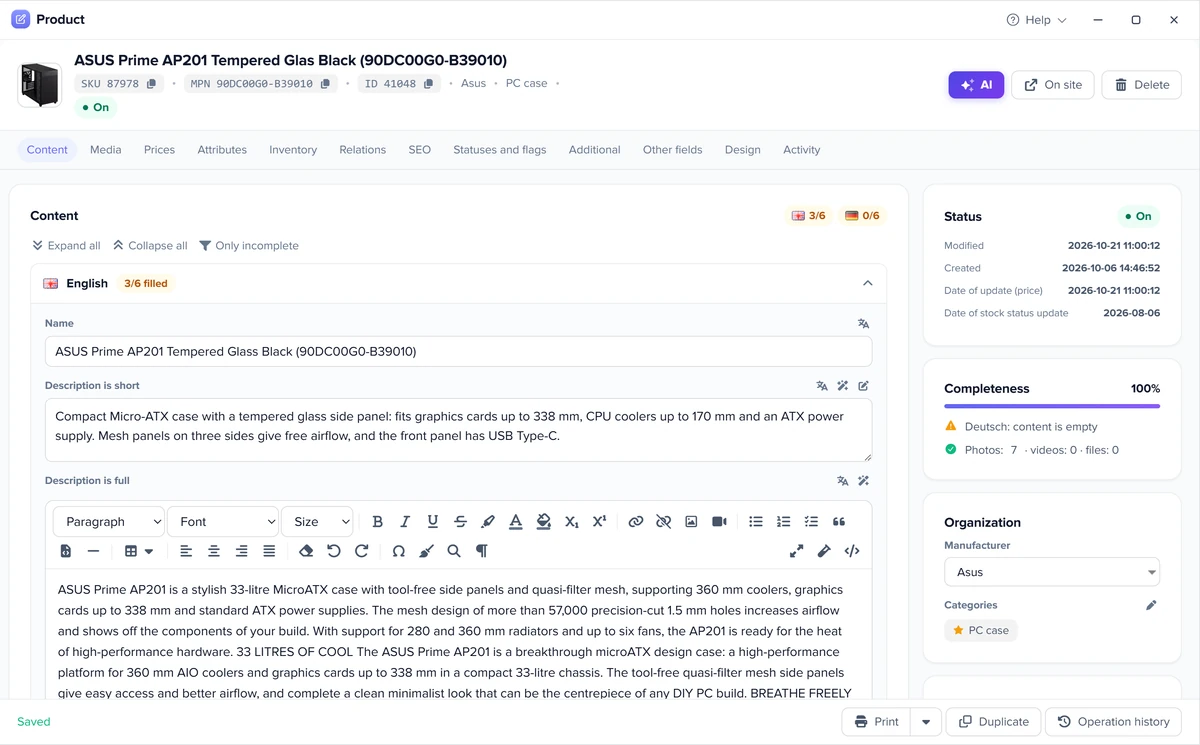
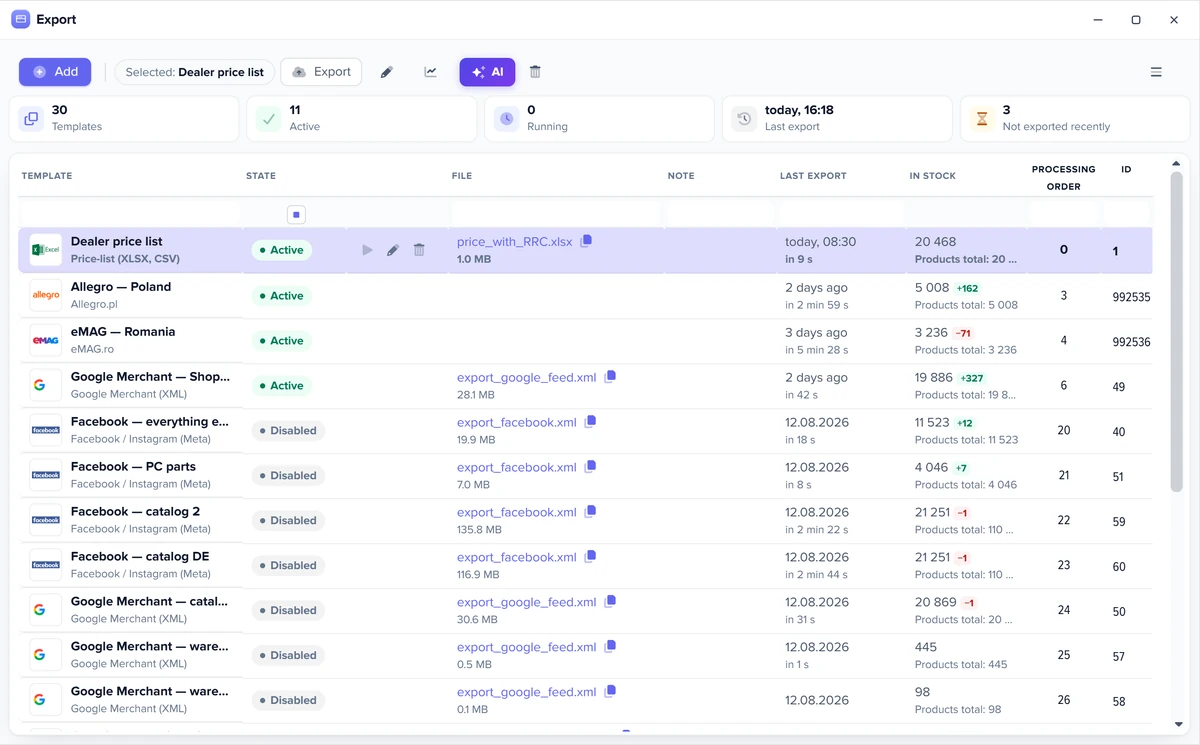
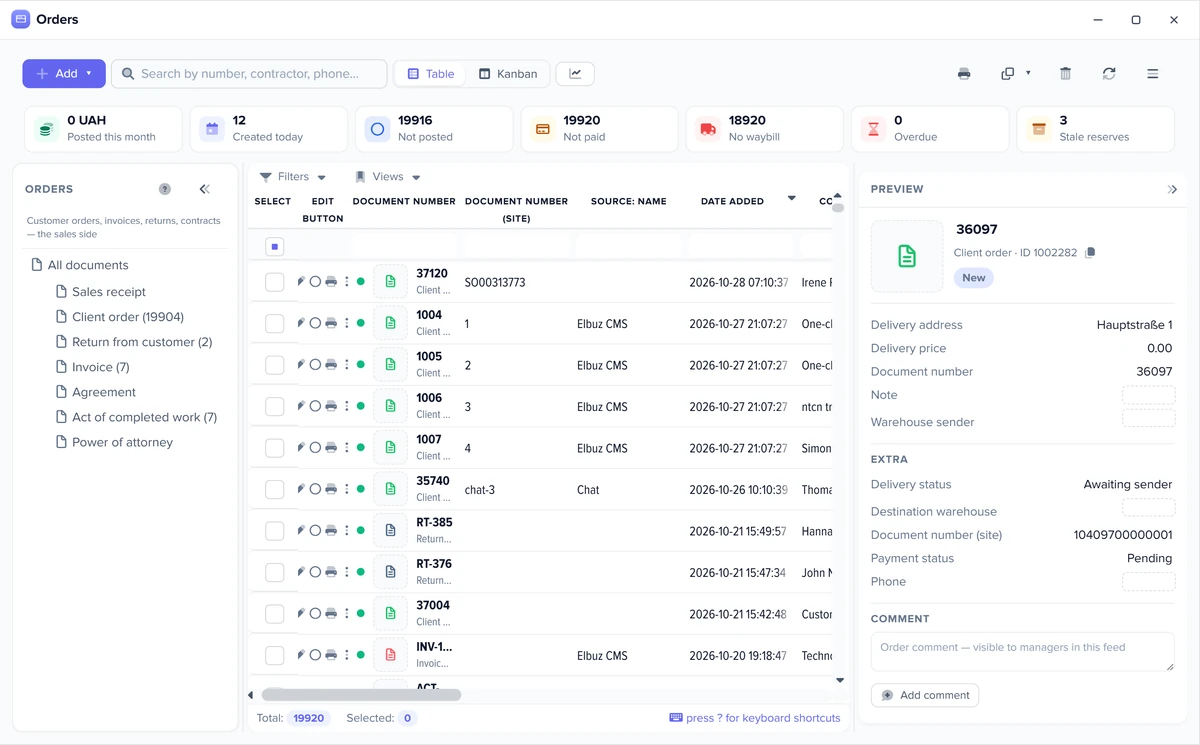
Elbuz screens: catalog, export templates and orders
The same windows run every marketplace: the product card, the export templates and the order list.
One product card feeds every marketplaceExport templates: one per marketplace and feedMarketplace and website orders in one list
5
How to connect OpenCart to Elbuz
A module on the hosting, two tunnel templates and, for OpenCart 3, the order extension.
Moduleput the etrade_http_tunnel2 folder into the site root: the “Download module” button gives the archive
Catalogan “Elbuz Tunnel” import template: CMS OpenCart, version, store address, “Connect” and “Get product catalog”
Orderson OpenCart 3, the Elbuz API Sync extension with an API v2 key; on OpenCart 2, the “Orders” box in the tunnel template
Exportan “Elbuz Tunnel” export template: what goes to the store, product selection and the backup copy
Scheduleswitch both templates on and set a schedule, and the runs go by themselves
No coding is needed. Support moves your data free of charge.
6
Automation: what runs without you
Set up the template once: exports and checks then run on their own, and you step in only where a decision is needed.
Check before every export
Before each run Elbuz counts how many products will go out and how many are in stock, and compares that with the previous run. A stock drop over 30%, a product count drop over 50% or an empty selection triggers a warning or stops the export, as you choose, for all templates or for one.
Only changed products
A template option sends only new and updated products: those changed in the card, by a price list or through the API since the last successful send, not the whole catalog every time.
Available stock
If you keep warehouse records, a setting exports available stock: the marketplace gets the quantity minus stock reserved by posted orders and blocked goods. The physical stock in the database does not change.
Schedule and Flows
Each template runs on its own schedule. A process (Flows) chains the steps: load price lists, update the catalog, export to marketplaces and send a notification with the result. Workflow automation.
Automatic rules
A new order, or a change to an order during import, runs a rule: event, condition, action. The customer gets an email or SMS, a manager gets a task, and a document is created on its own. Marketplace orders follow the same rules as website orders.
You can also give these jobs to an AI agent in plain words: load price lists, update the catalog, run an export, fill product cards. AI agents.
7
OpenCart integration FAQ
Do I have to leave OpenCart to use Elbuz?
No. The store, theme and checkout stay on OpenCart. Elbuz adds the catalog, supplier price lists, marketplaces and one order list around it.
How does the OpenCart Amazon integration work?
OpenCart products come into one Elbuz catalog, and the Amazon template lists them over the SP-API: offers by EAN or new listings, price and quantity per SKU on schedule. Amazon orders land in the same list as OpenCart orders.
Can I connect OpenCart to eBay and Etsy?
Yes. The same catalog feeds eBay and Etsy, each with its own price and schedule, and their orders come into one list with your store orders. You do not install a marketplace extension in OpenCart.
Is there an OpenCart Google Shopping feed?
Yes, from the same catalog: the product feed for Google Merchant Center is a feed template with its own selection and price, updated on schedule. The OpenCart store itself needs no feed extension.
Do I need the OpenCart API for this integration?
No. Catalog, prices and stock go through the Elbuz Tunnel module straight into the store database, and OpenCart 3 orders are sent by the Elbuz API Sync extension to the Elbuz API.
How do OpenCart orders reach Elbuz?
The Elbuz API Sync extension for OpenCart 3 sends a new order right after checkout and every status change after it. You map store statuses to Elbuz document and payment statuses. On OpenCart 2 the tunnel collects orders on schedule.
Can Elbuz manage OpenCart inventory?
Yes. Stock comes from your warehouses and supplier price lists, and the tunnel writes it into the store on schedule. A posted order from any channel reserves stock in one place, and with free stock enabled the reserved units are not offered on marketplaces.
Which OpenCart versions are supported?
OpenCart 2.x and 3.x, including ocStore. The Elbuz API Sync order extension is for OpenCart 3. For a store with its own tables, the tunnel works with custom SQL queries.
The website and marketplaces department joins your AI company along with every other department. €50 on your balance after sign-up and 14 days to test the integration on your own products.