WooCommerce integration connects your store to one Elbuz catalog through the official REST API: products with variations, brands and SEO fields, prices and stock in both directions, new products published from the catalog, and WooCommerce orders in one list with marketplaces.
The store stays on WordPress. Elbuz adds supplier prices, several sales channels and one order list.
Your catalog in Elbuz
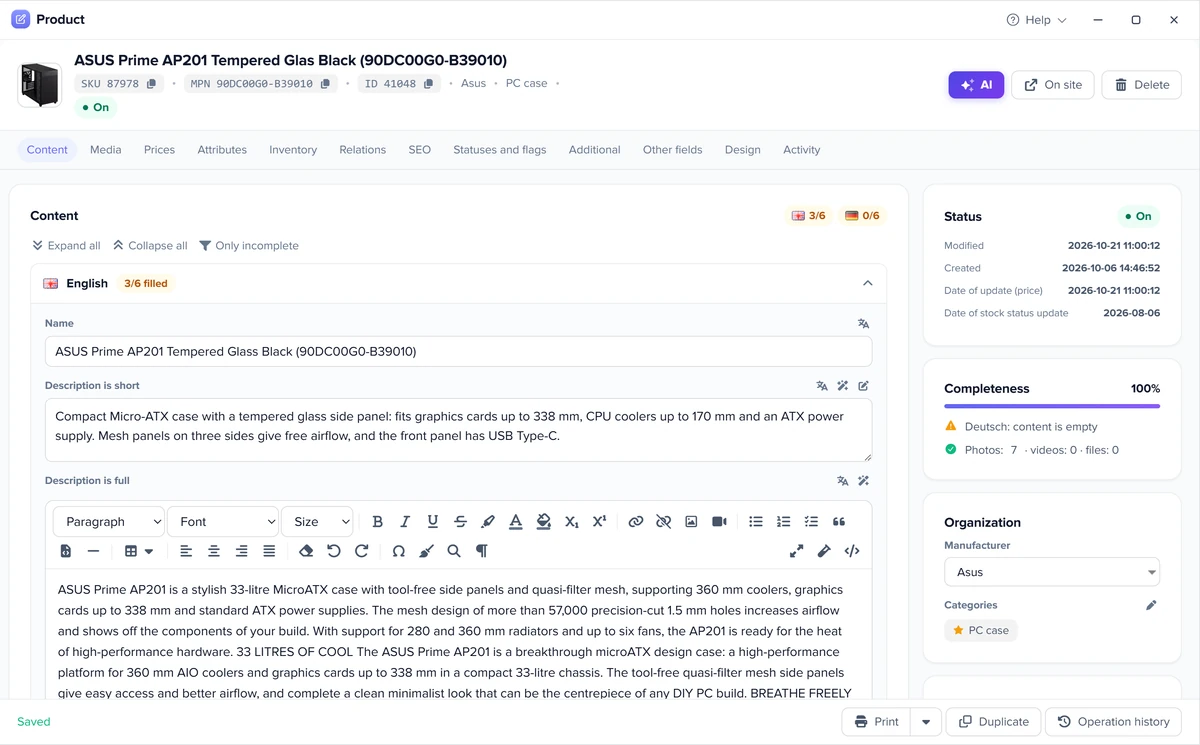
Products come in with title, descriptions, brand, SKU, barcode, price, sale price, stock, weight, tags, SEO title and description, and photos. The category tree comes by full path, and variations become separate cards of one family. A draft on the site switches the card off.
Inventory management
Prices and stock of linked products and variations go back to the site in batches on schedule, from your warehouses and supplier price lists.
New products from the catalog
A new product is published as a whole card. Categories are created on the site by name, so you do not map anything: the store is yours.
Order management
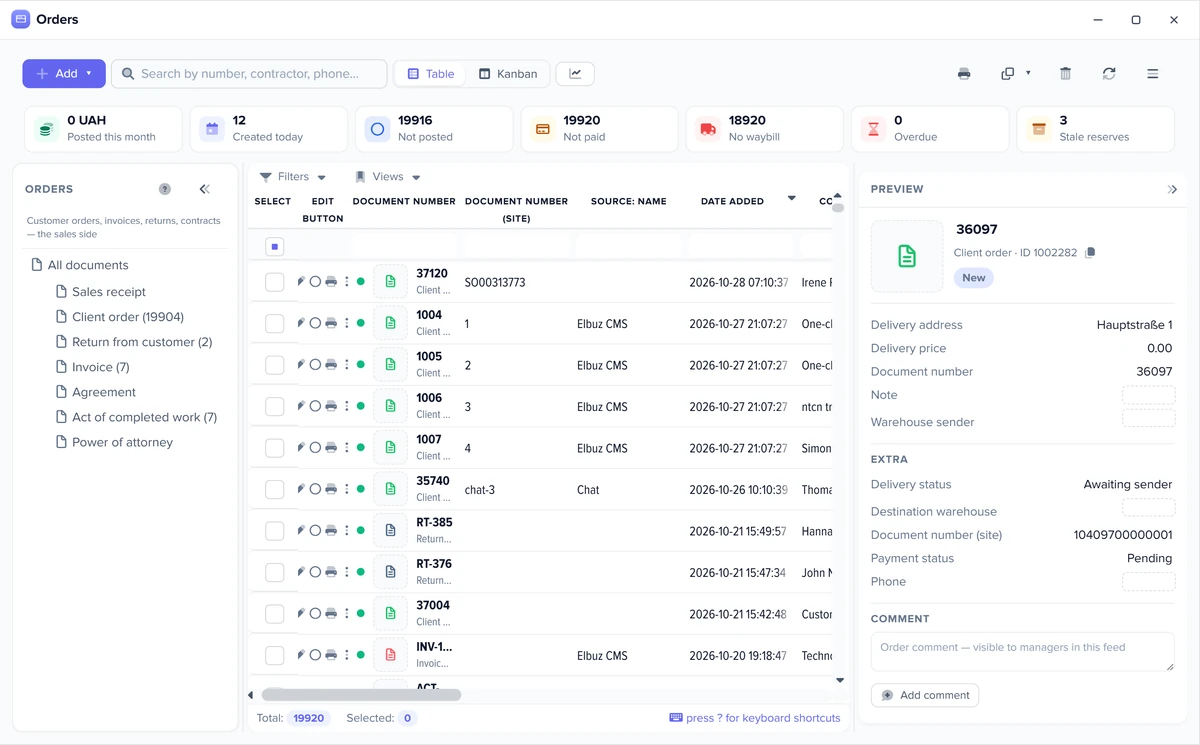
WooCommerce orders become customer orders in the same list as marketplace orders, and later runs bring only the changes. See order management.
Your own markup rules
Each template takes its own price or calculates it by formula, so the site and each marketplace can have different prices. Markup rules.
WooCommerce REST API without code: what Elbuz handles
Elbuz uses the official REST API v3. Your own integration needs a developer; here you only paste two keys.
Keysconsumer key and secreta key pair with Read/Write access from WooCommerce settings; no app, OAuth or plugin of ours
Hostingquirks handledif the host strips the Authorization header, Elbuz passes keys another way; plain permalinks and Cloudflare responses are handled too
Limitsbatches and retriesprices and stock go in batches, and Elbuz waits and repeats a call when the server answers 429 or 503
Prefer writing straight to the database? For WordPress there is also the Elbuz Tunnel module. For a store owner, the steps are in How to connect WooCommerce.
3
How it works: WooCommerce as one channel of your catalog
Products live in one catalog, and the store and each marketplace get their own template.
Catalogfrom your site, supplier price lists and warehouse
WooCommerce templateits own selection, price rule and schedule
Syncnew products, prices and stock go to the site
Orders backin one list with marketplaces
Elbuz does not replace your theme or checkout. Moving to Elbuz CMS is not required.
4
Elbuz screens: catalog, export templates and orders
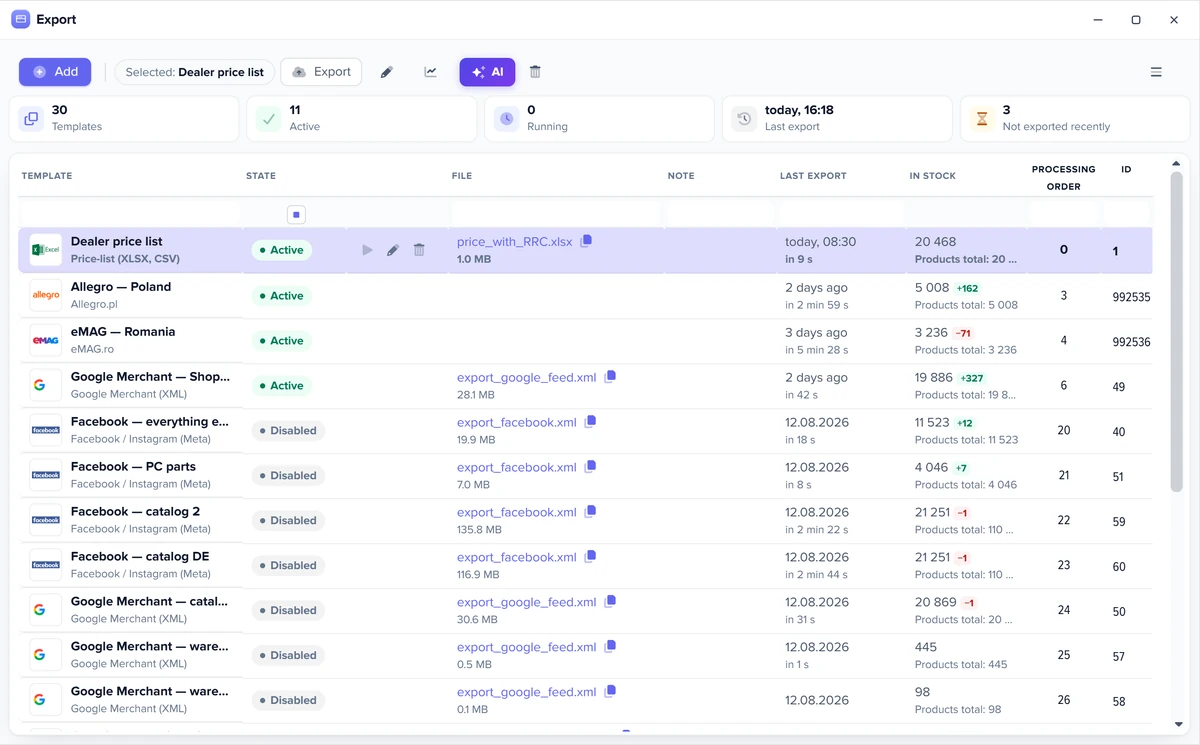
The same windows run every marketplace: the product card, the export templates and the order list.
One product card feeds every marketplaceExport templates: one per marketplace and feedMarketplace and website orders in one list
5
How to connect WooCommerce to Elbuz
Three values from your site, and the rest is a template.
KeysWooCommerce → Settings → Advanced → REST API: create a key with Read/Write access
Templatean import template of the WooCommerce type: site address with https, consumer key and secret
Checkrun once and compare a few cards and orders
Exportan export template with the same keys for prices, stock and new products
Scheduleput both on a schedule
No coding is needed. Support moves your data free of charge.
6
Automation: what runs without you
Set up the template once: exports and checks then run on their own, and you step in only where a decision is needed.
Check before every export
Before each run Elbuz counts how many products will go out and how many are in stock, and compares that with the previous run. A stock drop over 30%, a product count drop over 50% or an empty selection triggers a warning or stops the export, as you choose, for all templates or for one.
Only changed products
A template option sends only new and updated products: those changed in the card, by a price list or through the API since the last successful send, not the whole catalog every time.
Available stock
If you keep warehouse records, a setting exports available stock: the marketplace gets the quantity minus stock reserved by posted orders and blocked goods. The physical stock in the database does not change.
Schedule and Flows
Each template runs on its own schedule. A process (Flows) chains the steps: load price lists, update the catalog, export to marketplaces and send a notification with the result. Workflow automation.
Automatic rules
A new order, or a change to an order during import, runs a rule: event, condition, action. The customer gets an email or SMS, a manager gets a task, and a document is created on its own. Marketplace orders follow the same rules as website orders.
You can also give these jobs to an AI agent in plain words: load price lists, update the catalog, run an export, fill product cards. AI agents.
7
WooCommerce integration FAQ
Do I need a plugin to connect WooCommerce?
No. Elbuz works through the REST API that WooCommerce already has: you create a key pair in its settings and paste it into the template.
Can Elbuz manage WooCommerce inventory?
Yes. Stock comes from your warehouses and supplier price lists, and the export template sends prices and stock in batches on schedule, including variations.
Can I connect WooCommerce to Amazon or eBay through Elbuz?
Yes. The same catalog feeds WooCommerce, Amazon and eBay, each with its own price and schedule, and all orders land in one list.
Can Elbuz publish new products to WooCommerce?
Yes. A new product goes out as a whole card with categories created by name, so no category mapping is needed.
Does it work with any hosting?
It works with common setups: if the host strips the Authorization header or the site uses plain permalinks, Elbuz switches to another way of calling the API. The site must work over https.
The website and marketplaces department joins your AI company along with every other department. €50 on your balance after sign-up and 14 days to test the integration on your own products.