

Agentic commerce is shopping where an AI agent finds, compares and sometimes buys a product on the shopper's behalf: ChatGPT, Gemini, Perplexity or any other AI shopping assistant. The agent doesn't look at banners. It reads data. It will recommend your product only if your catalog is machine-readable: brand and GTIN, complete attributes, current price and availability, a product feed for each platform, and Product markup on the page.
Most store owners start with the wrong question: how do I get into ChatGPT? The better one is how much of my catalog an agent can read at all. A product without a brand won't pass into the feed. A product whose weight sits inside the description won't pass a filter like "under 6 lb". A price that changed this morning gives the shopper the wrong total. Below you'll find what the agent needs, a worked example on a sample catalog and a checklist you can run against your own store.
When store owners start asking about AI agents
It usually starts with referrals from chatgpt.com showing up in analytics, or with a test: the owner asks ChatGPT to pick a product in their own category and their store isn't in the answer. Then come the searches: "chatgpt shopping", "how to get my products on ChatGPT", "do I need a product feed for ChatGPT", "what is the agentic commerce protocol", "Google UCP".
"How do I get in" is the least useful of these. There is no switch that puts a store into the answer: even a connected feed only hands the agent data, and the agent chooses based on that data. So first count how much of your catalog is ready for it.
What changes when an agent does the shopping
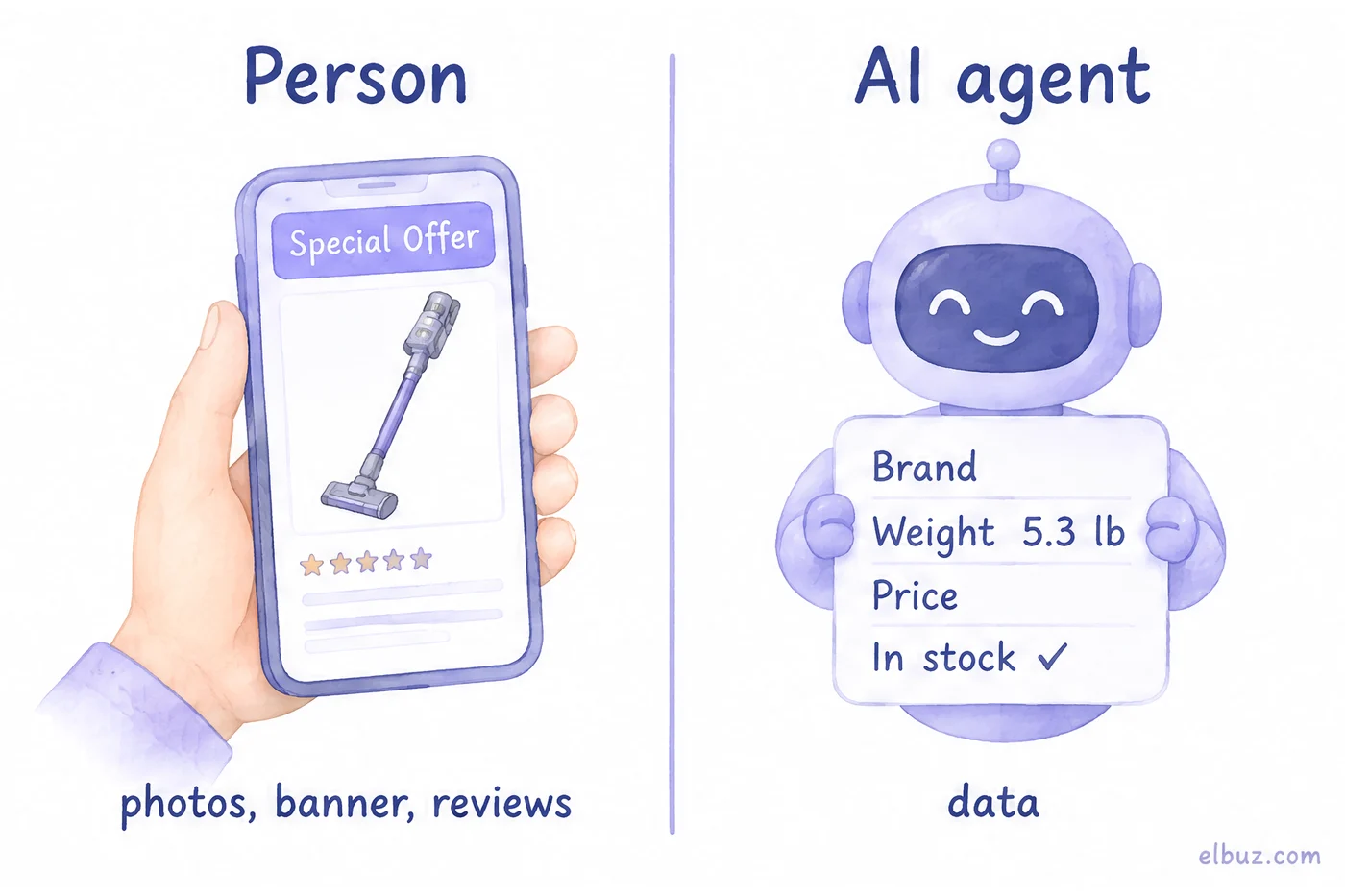
The reader of your product page changes. Instead of a person scrolling photos and reviews, a program works through it with the shopper's brief, something like "find a cordless vacuum under $300, under 6 lb, in stock". The agent turns the brief into conditions, looks for products where those conditions are written down as data, and compares whatever passes.
| What | Person | AI agent |
|---|---|---|
| How it finds a product | categories, site search, ads | a brief with conditions, data from feeds and pages |
| What it reads | photos, banner, description | attributes, price, availability, identifiers |
| Empty field | asks in chat or moves on | can't check the condition, so the product drops out |
| Feed price differs from the site | notices at checkout | has already quoted the old price |
| Checkout | on your site | on your site or inside the chat, where the platform supports it |
In the US, buying inside the chat already exists, but in limited form. Google runs checkout in AI Mode and Gemini on its Universal Commerce Protocol (UCP) for select US merchants with a Merchant Center account. OpenAI launched Instant Checkout with the Agentic Commerce Protocol (ACP) in September 2025, then changed course: merchants now use their own checkout, OpenAI focuses on product discovery, and a merchant who wants purchases inside the chat builds its own ChatGPT app. For most stores the working path today is the same on every platform: the agent finds and recommends, the purchase finishes on your site. The data it takes is the same either way, so prepare it now.
What an agent needs from your catalog
It needs data that can be compared without a human, and a channel that delivers it. The more precisely a product is described, the more filtered requests it passes.
| Data | Why the agent needs it | How it gets there |
|---|---|---|
| Attributes as name and value, with units | to check the brief: weight, size, compatibility | feed, markup, API |
| Brand, GTIN (UPC, EAN), MPN | to recognize the same product across sellers | feed, Product markup |
| Price with currency, sale price | to compare offers | feed, Offer markup |
| Availability | to avoid recommending what you don't have | feed, Offer markup |
| Title and plain-text description | to understand what the product is | feed, product page |
| Photo at a direct URL | to show the product in the answer | feed |
| Shipping and returns | to work out the full cost and terms | Offer markup, policy pages |
| Variants: color, size | to pick the right variant, not a similar product | ProductGroup markup, feed |
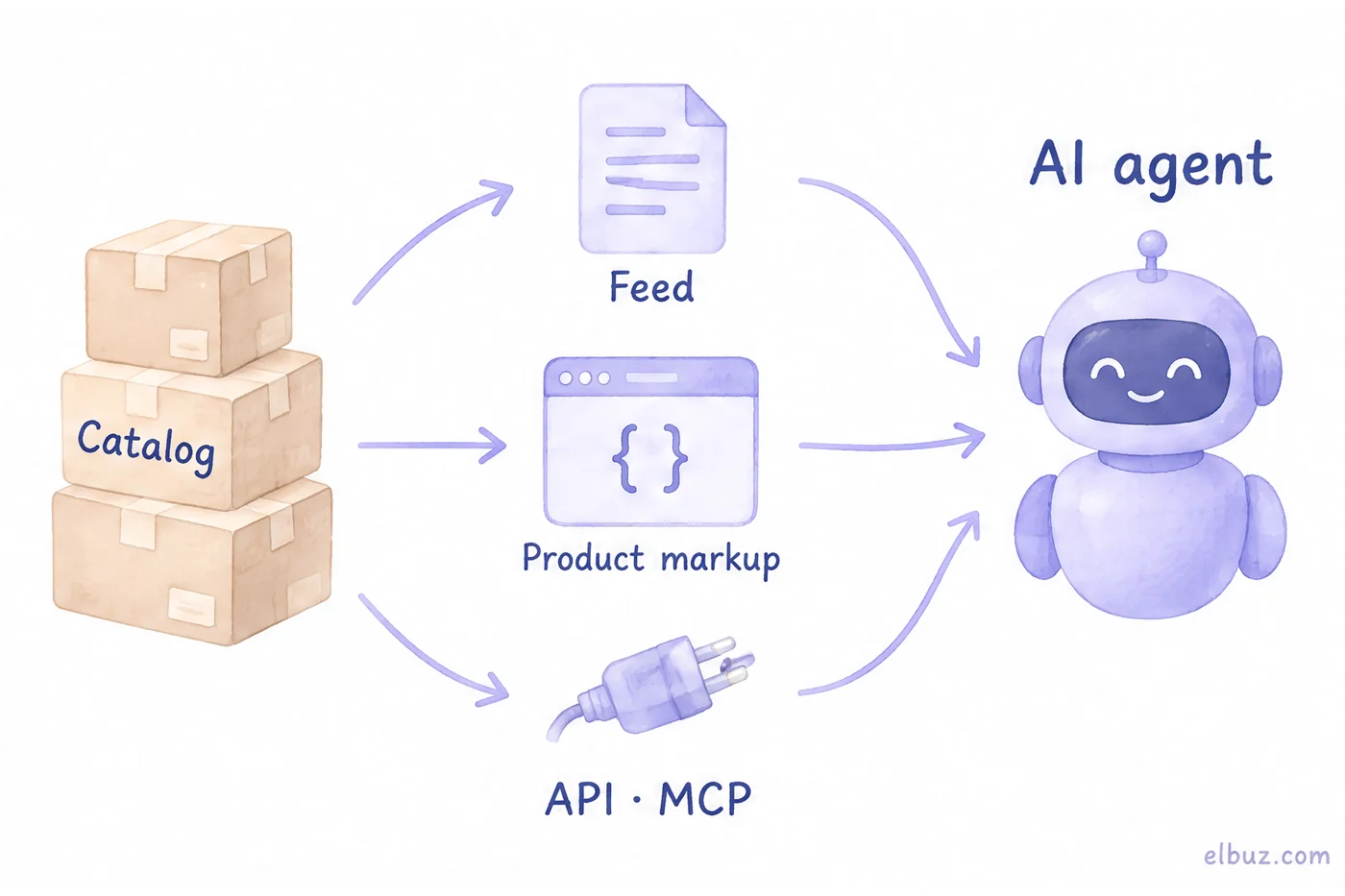
There are three channels, and none of them replaces the others:
- Feed. A file with all your products for a specific platform. OpenAI accepts CSV, TSV or JSONL in its own spec and takes the file only over SFTP. Google works from your Merchant Center feed, and UCP checkout is built on top of it.
- Markup on the page. A Schema.org Product block with an Offer in the code of the product page: price, currency, availability. Search engines read it, and so do agents that open your site themselves. For your pages to appear in ChatGPT search, robots.txt must not block OpenAI's search crawler, OAI-SearchBot.
- Order protocols. ACP from OpenAI and Stripe and UCP from Google describe how an agent places an order with a merchant. UCP lets you connect through an API, Agent2Agent or MCP. This is the step after the feed, and it is open to a limited set of merchants so far.
How many of your products an agent actually sees
As many as pass every condition at once, not each one separately. So count coverage:
Catalog coverage = products that have everything an agent needs ÷ active products × 100%.
A conditional example for the arithmetic; the numbers are not market data. A home appliance store with 2,000 active products. Filter them one step at a time: first products without a brand, then without a GTIN or manufacturer part number, then with required attributes missing, then without a photo.
| Check | Dropped | Left |
|---|---|---|
| Active products | 2,000 | |
| Has a brand | 300 | 1,700 |
| Has a GTIN or MPN | 400 | 1,300 |
| All required attributes filled | 600 | 700 |
| Has a photo | 20 | 680 |
| Ready for agents | 680 |
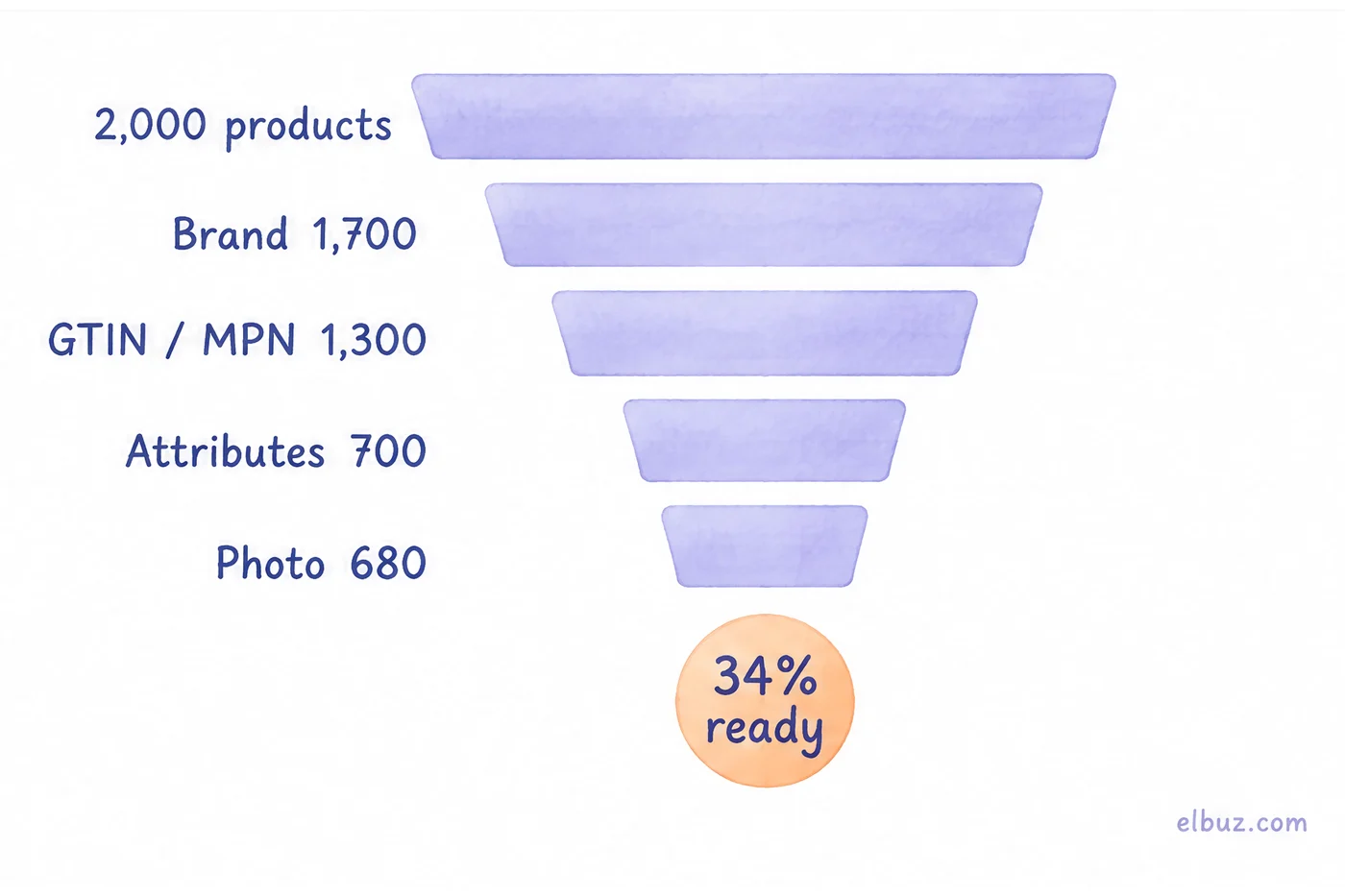
Coverage = 680 ÷ 2,000 × 100% = 34%. The other 66% of the catalog, 1,320 products, either never reaches the agent through the feed or can't be checked against the shopper's conditions. The biggest drop here is attributes, 600 products, so start with required attributes in your largest categories, not with the feed. Count coverage per category too: an average of 34% can hide a category where only a handful of products are ready.
Count the barcode row only where a barcode exists. Private-label or handmade goods may have no GTIN at all, and the manufacturer part number takes its place. Check price and availability separately: if the feed updates weekly while your supplier changes prices daily, some of your "ready" products show the agent stale data every day.
Catalog readiness checklist: 10 checks
You can run each check with a catalog filter or on ten random products.
- Every active product has a brand. A filter for an empty brand should return zero: OpenAI rejects products without one.
- GTIN (UPC, EAN) or MPN wherever they exist. Look at the share of products with a barcode by category.
- Required attributes are defined for each category and filled in. Count the share of products with all required attributes filled.
- Values are written the same way. "Black" and "black", "5 lb" and "80 oz" are different values to an agent's filter. Review the list of unique values for each attribute.
- Title: type, brand, model, key difference. Up to 150 characters, the limit in OpenAI's spec. No "HOT", "SALE" or emoji.
- Plain-text description with no placeholders. No HTML tags and no "n/a" or "null": OpenAI forbids placeholders, an unknown field stays empty.
- Photo at a direct URL. A JPEG or PNG that opens without logging in.
- Feed price and availability match the site. Compare ten random products in the feed and on the page. Update the feed at least as often as your supplier changes prices.
- Product markup with an Offer on the product page. Price, currency, availability. Google's Rich Results Test checks it.
- Shipping, payment and return terms on their own pages. Delivery times, costs, who pays for returns: agents compare these too.
Where catalogs break most often
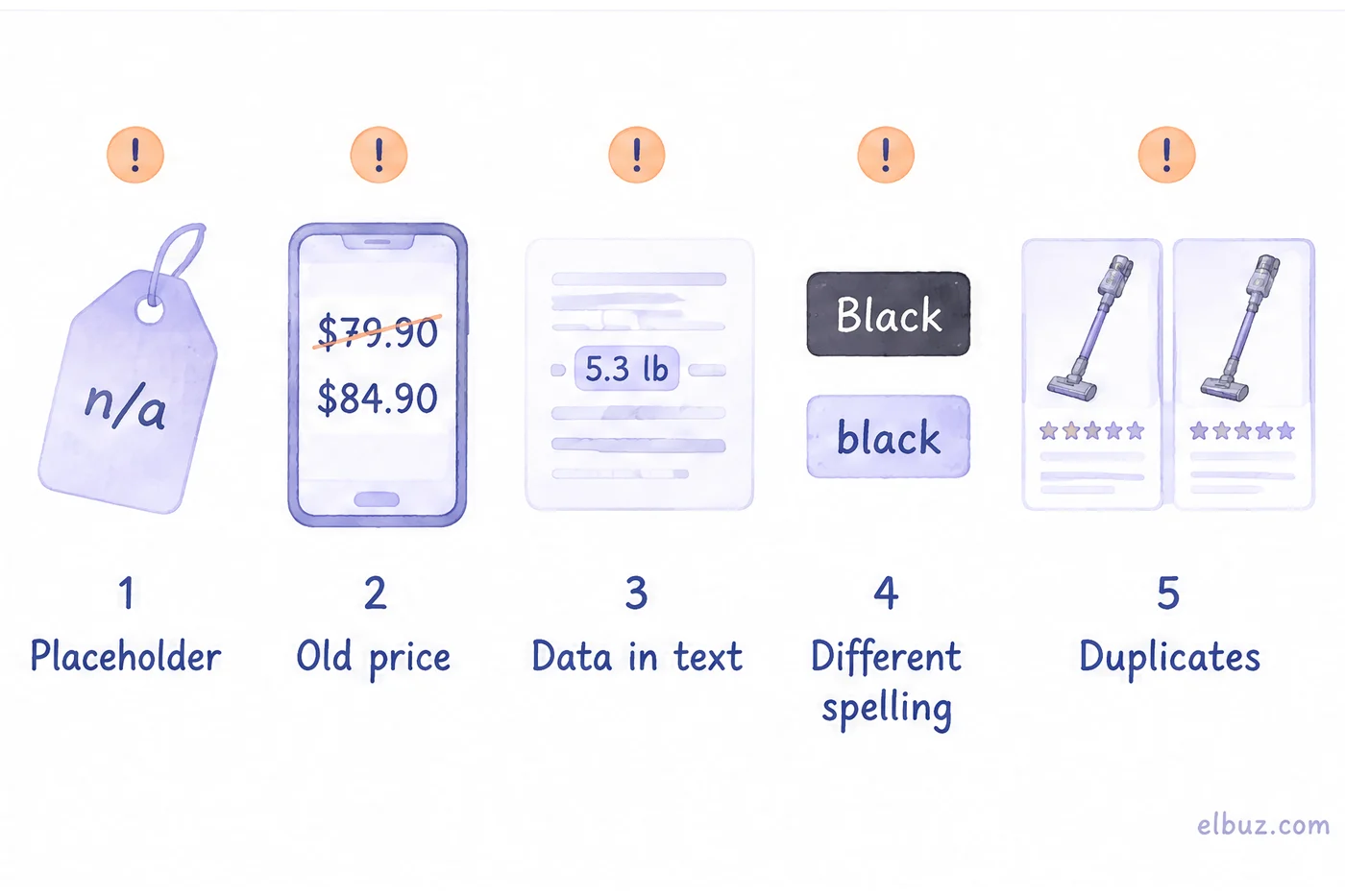
Usually not in the feed but in the data it's built from. Five mistakes that show up in catalogs filled from supplier price lists:
- Attributes buried in the description. A person reads "weight 5.3 lb" in a paragraph; an agent's filter doesn't. It needs a Weight field with a value. The product falls out of every request with a condition.
- Placeholders instead of empty fields. "—", "n/a" or "ask us" in a brand or color field counts as a value for the agent. OpenAI forbids such placeholders outright.
- The feed price lags behind the site. The feed was built in the morning, the supplier raised the price at noon, the agent quoted the shopper the old total. Google Merchant Center compares the feed price with the landing page and disapproves products that don't match.
- Variants as separate, unlinked listings. Six listings for "Black T-shirt S", "Black T-shirt M" and so on without a group: the agent doesn't know this is one product in six sizes.
- One product, two records. Duplicates with different prices muddle the comparison, and the agent may pick the more expensive one.
How to keep the catalog ready at thousands of products
Ten checks by hand work for a few hundred products, not for thousands: the catalog changes every day with supplier price lists, and today's 34% is a different number tomorrow. The checks belong in the system where your products already live. In Elbuz it looks like this:
- Attributes and completeness. You set required attributes per category, and the catalog shows how many of them each product has filled. Elbuz finds missing attributes, photos and descriptions on source sites and copies them into the product card, while AI confirms it found your exact product (how to find specs and photos for products).
- Feeds for ChatGPT and Google. The ready-made «OpenAI (ChatGPT Ads)» export template builds a CSV with the 17 fields of OpenAI's spec (price with currency, availability, photos, plain-text description, GTIN) and uploads it on schedule to the SFTP server OpenAI gives you (how to set up the OpenAI product feed). The same catalog feeds your Google Merchant Center feed.
- Product markup. If your store runs on Elbuz CMS, product pages already carry Product markup with an Offer: price, availability, seller and return policy, and products with variants are grouped. Shipping cost goes into the markup when it's known in advance: a flat rate, or free above an order total.
- An AI assistant on your own data. Through the Elbuz MCP server, your Claude or ChatGPT works with the catalog under an employee's permissions: it finds products without a description, photo or category and attribute values that differ only in spelling. It proposes the fixes, and you approve them in Pulse.
What Elbuz doesn't do: it doesn't enroll your store in checkout inside ChatGPT or Google. Feed access and in-chat checkout are granted by the platforms themselves. And the Elbuz MCP server is for your own assistant, not for shoppers' agents: they get your catalog through feeds and markup.
Frequently asked questions
What is agentic commerce?
It's shopping where an AI agent searches and compares products on the shopper's behalf, and sometimes places the order. The store sells through its data rather than its storefront: the agent picks what it can read and verify.
What is a protocol in agentic commerce?
A shared set of rules for how an agent talks to a merchant. The Agentic Commerce Protocol (ACP) from OpenAI and Stripe and Google's Universal Commerce Protocol (UCP) cover placing an order; the Model Context Protocol (MCP) connects AI assistants to programs and data, and UCP accepts it as one way to connect.
What is ChatGPT shopping?
Product search inside ChatGPT: it asks about budget and features, compares options and links to stores. It takes products from open web pages and from merchant feeds, so a store needs crawlable pages and complete product data.
Can shoppers buy directly inside ChatGPT or Google AI Mode?
In some cases. Google offers UCP checkout in AI Mode and Gemini to select US merchants. OpenAI moved away from its own Instant Checkout: merchants use their own checkout or build a ChatGPT app. For most stores the purchase finishes on their site.
How do I get my products into ChatGPT?
Keep product pages open to OAI-SearchBot and request product feed access from OpenAI; the feed goes over SFTP in OpenAI's format. Which products the agent picks then depends on the data from the checklist.
Does my store need an MCP server?
Not to appear in AI answers: feeds and markup handle that. MCP is useful in two ways: your own assistant works with the catalog and orders, and UCP lets a shopper's agent connect through MCP. Get the feed and data right first.
Sources
- OpenAI, product feed specification (fields, required fields, ban on placeholders, SFTP) — developers.openai.com.
- OpenAI, product feed best practices — developers.openai.com.
- OpenAI, Instant Checkout and the Agentic Commerce Protocol — openai.com; change of course to merchant checkout and ChatGPT apps — openai.com.
- OpenAI, crawlers and robots.txt (OAI-SearchBot) — developers.openai.com.
- Agentic Commerce Protocol (OpenAI, Stripe) — agenticcommerce.dev.
- Google, Universal Commerce Protocol — developers.google.com; merchant eligibility — Merchant Center Help.
- Google Merchant Center, mismatched product price — support.google.com.
- Schema.org, Product, Offer, ProductGroup — schema.org.
- Model Context Protocol — modelcontextprotocol.io.
Checked November 13, 2026.


