

A chatbot script is a map of the conversation: how a person enters the bot, what it says first, which buttons it offers, where each branch leads, and where the conversation ends — with an order or a handoff to a person. You can write one in six steps: the goal, the entry points, the first message, branches for frequent questions, a fallback to a human, and a final confirmation.
Most bots don't fail on the greeting. They fail in two places: the person types something of their own and gets stuck, or reaches a product and can't order it without answering ten questions. Below are the steps with a check for each, a ready flow for a store, copy rules, and how to use numbers to find the step where the bot loses buyers.
When stores sit down to write a script
Usually when the team answers the same questions every day — "is it in stock?", "how much is shipping?", "where is my parcel?" — while at night and on weekends shoppers get no answer. The owner decides to launch a bot on the website or in a messenger, opens a bot builder and sees an empty canvas. They search for "chatbot script", "chatbot flow examples" and "chatbot script template", and then ask how many buttons to add and what to do when the bot doesn't understand.
The builder is secondary: the map has to be drawn on paper or in a spreadsheet anyway. The wrong question is "how do I make the bot answer everything". A good script covers the five to seven most frequent questions and quickly hands the rest to a person.
How to write a chatbot script: 6 steps
Work backwards from the goal to the first message, not the other way round. Each step has a check: if it fails, don't move on.
- Goal and one target action. What should happen at the end of the conversation: an order, a phone number for a callback, an answer without an agent. Check: you can name the action with one verb — "order", "leave a number", "check status".
- Entry points. Where people come from: a button on the site, a link in an ad, a QR code on the parcel, a line in an email. In Telegram you can add a start parameter to the bot link so the bot knows the source and opens the right branch: Latin letters, digits, "_" and "-", up to 64 characters. Check: for each entry you know which message the bot starts with.
- First message. Who you are, what the bot can do, and 3–4 buttons for the most frequent questions. Check: the message fits on a phone screen without scrolling.
- Branches for frequent questions. Write down the last 20–30 customer questions from messengers and email and group them — the biggest groups become branches. Check: every branch ends with an answer or the target action, not a dead end.
- Fallback. What the bot does when it doesn't understand, and how a person reaches an agent — during and outside business hours. Check: from any step, a human is no more than two taps away.
- Final step. A confirmation: what was ordered, the total, shipping, what happens next. Check: after it, the buyer has nothing left to ask.
Chatbot flow example for an online store
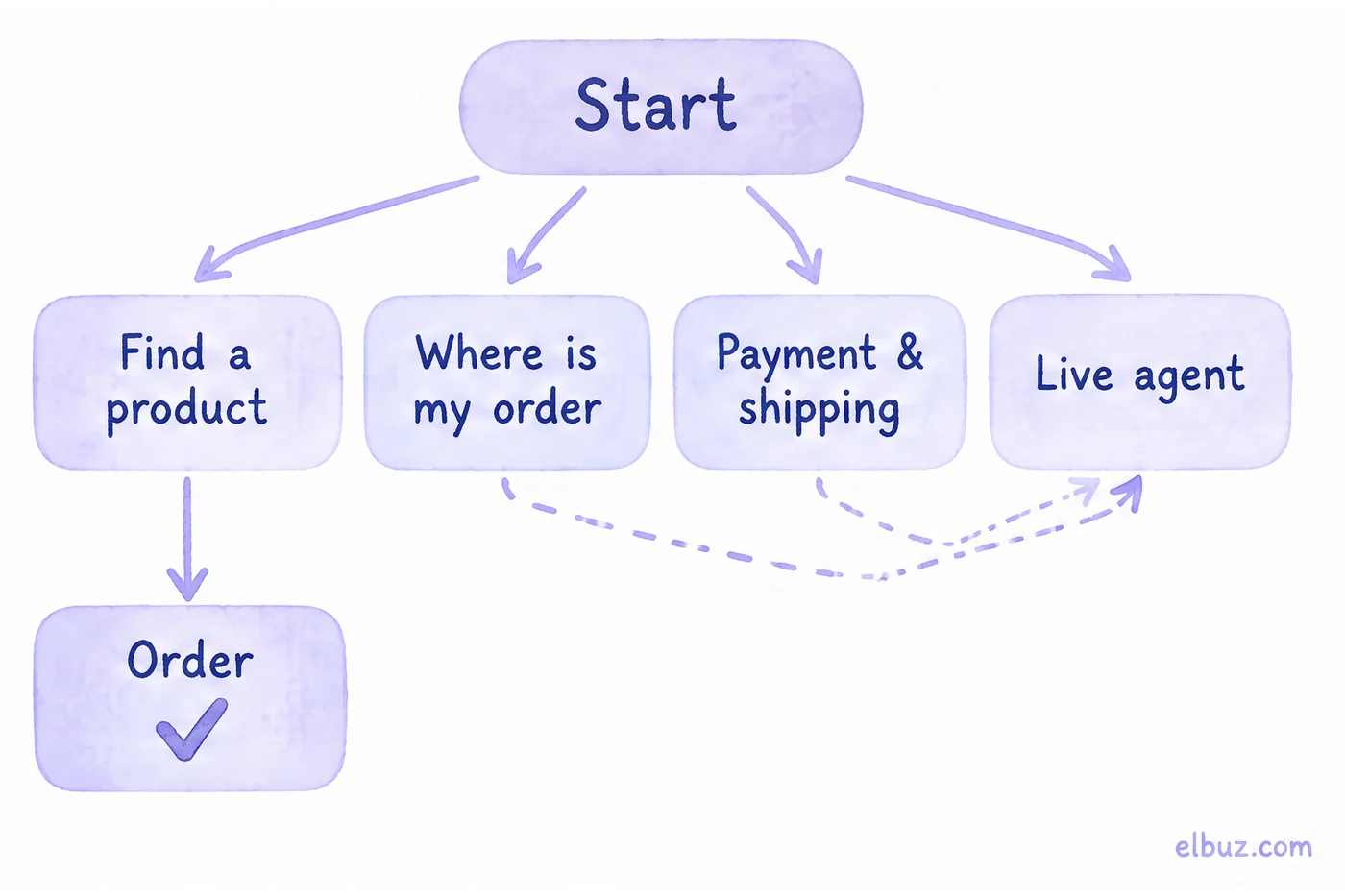
The template below covers the typical questions of a store that ships orders. Replace the categories and copy with your own; the structure stays the same.
| Step | Bot says | Buttons | Next |
|---|---|---|---|
| Start | "Hi! I'm the store's bot. I can help you find a product, check an order and explain shipping." | Find a product · Where is my order · Payment & shipping · Live agent | branches 1–4 |
| 1. Find | "What are you looking for?" | up to 6 categories · Other | "Other" goes to an agent |
| 1.1 Narrow down | "What's your budget?" | 3 price ranges | product picks |
| 1.2 Picks | 2–3 products with photo, price and stock | Order · Other options · Ask an agent | checkout |
| 1.3 Checkout | "What's your name and where should we ship?" — one question at a time | Share phone number | final step |
| 2. Status | "Send your order number or phone" | Share phone number | status and tracking number · Live agent |
| 3. Shipping | Shipping options and times, payment methods | Returns & exchanges · Back | start |
| 4. Live agent | During business hours: "An agent will reply within a few minutes." Outside them: "We'll reply in the morning — leave your number" | Share phone number | a person |
| Didn't understand | "Sorry, I didn't get that. Pick an option or type “agent”" | start buttons | after the second miss — an agent |
| Final step | Items, total, shipping, "an agent will confirm your order" | Confirm · Change | order |
Before moving the template into a builder, draw it as a flowchart: a box is a bot message, an arrow is a button. Dead ends, branches with no way to an agent, and steps that expect typing instead of a button show up at once.
How to write copy for a chatbot
One message, one idea and one question. People read a bot on their phone between other things, and they skip whatever doesn't fit on the screen.
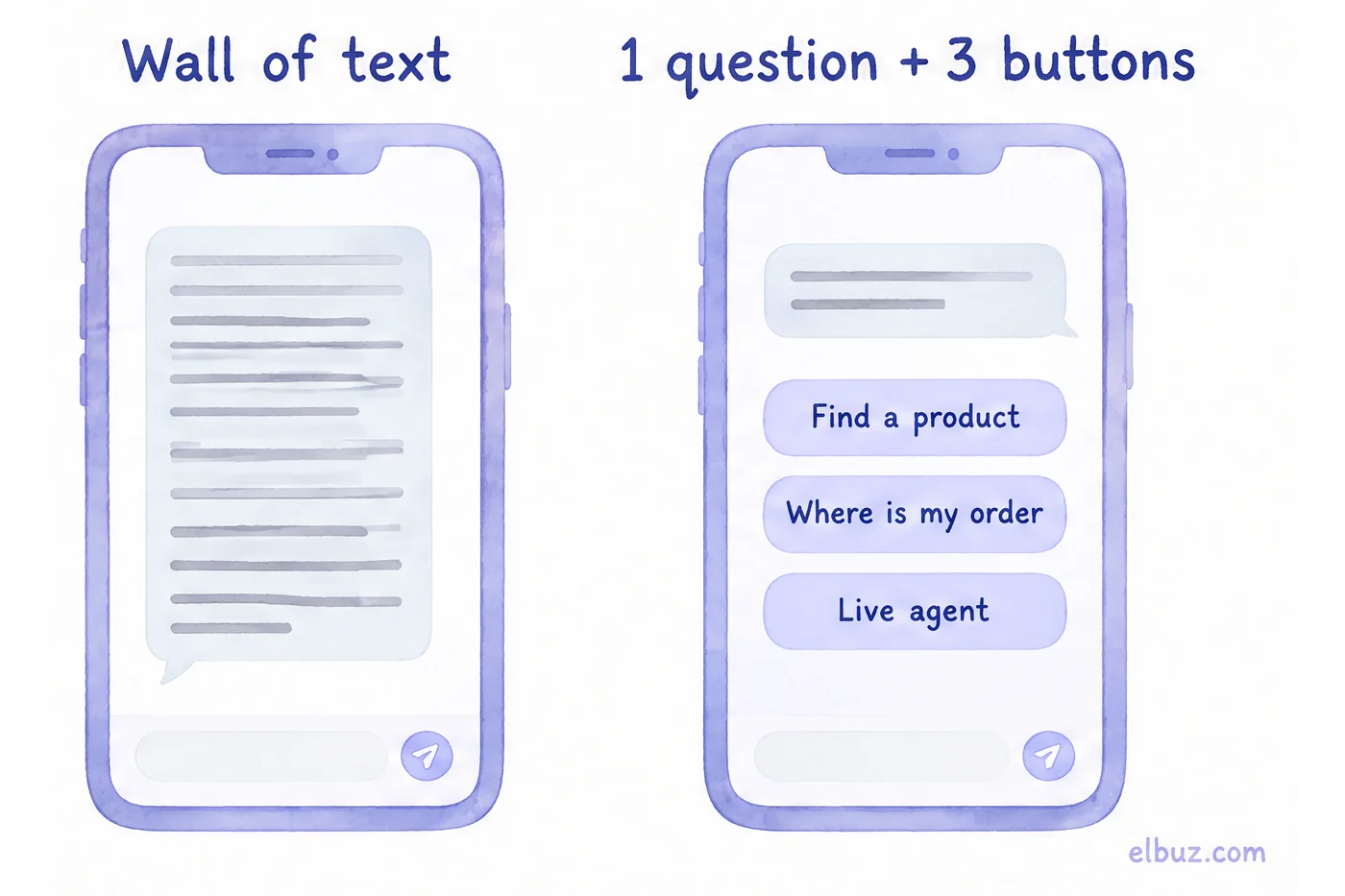
- Buttons as a verb or an object: "Find a product", "Where is my order", not "Yes" and "Next".
- 3–4 buttons in the first message, up to 6 in a category menu. With more, people stop choosing and type their own question.
- Ask for one field at a time. Name, phone and address in one message is the most common place where the conversation breaks off.
- Phone number as a button. In Telegram a bot can request the contact with a button, so the person doesn't have to type the number.
- Be honest about the bot. Don't pass the bot off as a person, and don't promise what it doesn't know — prices and stock should come from the catalog, not from the script text.
Telegram has two kinds of buttons. A reply keyboard under the input field sends the button text into the chat, as if the person typed it. Inline buttons under the bot's message send nothing to the chat, so the menu doesn't clutter the conversation. For menus and choices, inline buttons work better.
How to find the step where the bot loses buyers
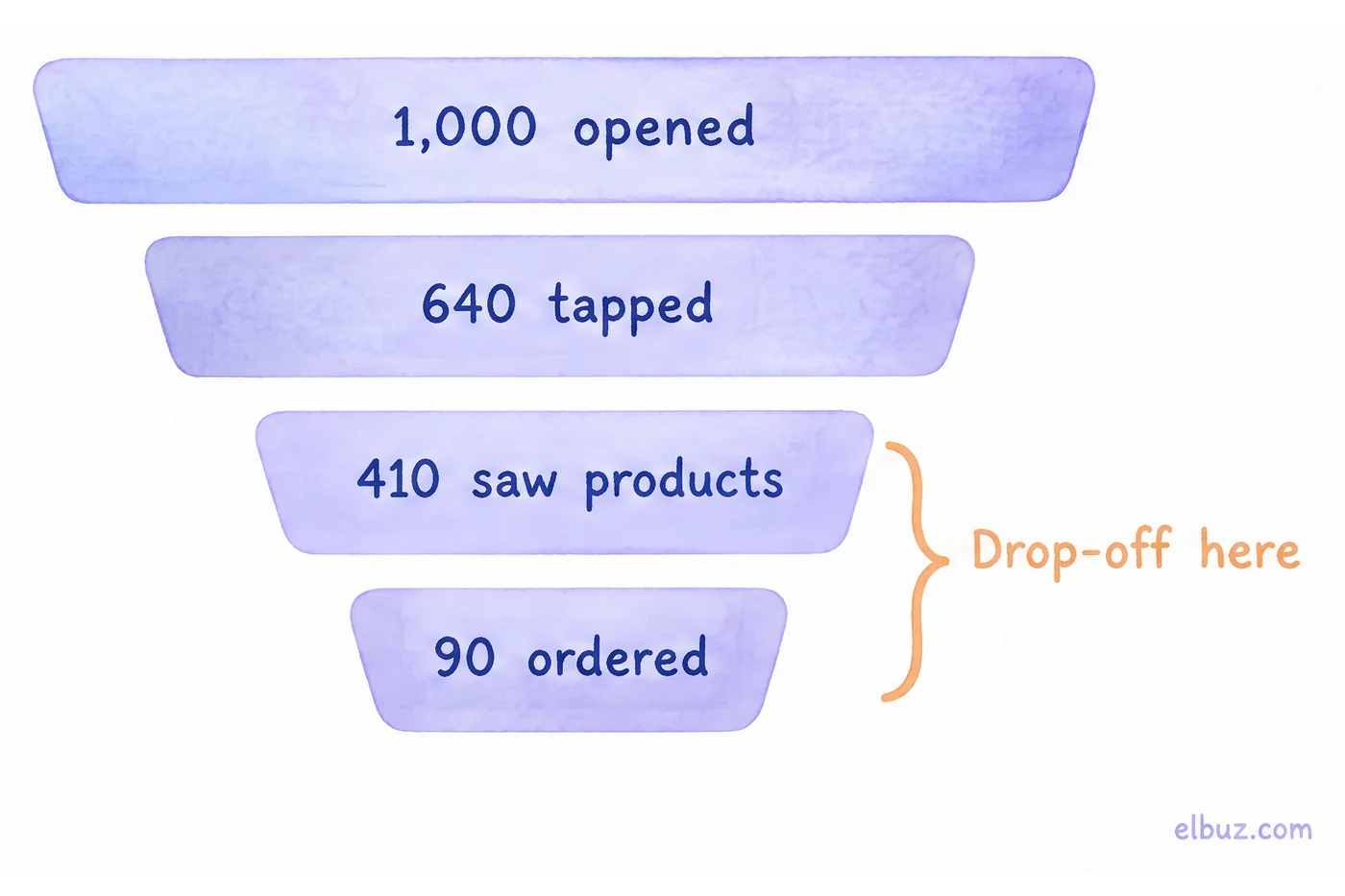
Count how many people reached each step and divide by the previous step. The lowest percentage shows the step to rewrite first.
Illustrative example for the arithmetic, not market benchmarks. In a month, 1,000 people opened the bot.
| Step | People | Of previous step |
|---|---|---|
| Opened the bot | 1,000 | — |
| Tapped a button in the first message | 640 | 64% |
| Reached product picks | 410 | 64% |
| Placed an order | 90 | 22% |
Here the checkout is the step to rewrite: only about one in five people get from product picks to an order. Typical causes are a long form in one message, no phone number button, and picks without a price or stock status. If checkout rises to 35% for the same 410 people, orders become 410 × 0.35 = 143.5, so 143 instead of 90.
Also watch two numbers: how many times the "didn't understand" reply fired, and what people typed right before it. Repeated phrases are ready-made new buttons or branches.
Button bot or AI assistant
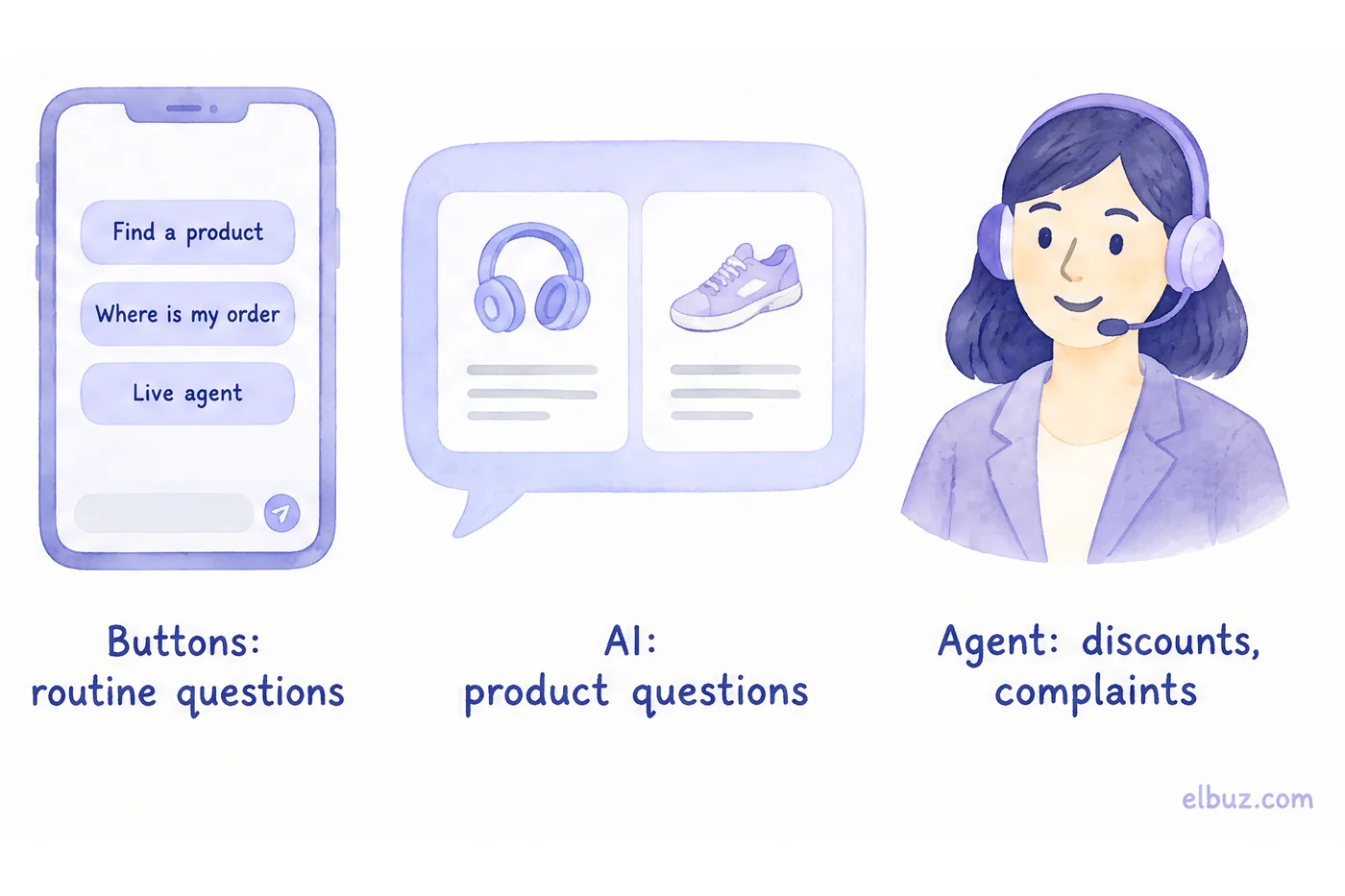
A button bot handles narrow, repetitive tasks well; an AI assistant handles open questions about products that no menu can predict. Both need a script: for the first, the script is the bot; for the second, it is the instructions, the limits and the moment to hand over to a person.
| Task | Buttons | AI assistant | Agent |
|---|---|---|---|
| Order status, shipping, payment | yes | yes | |
| "What's the difference between these two models?", "What goes with…?" | poorly | yes, if it sees the catalog | |
| A catalog of thousands of products | the menu can't hold it | yes | |
| Discount, complaint, unusual order | yes |
For an AI assistant, the script is written in words: role and tone, which data to answer from, what not to do (invent discounts, promise delivery times that aren't in your terms), and when to call a person. Frequent questions are still worth keeping as buttons — they shorten the way to the answer.
Mistakes that break a chatbot script
- Dead end. A branch ends with an answer and no buttons, and the person doesn't know what to do next. Every message needs a "Back" or "Live agent" button.
- The bot won't let go. Three rounds of "pick an option" and the buyer leaves. After the second miss, hand over to an agent.
- Prices and stock written into the script. In a week they are out of date, and the bot sells what you don't have. Pull them from the catalog.
- The script wasn't tested on real people. Ask three people to go through it without hints and watch where they stop. How to answer a buyer's doubts when a person leads the conversation — how to handle customer objections.
- Written and forgotten. Once a month, review the funnel and the phrases before "didn't understand".
When a button script isn't enough
When you have thousands of products and buyers ask about specific models, stock and compatibility: no menu can hold that, and answers can't be written in advance.
For this, Elbuz has an AI assistant for your website and Telegram: it answers from your catalog, store details, site articles and your instructions, and doesn't make up what isn't in the data. In the website chat, frequent questions are listed under the input field, and a request for a person or for a discount moves the conversation to a "needs an agent" queue with a notification in your Telegram group. An order placed in the chat becomes a customer order right away, next to the store's other orders — see ecommerce CRM.
Who doesn't need it: if the bot has one job — say, giving order status — the button script from this article is enough.
AI assistant in Elbuz chatAnswers from your catalog and calls an agent when needed
Frequently asked questions
What is a chatbot script?
A map of the conversation: what the bot says, which buttons it offers and where each answer leads — from the first message to the target action or a handoff to an agent.
What does a chatbot conversation flow include?
An entry point, a greeting with choices, branches for frequent questions, a target action, a fallback for when the bot doesn't understand, and a handoff to a person. The order of work is in the 6 steps.
How do I draw a chatbot flow?
As a flowchart: each bot message is a box, each button is an arrow to the next message. Check that every box has a way out and that an agent is no more than two taps away.
How many buttons should a chatbot menu have?
3–4 in the first message and up to 6 in a choice menu. If there are more options, split them into two steps or let the person type the question in their own words.
What should a chatbot do when it doesn't understand?
Show the main branch buttons and suggest typing "agent", and after the second miss hand the conversation to a person. Collect the phrases the bot didn't understand — they are candidates for new buttons.
Does an AI chatbot need a script?
Yes, but a different one: instead of a button tree, instructions with a role, data sources, off-limits topics and the conditions for handing over to an agent. Without them, the AI answers at random.
Sources
- Telegram, Bot Features — deep linking (start parameter), reply and inline keyboards — core.telegram.org.
- Telegram Bot API — KeyboardButton with the request_contact field (share your phone number) — core.telegram.org.
Checked on October 31, 2026. The funnel numbers are an illustrative example for the arithmetic.


