




Introduction
The Elbuz smart search analytics system is a powerful tool for analyzing user behavior when searching for products in your online store. These reports help you understand how customers search for products, what queries they use, how effective the search is, and how to improve the user experience to increase sales.
Why do you need search analytics?
- Increase conversion: Understanding user behavior allows you to optimize search and increase purchase rates
- Improving user experience: identifying problems (slow search, lack of results) and fixing them
- Profit growth: Search engine optimization directly impacts sales—the faster a customer finds the product they need, the higher the likelihood of a purchase.
- Understanding trends: Tracking popular queries helps plan purchases and marketing campaigns
List of all reports
The analytics system from Elbuz includes 17 reports, divided into categories by importance and functionality:
High Priority (Basic Reports)
- Dashboard — key metrics in one place
- Search query analysis — detailed statistics on user requests
- Conversion and performance analysis — a funnel from search to purchase
- Performance analysis — search speed and problematic queries
- Session Analysis and Conversion Funnel — user behavior from inception to conversion
Medium Priority (Advanced Analytics)
- Analysis of products and categories — popular products, categories, and brands
- User behavior analysis — how users interact with search
- Suggestion Analysis — autocompletion efficiency
- Analysis of actions with goods — add to cart, favorites, comparison
- Device and browser analysis — optimization for different platforms
- Analysis of filters and sorting — how users filter products
- User experience (UX) analysis — auto-completion and query refinement
Low priority (specialized analytics)
- Voice and visual search analysis - statistics of alternative search methods
- Modal Window and UI Interaction Analysis - interaction with the interface
- Analysis of history and popular queries - query reuse
- URL and sharing analysis - Sharing and search recovery functions
- Analysis of languages and multilingualism — statistics on interface languages
Report 1: Dashboard
What does this report show?
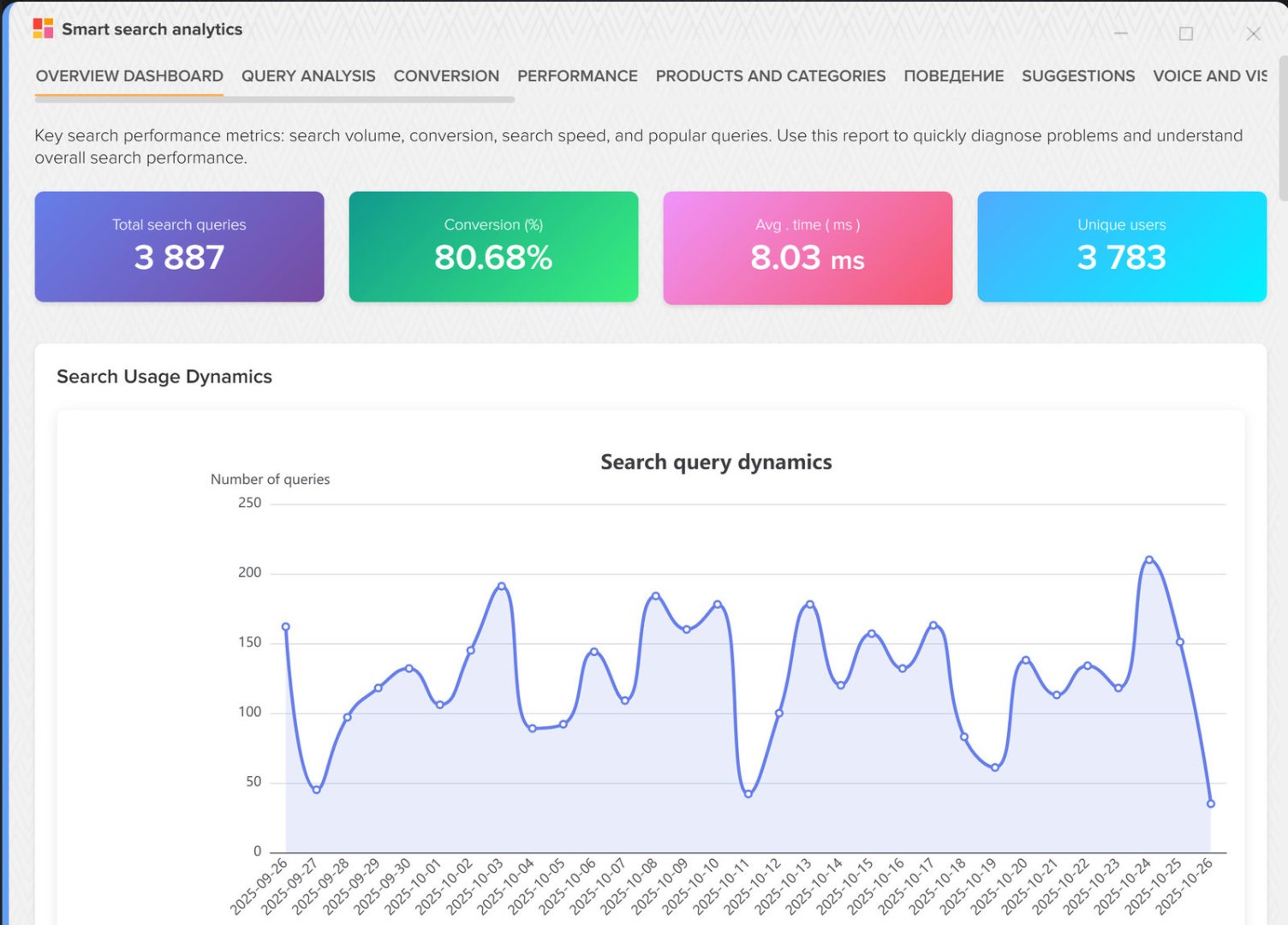
The Overview Dashboard is the main screen with key search performance metrics. Here you'll see the most important information about how users use product search.
Key metrics:
- Total number of search queries — how many times users used the search
- Search → Click Conversion — the percentage of searches that resulted in a click on a product
- Average search execution time - how fast is your search?
- Top 10 most popular queries — what users search for most often
- Dynamics of search usage — activity chart by day
What benefits does it bring?
Quick problem diagnosis:
- If the search → click conversion is low (less than 30%), then the search is not showing relevant results.
- If the average execution time is greater than 300 ms, the search is slow and discouraging customers.
- A drop in the overall number of searches may indicate technical problems.
Understanding demand:
- Top searches show which products are currently trending.
- You can schedule advertising campaigns based on popular queries
- Identify products that are out of stock but are actively sought after
Example of use:
Situation: The owner of an online electronics store noticed that the search → click conversion rate dropped from 45% to 28%.
Analysis: The query "iPhone 15 Pro" appeared in the top search results, but there were 0 results for it.
Solution: We've added new iPhone models to the catalog and updated search terms.
Result: Conversion increased to 52%, iPhone sales increased by 37%.
Report 2: Search Query Analysis
What does this report show?
A detailed analysis of what users are searching for. This report helps you understand customer search behavior and identify problem areas in your product catalog.
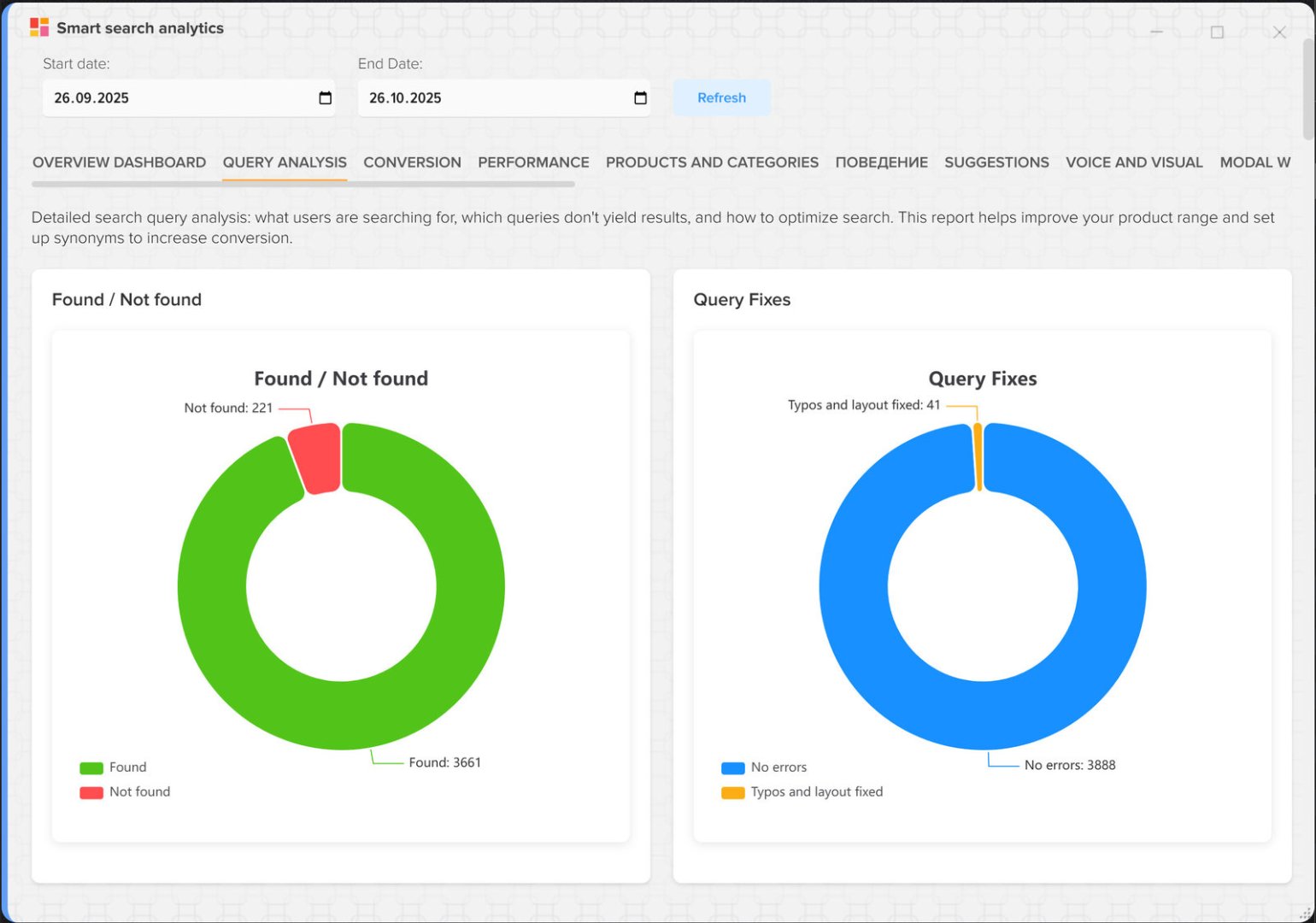
Main sections:
- Top 50 search queries with metrics — detailed statistics for each request
- Queries with zero results — what clients are looking for but can't find
- Distribution by search types - text, voice, image
- Average query length - how many words do users use
What benefits does it bring?
Improving the product range:
- Queries with zero results show which products are missing from the catalog
- It is possible to identify demand for new product categories
- Understand which brands and models are of interest to buyers
Search optimization:
- Add synonyms for common queries (e.g., "laptop" → "laptop")
- Correct typos in product names if queries with errors do not return results
- Set search priorities for popular queries
Example of use:
Situation: A children's goods store sees 150 searches per day for "cane stroller," but there are 0 results for this query.
Analysis: There are strollers in the catalogue, but they are called "strollers".
Solution: Added the synonym "cane stroller" for the "stroller" category.
Result: 18 strollers were sold for this search query in a week, increasing profit by 1,324 euros.
Report 3: Conversion and Search Performance Analysis
What does this report show?
A conversion funnel from the search to adding a product to the cart. Shows at what stage customers are lost and which queries lead to the highest conversions.
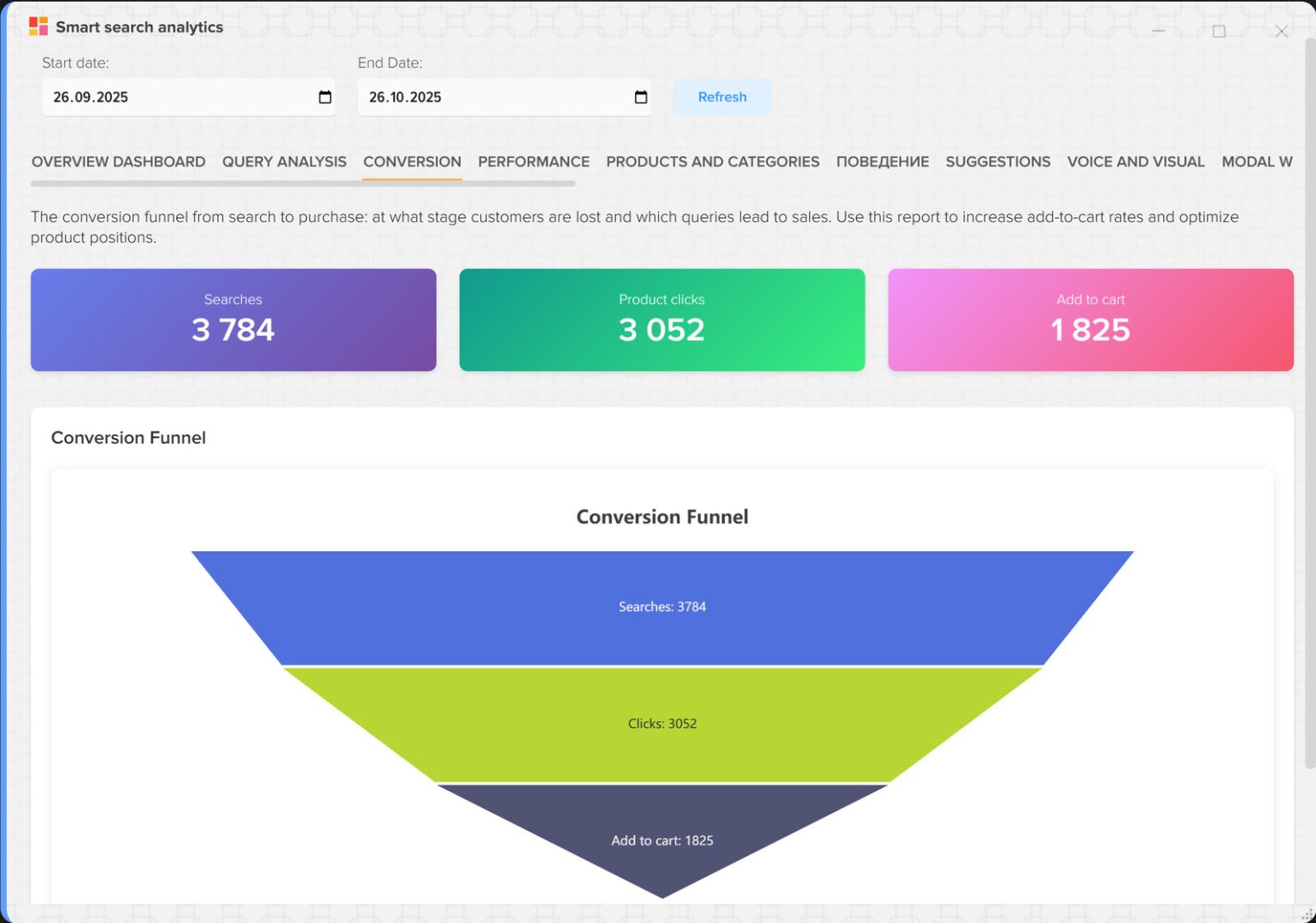
Main elements:
- Funnel: Search → Click → Cart — visualization of the user's journey
- CTR by position in results — which position is most often clicked on
- Conversion to purchase by request - what queries lead to sales
- Products with the best conversion rates — which products are most often added to the cart after searching
What benefits does it bring?
Increase sales:
- Identify queries with high sales potential and focus on them in advertising
- Understand why people click but don't add to cart (maybe high price or bad description)
- Optimize search results for low-converting queries
Improving product positions:
- If the CTR drops after the 3rd position, it means users are not scrolling the results.
- It is important that the most relevant products are in the top 3
- You can set priorities for high-margin products
Example of use:
Situation: A clothing store sees that the search query "women's jeans" has a high CTR (68%), but the conversion rate to cart is only 4%.
Analysis: Most of the products in positions 1-5 are expensive designer jeans (from 200 euros).
Solution: We added more affordable models (50-75 euros) to the top of the search results, leaving the more expensive ones below.
Result: The conversion rate to cart increased to 19%, and jeans sales increased by 83%.
Report 4: Performance Analysis
What does this report show?
Technical search performance metrics: speed, slow queries, server load. Helps the IT department and technical support optimize search engine performance.
Key indicators:
- Search execution time by time of day — when search is slowest
- Response time distribution - how many queries are executed quickly and how many are executed slowly
- Slow queries (> 1 second) — what queries are slowing down the system?
- Correlation of time and number of results — does the volume of results affect the speed?
What benefits does it bring?
Improving user experience:
- Slow search (more than 500 ms) irritates users and reduces conversions.
- Every 100ms of delay reduces conversion by 1-2%.
- Fast search (less than 300 ms) creates the impression of a modern and user-friendly website
Infrastructure optimization:
- Identify peak load hours and add server capacity
- Optimize slow queries (add indexes, caching)
- Identify queries that are overloading the database
Example of use:
Situation: The average search speed is 150 ms, but from 18:00 to 22:00 it increases to 1200 ms.
Analysis: In the evening hours, the number of requests increases 5 times, and the server cannot cope.
Solution: We added another server for load balancing and configured caching for popular queries.
Result: The speed during peak hours dropped to 200 ms, and conversion increased by 12%.
Report 5: Analysis of products and categories
What does this report show?
Statistics on products, categories, and brands that users find through search. Helps understand which products are popular and how users navigate the catalog.
Main sections:
- Top 50 Clicked Products — which products are most often opened from search
- Top 20 Popular Categories — which categories attract the most interest
- Top 20 Popular Brands — what brands are users searching for?
- Products with the highest conversion rate to cart — what do they buy most often?
- Products with detailed view — which products do users spend more time on?
What benefits does it bring?
Assortment management:
- Popular products should be kept in stock and highlighted in advertising
- Products with low sales can be removed from the catalog or the price can be reduced.
- Identify categories that generate the most profit
Marketing and Purchasing:
- Order more popular brands and models
- Launch targeted advertising campaigns for popular categories
- Work with suppliers of popular brands to get the best conditions
Example of use:
Situation: A home appliance store sees that Delonghi coffee machines are in the top 10 clicks, but the conversion rate to cart is low.
Analysis: Prices for coffee machines are 15-20% higher than those of competitors.
Solution: We agreed on a discount with the supplier and reduced prices by 10%.
Result: Delonghi coffee machine sales quadrupled, with profits increasing by €4,700 per month.
Report 6: User Behavior Analysis
What does this report show?
Search usage patterns: how long users search, how many events they perform, and how they use filters. Helps understand the usability of the search interface.
Key metrics:
- Overall user activity — number of sessions, unique users, events
- Distribution of sessions by duration - how much time do they spend searching?
- Using filters - opening, applying, closing filters
- Top 50 most active sessions — detailed analysis of complex user scenarios
What benefits does it bring?
UX/UI improvements:
- If users spend a long time searching but don't buy anything, the interface is complex or the products are not the right ones.
- Low use of filters may mean that they are poorly visible or unclear.
- Short sessions with few events - people don't find what they're looking for
Filter optimization:
- If filters are opened frequently but rarely used, the filters may be useless.
- You can add the most popular filters directly to your search results.
- Remove unnecessary filters that no one uses
Example of use:
Situation: The average search session duration is 45 seconds, but the conversion rate is only 8%.
Analysis: Users open filters 72% of the time, but apply them only 15% of the time.
Solution: We've simplified the filter interface and added quick filters (price, brand, availability) directly to the results.
Result: The use of filters increased to 48%, conversion increased to 14%.
Report 7: Suggestions Analysis
What does this report show?
Autocompletion system (typing suggestions) effectiveness. This shows how helpful suggestions are and how they influence user behavior.
Main sections:
- Using hints vs. direct input - how many people choose the prompts
- CTR of position suggestions — which position is most often clicked on
- Top 30 Most Clicked Tooltips — What tips are the most useful?
- Types of hints — terms, categories, products, brands
- Hint generation time - how quickly do hints appear?
What benefits does it bring?
Search acceleration:
- Suggestions reduce query entry time by 30-50%
- Users find what they need faster → higher conversion rates
- The number of typos and incorrect queries is reduced
Tooltip optimization:
- If the first suggestion is rarely clicked, the algorithm needs to be improved.
- You can display popular products directly in the tooltips
- Add categories and brands to quick navigation tips
Example of use:
Situation: Only 12% of users select suggestions, the rest enter their query in full.
Analysis: Suggestions appear 800ms after typing - too slow.
Solution: We optimized database queries and added caching for popular suggestions. The time has been reduced to 100 ms.
Result: The use of hints increased to 54%, conversion increased by 17%.
Report 8: Voice and Visual Search Analysis
What does this report show?
Statistics on the use of alternative search methods: voice search and image search. Helps assess the demand for these features.
Key indicators:
- Voice search dynamics - How many people use voice input?
- Image search dynamics - How often do people upload photos for search?
- Confidence distribution - how accurately is the voice recognized
- Dimensions of uploaded images — what photos do users upload?
- Comparison of the effectiveness of search types — text vs. voice vs. image
What benefits does it bring?
Understanding trends:
- The rise of voice search means an increase in mobile traffic.
- If you don't use voice search, it's possible the feature isn't working properly or isn't noticeable.
- Image search is popular in fashion, furniture, and decor—important for these niches.
Technical optimization:
- Low voice recognition confidence (< 70%) — нужно улучшить модель
- Large images (>1 MB) slow down search - need compression
- If the conversion rate of voice search is higher than text search, highlight this feature in the interface
Example of use:
Situation: A fashion retailer sees that only 0.3% of users use image search.
Analysis: The photo search button is hidden in the menu, and many people don't know about this function.
Solution: We added a prominent camera icon to the search bar and created a pop-up hint for the first visit.
Result: Usage increased to 4.7%, with photo search conversion at 31% (higher than text search).
Report 9: Modal Window and UI Interaction Analysis
What does this report show?
Search widget interface usage statistics: opening/closing modal windows, pagination, and catalog switching. Helps understand how users interact with the interface.
Main sections:
- Opening/closing a modal window - how often do they open the search
- Sources of discovery - button, hotkey, automatically
- Using pagination - how many users view the second and third pages
- Show more/less clicks - How to use group disclosure
- Switching directory - how often do people open the category tree?
What benefits does it bring?
Interface optimization:
- If there are few clicks on the 2nd page, the first results should be as relevant as possible.
- If a modal window is often closed immediately, it may be in the way or opening accidentally.
- Low use of hotkeys - need to be prompted about them
Navigation improvements:
- If a catalog is rarely opened, it may be complex or unnecessary.
- Frequent use of "Show more" - it's better to show more results at once
- You can remove unnecessary interface elements and simplify navigation.
Example of use:
Situation: 95% of users don't go to the 2nd page of results.
Analysis: There are 12 products on the first page, but the most relevant ones are not always in the top 12.
Solution: We increased the number of products per page to 24 and improved the ranking algorithm.
Result: The CTR increased by 23%, and users began to find what they needed faster.
Report 10: Analysis of history and popular queries
What does this report show?
Search query reuse statistics: search history, popular queries, and frequency. Helps understand how easy it is for users to return to previously searched items.
Key metrics:
- Clicks on history vs. new queries - How many people use history?
- Top 30 popular queries - what is most often chosen from the popular ones
- Distribution of clicks by positions in history — where in history people click most often
- Request repetition - how often do users enter the same query?
What benefits does it bring?
Improving user experience:
- Search history saves time – no need to re-enter your search query
- Popular queries help new users quickly find what they need
- High repetition may mean that people take a long time to choose or compare products.
Personalization:
- You can suggest products from your search history on the main page
- Send emails with products based on popular search queries
- Add "Recently searched..." for quick access
Example of use:
Situation: 28% of users repeat the same request 3-5 times a week.
Analysis: Users are searching but not buying—perhaps they are waiting for discounts or are thinking about it.
Solution: We set up an email newsletter: if a user searched for a product three times but didn't buy it, we send a 10% discount.
Result: Conversion of repeat searches increased from 12% to 34%, additional profit 2800 euros/month.
Report 11: URL and sharing analysis
What does this report show?
Sharing and URL usage statistics: copying search results links, restoring search results from URLs, updating URLs when parameters change.
Key indicators:
- Copying links for sharing - How often are search results shared?
- Recovering search from URL — how many people click on saved links
- Top 30 queries with the most shares — what is most often shared
- URL updates - how often do the settings in the address bar change?
What benefits does it bring?
Viral effect:
- If users share links, it's free traffic.
- You can encourage sharing with discounts or bonuses.
- Popular sharing queries show interesting products that can be promoted
Ease of use:
- Users can save links to interesting collections
- Easy to share with friends or colleagues
- Can be used in newsletters and social networks
Example of use:
Situation: The sharing function is used by only 0.5% of users.
Analysis: The "Share" button is inconspicuous, and many people don't know about it.
Solution: We've added a prominent "Copy link" button and a "Share this find with friends" pop-up.
Result: Usage increased to 3.2%, with additional traffic of 450 clicks/day on shared links.
Report 12: Product Activity Analysis
What does this report show?
Глубокий анализ взаимодействия с товарами: добавление в корзину, избранное, сравнение. Показывает, какие товары и откуда пользователи добавляют, и насколько эффективны эти действия.
Main sections:
- Распределение действий — корзина vs избранное vs сравнение
- Топ-30 товаров в корзине — какие товары чаще всего добавляют
- Источники добавления в корзину — откуда добавляют: результаты поиска, карточка товара
- Товары в избранном и сравнении — что чаще сохраняют для потом
- Клики по рейтингам и отзывам — насколько важны отзывы при выборе
Какую пользу приносит?
Increase sales:
- Товары, которые часто добавляют в избранное, но не покупают — можно предложить скидку
- Если много добавляют в сравнение — пользователи сомневаются, нужны более подробные описания
- Товары с высокой конверсией в корзину — выделить в рекламе
Работа с контентом:
- Частые клики по отзывам показывают, что отзывы важны — нужно их собирать
- Товары без отзывов могут продаваться хуже — стимулировать покупателей оставлять отзывы
- Добавить больше фото и видео для товаров, которые часто сравнивают
Example of use:
Situation: Смартфон Samsung Galaxy S23 добавляют в сравнение 340 раз, но покупают только 12 раз.
Analysis: В описании всего 3 характеристики, нет видеообзора, мало фото.
Solution: Добавили подробные характеристики, видеообзор, 15 фото с разных ракурсов, отзывы покупателей.
Result: Конверсия выросла с 3.5% до 19%, продажи увеличились в 5 раз.
Отчёт 13: Анализ языков и мультиязычности
Что показывает этот отчёт?
Статистика использования поиска на разных языках интерфейса. Помогает понять, какие языковые версии популярны, и как оптимизировать поиск для каждого языка.
Key indicators:
- Распределение запросов по языкам — сколько поисков на каждом языке
- Топ запросы по каждому языку — что ищут на русском, английском, украинском и т.д.
- Конверсия по языкам — какая языковая версия конвертирует лучше
- Результативность поиска по языкам — процент запросов с нулевыми результатами
Какую пользу приносит?
Локализация и расширение рынка:
- Если на английском много запросов, но низкая конверсия — возможно, плохой перевод
- Высокий процент нулевых результатов на определённом языке — не хватает переводов товаров
- Можно сфокусироваться на самых прибыльных языковых версиях
Оптимизация контента:
- Популярные запросы на разных языках могут отличаться — нужны разные стратегии
- Убедиться, что все товары переведены на все активные языки
- Добавить синонимы и альтернативные названия на каждом языке
Example of use:
Situation: На украинском языке 18% запросов дают нулевые результаты (на русском — 4%).
Analysis: Многие товары не переведены на украинский, пользователи ищут, но не находят.
Solution: Запустили автоматический перевод всех товаров, добавили украинские синонимы для популярных категорий.
Result: Процент нулевых результатов снизился до 5%, продажи на украинском языке выросли на 67%.
Отчёт 14: Анализ устройств и браузеров
Что показывает этот отчёт?
Подробная статистика о том, с каких устройств (Desktop, Mobile) и браузеров пользователи работают с поиском. Этот отчёт критически важен для оптимизации интерфейса под разные платформы и выявления проблем совместимости.
Key indicators:
- Распределение Desktop vs Mobile — соотношение пользователей с компьютеров и мобильных устройств
- Конверсия по типам устройств — какие устройства приносят больше продаж
- Топ-10 браузеров — самые популярные браузеры среди пользователей
- Топ-10 разрешений экрана — на каких разрешениях работают пользователи
- Детальная статистика по браузерам — скорость поиска, процент нулевых результатов для каждого браузера
- Проблемные комбинации — браузер + разрешение с высоким процентом ошибок
Какую пользу приносит?
Оптимизация под платформы:
- Если 70% пользователей с мобильных, но конверсия ниже — срочно нужна оптимизация мобильной версии
- Можно выявить браузеры с низкой производительностью и оптимизировать код
- Понять, на каких разрешениях интерфейс работает хуже всего
Выявление технических проблем:
- Если в Safari высокий процент нулевых результатов — возможно, проблема с JS или CSS
- Проблемные комбинации (например, Chrome + 360x640) указывают на баги интерфейса
- Медленная работа на определённом браузере — повод для технической оптимизации
Example of use:
Situation: Магазин видит, что 65% трафика с мобильных (Android), но конверсия всего 9% (на Desktop — 24%).
Analysis: В Chrome Mobile на разрешении 360x640 (самое популярное) кнопка "В корзину" часто не видна — нужно прокручивать.
Solution: Переработали мобильный интерфейс: кнопка всегда видна, увеличили размер кликабельных элементов, убрали лишние поля.
Result: Конверсия на мобильных выросла до 18%, общие продажи увеличились на 34%.
Отчёт 15: Анализ фильтров и сортировки
Что показывает этот отчёт?
Статистика использования фильтров и сортировки при поиске товаров. Показывает, какие типы сортировки предпочитают пользователи, какие бренды и категории чаще всего фильтруют, и как это влияет на конверсию.
Main sections:
- Распределение типов сортировки — по релевантности, цене, популярности, рейтингу, новинкам
- Топ-10 брендов в фильтрах — какие бренды чаще всего выбирают пользователи
- Конверсия по типу сортировки — какая сортировка приводит к большему количеству покупок
- Топ категорий в фильтрах — самые популярные категории для фильтрации
- Популярные комбинации фильтров — какие фильтры применяют вместе
Какую пользу приносит?
Улучшение конверсии:
- Если сортировка "по цене (возрастание)" имеет конверсию 23%, а "по релевантности" только 11% — нужно изменить сортировку по умолчанию
- Популярные бренды в фильтрах показывают, что важно для покупателей — можно продвигать эти бренды
- Комбинации фильтров (например, "бренд + цена") помогут создать быстрые фильтры
Оптимизация интерфейса:
- Если фильтр по категориям используют 45% пользователей — нужно сделать его более заметным
- Редко используемые фильтры можно скрыть или убрать — упростить интерфейс
- Добавить популярные комбинации как готовые пресеты (например, "Топ брендов до 100 евро.")
Example of use:
Situation: Магазин электроники видит, что пользователи чаще всего сортируют по "цена: возрастание" (52% сессий), но конверсия низкая — 8%.
Analysis: Самые дешёвые товары — это аксессуары с низкой маржой. Сортировка "по популярности" даёт конверсию 19%.
Solution: Изменили сортировку по умолчанию на "по популярности", добавили фильтр быстрого доступа "Хиты продаж".
Result: Средний чек вырос на 37%, конверсия увеличилась до 16%, прибыль выросла на 8400 евро./месяц.
Отчёт 16: Анализ пользовательского опыта (UX)
Что показывает этот отчёт?
Глубокий анализ пользовательского опыта: предпочтения режима отображения (список/сетка), использование автокомплита и паттерны уточнения поисковых запросов. Помогает понять, насколько удобен интерфейс и как пользователи ищут нужные товары.
Основные метрики:
- Предпочтения режима отображения — список vs сетка, количество переключений
- Статистика автокомплита — сколько пользователей используют автодополнение запросов
- Эффективность автокомплита — средняя длина запроса до срабатывания, конверсия
- Топ автокомплит-запросы — какие запросы чаще всего автоматически дополняются
- Статистика уточнений — как часто пользователи изменяют запрос после первого поиска
- Паттерны уточнения — как пользователи корректируют запросы (добавляют слова, меняют на синонимы)
Какую пользу приносит?
Улучшение удобства поиска:
- Если автокомплит используют только 12% — он либо медленный, либо неточный, либо незаметный
- Высокий процент уточнений (более 40%) означает, что первый результат поиска нерелевантен
- Паттерны уточнений показывают, каких синонимов или вариантов не хватает в системе
Оптимизация интерфейса:
- Если пользователи предпочитают "список" (78%), но по умолчанию "сетка" — изменить настройки
- Анализ успешных автокомплитов помогает улучшить алгоритм подсказок
- Часто уточняемые запросы нужно сразу показывать правильно — добавить синонимы
Example of use:
Situation: 54% пользователей уточняют запрос после первого поиска. Среднее время до уточнения — 8 секунд.
Analysis: Топ паттерн уточнения: "iPhone" → "iPhone 15", "ноутбук" → "ноутбук Asus", "кроссовки" → "кроссовки Nike".
Solution: Улучшили автокомплит: теперь при вводе "iPhone" сразу предлагаются модели. Добавили популярные уточнения как быстрые фильтры.
Result: Процент уточнений снизился до 28%, среднее время поиска сократилось с 45 до 23 секунд, конверсия выросла на 14%.
Отчёт 17: Анализ сессий и конверсионная воронка
Что показывает этот отчёт?
Комплексный анализ пользовательских сессий от начала до конца: воронка конверсии через 5 этапов, распределение длительности сессий, сравнение успешных и неуспешных сессий, корреляция количества действий с конверсией. Это один из самых важных отчётов для понимания, как пользователи проходят путь от поиска до покупки.
Main elements:
- Воронка конверсии (5 этапов) — Открытие поиска → Выполнение запроса → Клик по товару → Просмотр карточки → Добавление в корзину
- Распределение длительности сессий — 0-30 сек, 30-60 сек, 1-2 мин, 2-5 мин, 5+ мин
- Метрики успешных сессий — среднее количество запросов, длительность, действий для сессий с конверсией
- Метрики неуспешных сессий — те же параметры для сессий без конверсии
- Корреляция запросов и конверсии — как количество поисковых запросов влияет на вероятность покупки
Какую пользу приносит?
Выявление узких мест:
- Если на этапе "Клик по товару → Просмотр карточки" отваливается 60% — проблема в скорости загрузки или интерфейсе
- Большая разница в длительности успешных (90 сек) и неуспешных (25 сек) сессий — люди уходят слишком быстро
- Если конверсия выше при 2-3 запросах, чем при 1 или 5+ — нужно помогать пользователям уточнять запрос
Оптимизация воронки:
- Каждый этап воронки можно оптимизировать отдельно: улучшить результаты поиска, ускорить загрузку карточек, сделать кнопку "В корзину" заметнее
- Понимание, сколько действий делают успешные пользователи, помогает понять ожидания
- Короткие сессии без конверсии — возможно, люди не находят то, что ищут
Example of use:
Situation: Воронка показывает: 10000 открытий → 8500 запросов (85%) → 4200 кликов (50%) → 3150 просмотров (75%) → 410 в корзину (13%).
Analysis: Огромный отток на этапе "Клик → Просмотр" (25%) и "Просмотр → Корзина" (87%). Средняя длительность неуспешных сессий — 18 секунд.
Solution:
- Ускорили загрузку карточек товара с 2.3 сек до 0.6 сек
- Увеличили кнопку "В корзину", добавили яркий цвет
- Добавили блок "Похожие товары" на карточку
Result: Конверсия "Клик → Просмотр" выросла до 89%, "Просмотр → Корзина" — до 22%. Общая конверсия воронки увеличилась с 4.1% до 9.2%, продажи выросли в 2.2 раза.
Практические примеры комплексного использования отчётов
Пример 1: Падение продаж — комплексный анализ
Problem: Продажи через поиск упали на 25% за последний месяц.
Шаг 1 — Отчёт 1 (Dashboard): Обнаружили, что общее количество поисков осталось прежним, но конверсия упала с 42% до 28%.
Шаг 2 — Отчёт 3 (Конверсия): Воронка показала, что клики по товарам остались на том же уровне, но добавление в корзину упало.
Шаг 3 — Отчёт 5 (Товары и категории): Выяснили, что топ-10 товаров по кликам изменились — старые хиты ушли из наличия.
Шаг 4 — Отчёт 2 (Анализ запросов): Проверили запросы с нулевыми результатами — 5 из топ-10 запросов теперь не дают результатов.
Solution: Срочно завезли популярные товары, добавили аналоги, настроили подсказки на альтернативы.
Result: За неделю конверсия восстановилась до 39%, продажи вернулись на прежний уровень.
Пример 2: Запуск новой категории товаров
Task: Запустить новую категорию "Умные часы" и понять, как её продвигать.
Шаг 1 — Отчёт 2 (Анализ запросов): Проверили, сколько запросов "умные часы" было до запуска — 250 в месяц, все с нулевыми результатами.
Шаг 2 — Отчёт 7 (Подсказки): Добавили "умные часы" в подсказки, связали с брендами Apple Watch, Samsung Galaxy Watch.
Шаг 3 — Отчёт 1 (Dashboard): Через 2 недели проверили динамику — запросы выросли до 890 в месяц, конверсия 32%.
Шаг 4 — Отчёт 5 (Товары и категории): Выяснили, что Apple Watch SE кликают чаще всего, но покупают Galaxy Watch (дешевле).
Solution: Запустили рекламу на Apple Watch SE (приводит трафик) и добавили рекомендации Galaxy Watch (конвертирует лучше).
Result: За месяц продали 87 умных часов, прибыль 9750 евро., категория окупилась за 3 недели.
Пример 3: Оптимизация для мобильных пользователей
Task: 60% трафика с мобильных, но конверсия на 40% ниже, чем с десктопа.
Шаг 1 — Отчёт 6 (Поведение пользователей): Обнаружили, что на мобильных фильтры открывают 68% пользователей, но применяют только 9%.
Шаг 2 — Отчёт 9 (UI взаимодействия): Пагинация на мобильных используется редко — пользователи не прокручивают до конца.
Шаг 3 — Отчёт 8 (Голосовой поиск): Голосовой поиск на мобильных всего 0.8%, хотя конверсия 43% (выше текстового).
Solution:
- Упростили мобильные фильтры, добавили быстрые фильтры наверху
- Увеличили количество товаров на странице с 12 до 20
- Сделали кнопку голосового поиска большой и заметной
Result: Конверсия на мобильных выросла с 18% до 27%, использование голосового поиска выросло до 6.4%.
Как читать отчёты и принимать решения
Общие принципы работы с аналитикой:
1. Регулярность
Проверяйте ключевые метрики еженедельно:
- Общее количество поисков (не упало ли?)
- Конверсия поиск → клик (норма 35-50%)
- Конверсия поиск → корзина (норма 8-15%)
- Среднее время выполнения (должно быть< 300 мс)
2. Сравнение периодов
Всегда сравнивайте текущий период с предыдущим:
- Неделя к неделе
- Месяц к месяцу
- Год к году (для учёта сезонности)
3. Проверка гипотез
Любое изменение проверяйте данными:
- Hypothesis: "Если добавить синонимы, конверсия вырастет"
- Action: Добавить синонимы для топ-10 запросов
- Examination: Через неделю сравнить конверсию по этим запросам
- Result: Если выросла — применить ко всем запросам
4. Фокус на прибыли
Не все метрики одинаково важны:
| Metrics | Importance | Why |
|---|---|---|
| Cart conversion rate | Критично | Напрямую влияет на продажи |
| Запросы с нулевыми результатами | High | Lost profits |
| Скорость поиска | High | Влияет на UX и конверсию |
| Количество поисков | Average | Важно в динамике |
| Источники открытия модального окна | Low | Интересно, но не критично |
Контрольные показатели (KPI) для оценки эффективности поиска
| Metrics | Хороший показатель | Bad indicator | How to improve |
|---|---|---|---|
| Конверсия поиск → клик | > 40% | < 25% | Улучшить релевантность, добавить синонимы |
| Конверсия поиск → корзина | > 10% | < 5% | Оптимизировать позиции товаров, улучшить описания |
| Average execution time | < 200 мс | > 500 мс | Оптимизация запросов, кэширование, индексы |
| Процент нулевых результатов | < 5% | > 15% | Расширить ассортимент, добавить синонимы, исправить опечатки |
| Использование подсказок | > 40% | < 15% | Ускорить подсказки, улучшить алгоритм |
| CTR первой позиции | > 30% | < 15% | Улучшить алгоритм ранжирования |
| Средняя длительность сессии | 30-60 sec | > 120 сек | Упростить интерфейс, улучшить релевантность |
Чек-лист еженедельной проверки
Понедельник — Проверка ключевых метрик (10 минут)
- Open Отчёт 1 (Dashboard)
- Проверить общее количество поисков за неделю (сравнить с прошлой неделей)
- Проверить конверсию поиск → клик (норма > 35%)
- Проверить среднее время выполнения (норма< 300 мс)
- Посмотреть топ-5 запросов — нет ли новых трендов?
Вторник — Проверка запросов с проблемами (15 минут)
- Open Отчёт 2 (Анализ запросов)
- Просмотреть топ-20 запросов с нулевыми результатами
- Выбрать 5 запросов с наибольшим количеством
- Решить: добавить товары или настроить синонимы
Среда — Анализ конверсии (15 минут)
- Open Отчёт 3 (Конверсия)
- Проверить воронку: где максимальный отток?
- Посмотреть топ-10 запросов с лучшей конверсией
- Запустить рекламу на эти запросы
Четверг — Проверка производительности (10 минут)
- Open Отчёт 4 (Производительность)
- Проверить, нет ли медленных запросов (> 1 секунды)
- Если есть — передать IT-отделу на оптимизацию
Пятница — Анализ товаров и планирование (20 минут)
- Open Отчёт 5 (Товары и категории)
- Посмотреть топ-20 кликаемых товаров
- Проверить наличие и цены этих товаров
- Запланировать закупки популярных товаров
- Выделить товары с высокой конверсией в рекламе
Conclusion
Аналитика умного поиска Elbuz — это не просто цифры и графики. Это инструмент, который напрямую влияет на прибыль вашего бизнеса. Регулярный анализ данных позволяет:
- Увеличить продажи на 20-40% за счёт оптимизации поиска и ассортимента
- Сократить операционные расходы — не закупать товары, которые не нужны
- Улучшить пользовательский опыт — довольные клиенты покупают больше и возвращаются
- Выявлять тренды раньше конкурентов — первыми предложить то, что начинают искать
- Принимать решения на основе данных — не гадать, а точно знать, что работает
Начните с простого: каждый понедельник открывайте Отчёт 1 (Dashboard) и проверяйте ключевые метрики. Постепенно углубляйтесь в другие отчёты. Через месяц вы будете видеть закономерности, через три месяца — предсказывать тренды, через полгода — опережать конкурентов.
Remember: каждая метрика — это деньги. Конверсия +1% может означать +12000 евро. в месяц. Скорость поиска -100 мс может увеличить продажи на 5%. Один правильно добавленный синоним может принести 20 дополнительных продаж в месяц.
Используйте аналитику каждый день. Анализируйте, оптимизируйте, растите!
Если у вас возникли вопросы по работе с аналитикой или нужна помощь в интерпретации данных, обратитесь к вашему менеджеру проекта или в службу технической поддержки.
- Introduction
- List of all reports
- Report 1: Dashboard
- Report 2: Search Query Analysis
- Report 3: Conversion and Search Performance Analysis
- Report 4: Performance Analysis
- Report 5: Analysis of products and categories
- Report 6: User Behavior Analysis
- Report 7: Suggestions Analysis
- Report 8: Voice and Visual Search Analysis
- Report 9: Modal Window and UI Interaction Analysis
- Report 10: Analysis of history and popular queries
- Report 11: URL and sharing analysis
- Report 12: Product Activity Analysis
- Отчёт 13: Анализ языков и мультиязычности
- Отчёт 14: Анализ устройств и браузеров
- Отчёт 15: Анализ фильтров и сортировки
- Отчёт 16: Анализ пользовательского опыта (UX)
- Отчёт 17: Анализ сессий и конверсионная воронка
- Практические примеры комплексного использования отчётов
- Как читать отчёты и принимать решения
- Контрольные показатели (KPI) для оценки эффективности поиска
- Чек-лист еженедельной проверки
- Conclusion


