

Merchant acquiring is the service that lets a store accept card payments: the acquirer — a bank or a licensed payment company — takes the payment from your checkout, gets it approved by the customer's bank through Visa or Mastercard, and pays the money into your account minus a fee. An online store usually gets it through a payment gateway such as Stripe, Adyen or PayPal rather than straight from a bank.
Stores rarely go wrong in choosing the provider; they go wrong in the arithmetic. They compare the headline percentage and miss the fixed fee per transaction, or they skip cards because cash on delivery "costs nothing". Below: how a card payment flows, a calculation of two price plans on the same numbers, card versus cash on delivery, and what a provider checks before it lets you go live.
When a store starts looking at acquiring
Usually the store already sells, and customers want to pay by card, Apple Pay or PayPal at checkout. The owner searches for "what is an acquiring bank", "payment gateway fees" and "how much is a normal processing fee", and lands on price pages that cannot be compared: one shows a single percentage, another a percentage plus cents, a third "interchange++".
"Which provider is cheapest" is the wrong question. The right one is how much your own month of payments will cost on each plan. That takes a couple of minutes, and the example below shows how.
What merchant acquiring is and who takes part in a payment
Acquiring is accepting card payments; the acquirer is the bank or payment company that provides this service to the store. Several parties stand between the customer and your account:
| Party | Who it is | What it does |
|---|---|---|
| Merchant | Your store | Accepts the payment and receives the money |
| Acquirer (acquiring bank) | The bank or licensed company the store has an acquiring contract with | Sends the payment into the card network and pays the store |
| Issuer | The bank that issued the customer's card | Checks the funds and that the cardholder is paying, and debits the amount |
| Card scheme | Visa, Mastercard and others | Routes requests between acquirer and issuer under its rules |
| Payment gateway / PSP | A provider between the store and the acquirer, or one that is its own acquirer | Gives you a payment page, plugins and a single contract |
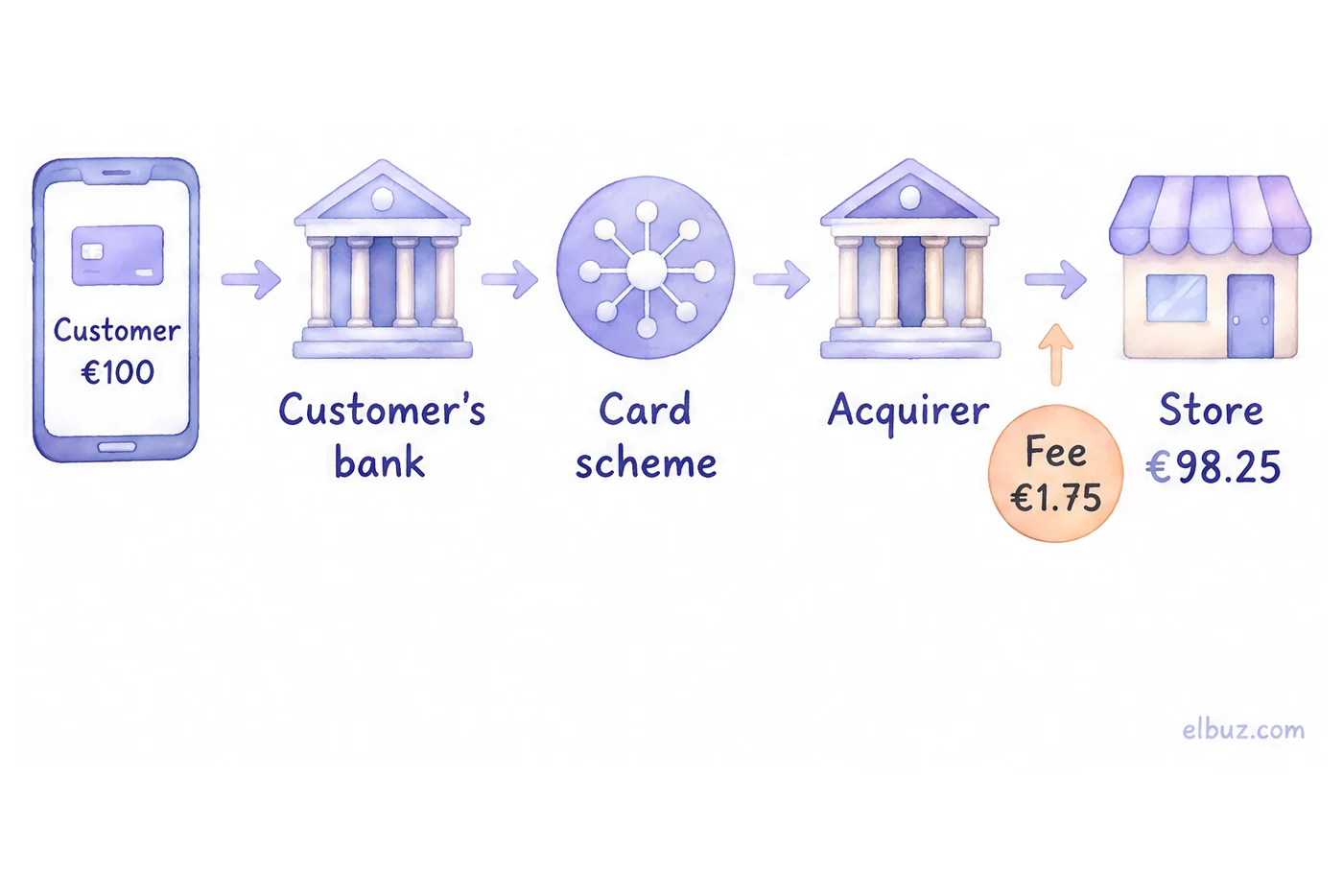
Example: a customer pays €100 with a standard EEA card. At 1.5% + €0.25 — Stripe's published standard rate for EEA cards on its Ireland pricing page — the fee is €1.75 and the store receives €98.25. In your bank statement this shows up as a payout from the provider: the sum of card payments for a period, already net of fees.
In-store, online and mobile acquiring
The types of acquiring differ in where the customer pays. An online store needs online (card-not-present) acquiring first; in-store or mobile acquiring is added when you have a pickup point, a showroom or couriers who take payment at the door.
| Type | Where the customer pays | What the store needs |
|---|---|---|
| In-store (card-present) | At a counter, by card or phone through a terminal | A card terminal and a contract for in-person payments |
| Online (card-not-present) | On the website, in an app or through a payment link | A contract with a gateway, a checkout plugin or payment links |
| Mobile | Wherever the courier or seller is: a mobile terminal or a phone accepts the card | A mobile reader or a tap-to-pay app on a smartphone |
How a card payment on a website works
A payment takes five steps, and the store never sees the card details:
- The customer checks out and chooses card, Apple Pay, Google Pay or PayPal.
- The website hands the order to the payment page or payment form of the provider: amount, order number, description. The card is entered there.
- The issuer checks the payment and, in the EEA and UK, usually asks the customer to confirm it in the banking app or with a code (3-D Secure, strong customer authentication).
- The provider reports the result. The customer returns to the site, and a server notification (webhook) marks the order "paid" or "payment failed".
- The money reaches your account minus the fee, on the payout schedule in your contract.
Besides a normal payment there are three operations. Authorisation and capture — the amount is blocked on the card and charged when you confirm the order; useful when stock has to be checked. Refund — all or part of the amount goes back to the same card. Chargeback — the customer disputes the payment through their bank, and the money can be taken back from you plus a dispute fee; keep proof of delivery and the correspondence for disputed orders.
How much acquiring costs: what the fee is made of
The processing fee is a percentage of each payment, often plus a fixed amount per transaction, sometimes a monthly or minimum fee and separate charges for disputes and currency conversion. Compare the full monthly amount, not the percentage:
Monthly fees = card turnover × percentage + number of payments × fixed fee + monthly fee.
Published EU prices of three common providers, checked on October 31, 2026 (standard rates; volume and custom pricing differ):
| Provider | Model | Card payments | Dispute / chargeback |
|---|---|---|---|
| Stripe (Ireland page) | Blended | 1.5% + €0.25 standard EEA cards; 2.8% + €0.25 premium EEA; 2.5% + €0.25 UK; 3.15% + €0.25 international; +2% if currency is converted | €20 per dispute |
| PayPal (Ireland page) | Blended or interchange plus | PayPal checkout 3.40% + €0.35; card payments via PayPal 1.20% + €0.35 (blended) or interchange + 1.20% + €0.35 | €16 per chargeback; dispute fee €14 (standard) |
| Adyen | Interchange++ | Fixed processing fee + interchange++ + 0.60% for Visa and Mastercard; the fixed fee depends on the currency (£0.11 on the UK page, $0.13 on the US page) | Not listed on the pricing page |
Blended means one price for most cards. Interchange++ (interchange plus) means you pay the issuer's interchange and the scheme fees at cost, plus the provider's margin; it is cheaper on consumer debit cards and harder to predict.
Illustrative example for the arithmetic, the rates are not offers of specific providers. A store takes 300 card payments a month with an average order of €40 — €12,000 in turnover. Plan A: 1.9%. Plan B: 1.5% + €0.25 per transaction.
| Plan | Calculation | Per month, € |
|---|---|---|
| A: 1.9% | 12,000 × 1.9% | 228 |
| B: 1.5% + €0.25 | 12,000 × 1.5% + 300 × 0.25 | 255 |
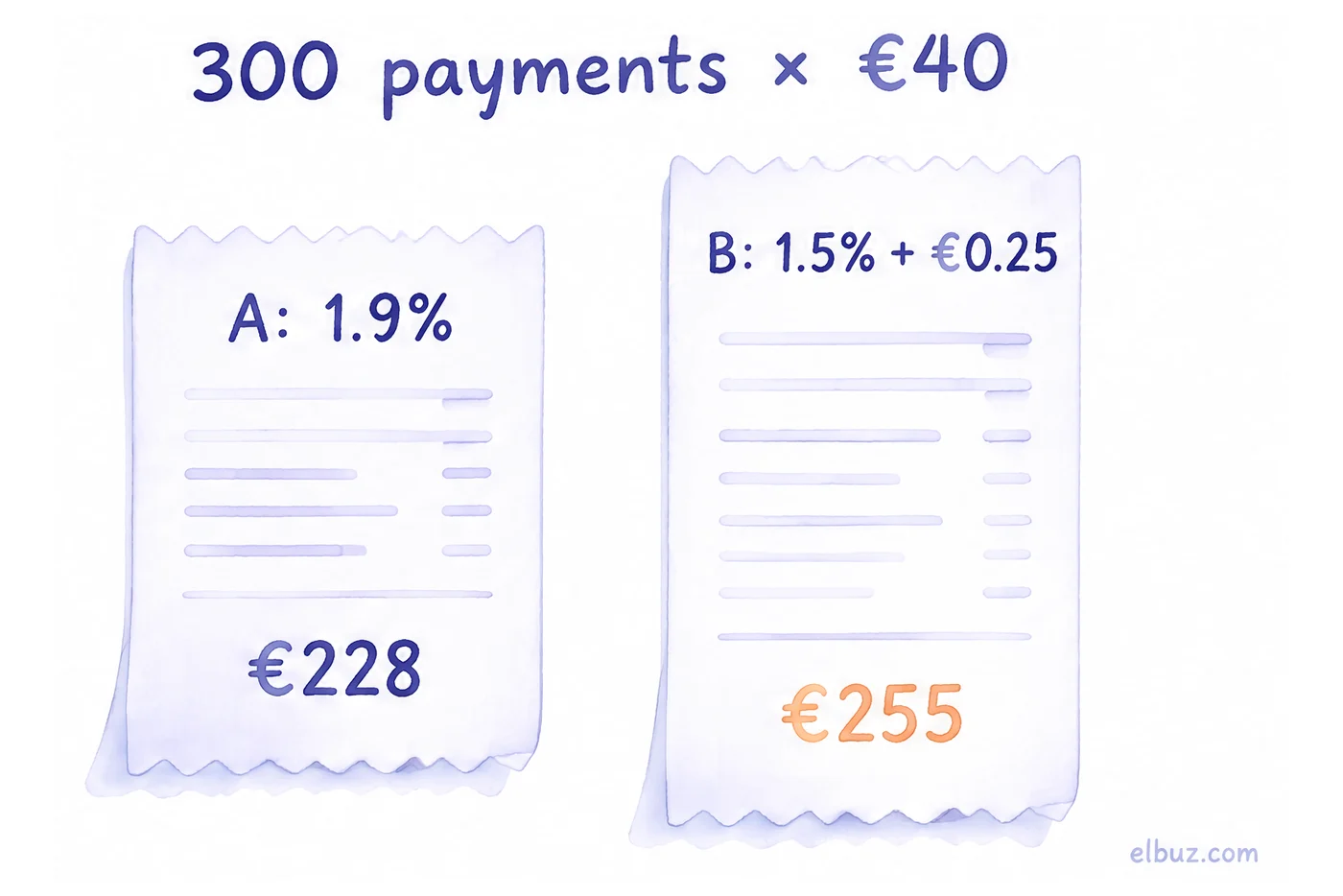
The plan with the lower percentage costs €27 a month more, because the orders are small and the fixed fee weighs more. With a €100 average order and the same 300 payments it flips: A costs €570, B costs €525. The break-even is the order value where 0.4% equals €0.25 — that is €62.50: above it plan B is cheaper, below it plan A.
Check separately what the headline rate does not show:
- Refunds and disputes — whether the fee comes back on a refund (on Stripe's page it does not) and what a dispute costs.
- Foreign cards and currency — UK and non-EEA cards and currency conversion cost more on most plans; look at your share of foreign orders.
- Payout schedule — how many days until the money arrives and whether new accounts get a rolling reserve.
How the fee eats into your margin is covered in what profit margin is and how to calculate it, and how to build it into the price — in the markup calculator with formulas.
Card or cash on delivery: which is cheaper
Card payment is cheaper when refused cash-on-delivery parcels cost you more than the card fees. If you sell in a market where buyers still expect to pay the courier, compare on one order:
Card wins if refusal rate × cost of shipping there and back > card fee per order.
Illustrative example. An order is €100, the card fee is 1.5% + €0.25 = €1.75. A refused parcel costs the store €14 of shipping there and back; the carrier's cash-handling fee is left out. Over 10 orders: by card — €17.50 of fees; cash on delivery with one refusal — €14, with two — €28.
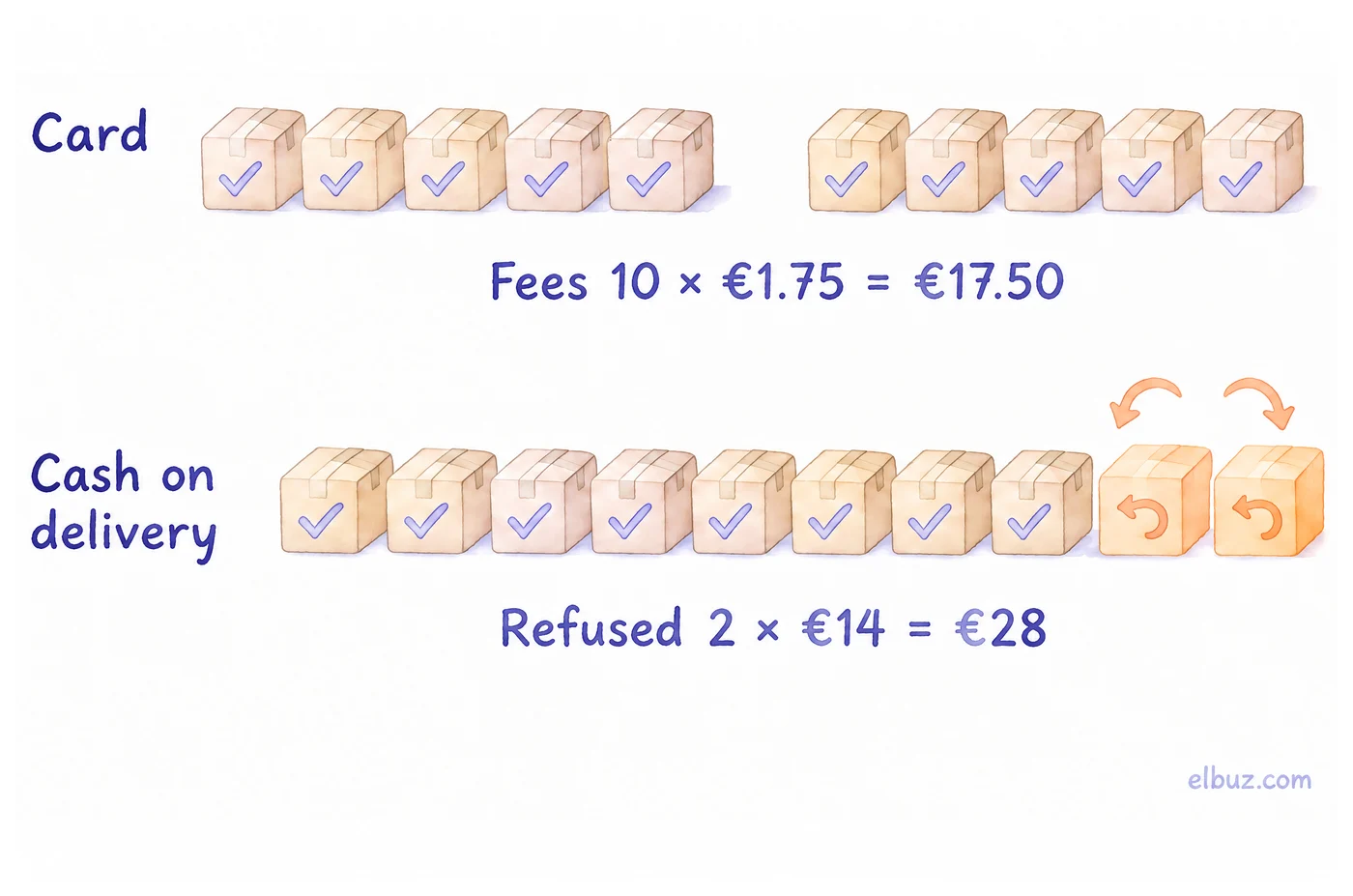
The break-even is 1.75 ÷ 14 = 12.5%, one refusal in eight orders. If every eighth parcel or more comes back, cards are cheaper even before counting the money the carrier holds for weeks. Prepayment still puts some buyers off, so where cash on delivery is common, stores usually keep it next to cards instead of dropping it.
Ways to accept payment in an online store
Most stores combine several methods because customers pay differently:
| Method | How it works | What to consider |
|---|---|---|
| Payment gateway (cards, Apple Pay, Google Pay) | One contract, a payment page or form, plugins for popular platforms | Fastest to connect; compare full cost and payout terms |
| Direct acquiring contract with a bank | The bank is your acquirer, often with its own gateway | Usually for larger volume; more checks and integration work |
| PayPal and other wallets | The customer pays from a wallet balance or a linked card | Higher rates than plain cards on many plans; some buyers prefer it |
| Buy now, pay later | A provider pays you and collects instalments from the customer | Fee is usually higher than for cards |
| Bank transfer / pay by bank | The customer pays to your IBAN or through an open-banking flow | Match payments with the statement; common for B2B orders |
| Cash on delivery | The customer pays the courier, the carrier transfers the money | Refusals, late payout, carrier fee |
How to set up card payments for an online store
To start accepting cards you need a registered business with a bank account and a website the provider can review. Providers usually check five things:
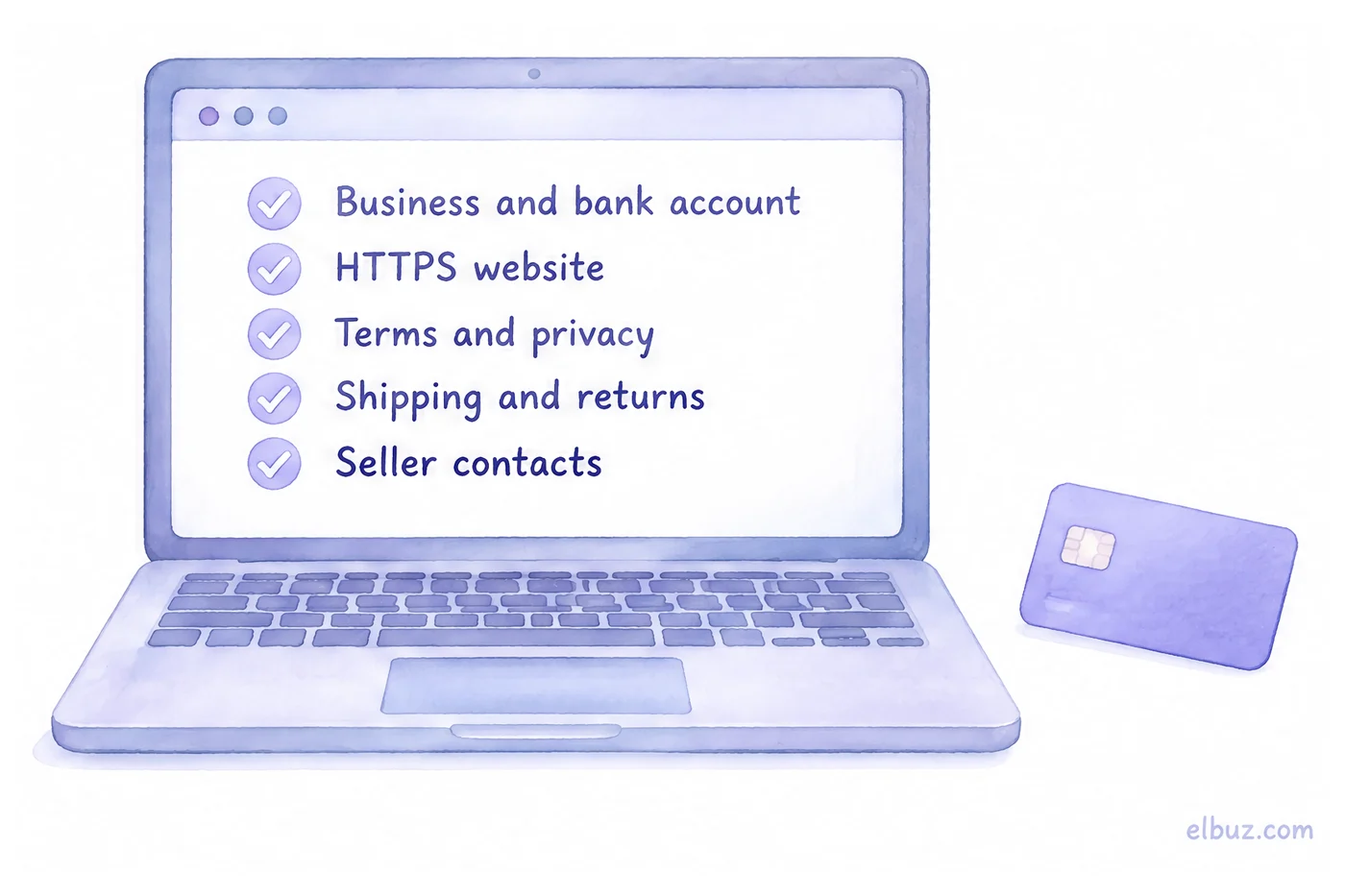
- Registered business and bank account — company or sole-trader details, the owner's ID, an account for payouts; what you sell must match the business.
- HTTPS website — with a catalog, prices including VAT where it applies, and a checkout.
- Terms and privacy policy — terms of sale the customer accepts when ordering, and how you handle personal data.
- Shipping and returns — on separate pages; EU consumers have a 14-day right of withdrawal for most distance purchases, and your returns page should say how it works.
- Seller contact details — legal name, address, email and phone.
The order is then: sign-up, business and website check, contract, API keys or a plugin on the site, test payments, live mode. Some product categories are restricted or not accepted at all — check the provider's list before spending time on integration.
Payment security: 3-D Secure, SCA and PCI DSS
3-D Secure is the protocol for extra confirmation of online card payments: the customer's bank asks for approval in the app or a code, or lets the payment through if the risk is low. The specifications are maintained by EMVCo. In the EEA, the revised Payment Services Directive (PSD2) requires strong customer authentication for most online card payments, and 3-D Secure is how it is done. For the store, it means fewer fraudulent payments, and under card scheme rules liability for fraud on an authenticated payment generally shifts to the issuer.
PCI DSS is the card data security standard from the PCI Security Standards Council; it applies to everyone who stores, processes or transmits card data. The simplest path for a store is not to touch card data at all: the customer enters the card on the provider's page or hosted form, and the site only receives the result. Never ask for a card number and CVC in chat, by phone or in an order comment.
How to choose a payment provider: what to check
- A plugin for your platform — WooCommerce, OpenCart, PrestaShop or your own — and who keeps it updated.
- Full cost — by the formula above, on your turnover and order value, including foreign cards.
- Payment methods — cards, Apple Pay, Google Pay, wallets and payment links for orders taken in chat.
- Capture and partial refunds — done in the dashboard, without a support ticket.
- Payment status — reaches your site by itself, with no statement matching.
- Payout schedule and support that answers on Friday evening when payments stop going through.
When there are many payments: payment status inside the order
When orders come from the website, chat and phone at once, matching payments with the bank statement by hand becomes a job of its own. In Elbuz the payment method and status live in the order: the amount due is shown on the order and on the customer record, bank payments can be imported from a statement, and for cash on delivery the system warns you if this customer has refused parcels before. How it works is on the order management software page.
Elbuz does not replace the contract with a payment provider: you sign up with Stripe, Adyen, PayPal or your bank, and Elbuz keeps the orders and their payments.
Orders and payments in ElbuzStatuses, payments and shipping in one list, 14 days free
Frequently asked questions
What is an acquiring bank?
It is the bank or licensed payment company that has the contract with the store: it accepts the card payment, sends it through Visa or Mastercard to the customer's bank and pays the store the money minus its fee.
How do merchant acquirers make money?
From the fee on each payment: the part above interchange and scheme fees, which go to the issuer and the card scheme. On top of that, some charge fixed per-transaction, monthly, dispute and currency conversion fees.
What is the difference between an acquirer and a payment processor?
The acquirer holds the merchant contract and is responsible for settling money to the store; the processor runs the technical side of passing the transaction. Many gateways, such as Stripe and Adyen, combine both for the store under one contract.
How much is a normal processing fee?
It depends on the provider, card type and country. Stripe's standard rate for EEA cards is 1.5% + €0.25 on its Ireland page; compare full monthly cost on your own numbers — formula and example above.
How can I avoid payment processing fees?
You cannot avoid them on card payments, but you can lower them: choose the plan that fits your average order, look at interchange++ when volume grows, and offer bank transfer for large B2B orders.
Can I accept card payments without a website?
Yes. Payment providers offer payment links: you send the link in chat or by email, and the customer pays on the provider's page. The business checks and the contract still apply.
Sources
- Stripe pricing, Ireland — stripe.com/ie/pricing.
- PayPal business fees, Ireland — paypal.com/ie/business/paypal-business-fees.
- Adyen pricing — adyen.com/pricing and adyen.com/en_GB/pricing.
- Directive (EU) 2015/2366 on payment services (PSD2) — eur-lex.europa.eu.
- Directive 2011/83/EU on consumer rights (14-day right of withdrawal) — eur-lex.europa.eu.
- EMV 3-D Secure — emvco.com.
- PCI Data Security Standard — pcisecuritystandards.org.
Checked on October 31, 2026.


