

Banner blindness is the habit of website visitors to ignore anything that looks like an ad: banners, bright boxes, strips at the top of the page and the right-hand column. A person looking for something specific reads the text and links and skips the "advertising", even when it holds exactly what they are looking for. The term was introduced by Jan Panero Benway and David Lane in 1998.
For an online store this is not about ad networks but about your own pages: a promotion in the homepage slider, delivery terms in a coloured box, a button in a bright frame can simply go unseen. Below: what the research showed, the three signals that make something "look like an ad", where banner blindness hits the homepage, category and product page, what it costs on illustrative numbers, and how to test your own site.
When people ask what banner blindness is
Usually after the store made a beautiful promo banner and sales of the promoted product did not move. Or analytics shows that almost nobody clicks the homepage banner, although it fills the whole first screen. The owner or marketer searches for "banner blindness", "banner blindness UX", and then asks: "how to avoid banner blindness", "do homepage carousels work", "which banner will people notice".
The usual answer is to make the banner even brighter. Research points the other way: the more a block looks like an ad, the more reliably people skip it.
Where the term came from and what the research showed
The term came from usability tests: people missed large, bright links that were designed precisely to be noticed. Benway and Lane of Rice University described this in the paper "Banner Blindness: Web Searchers Often Miss 'Obvious' Links" (1998).
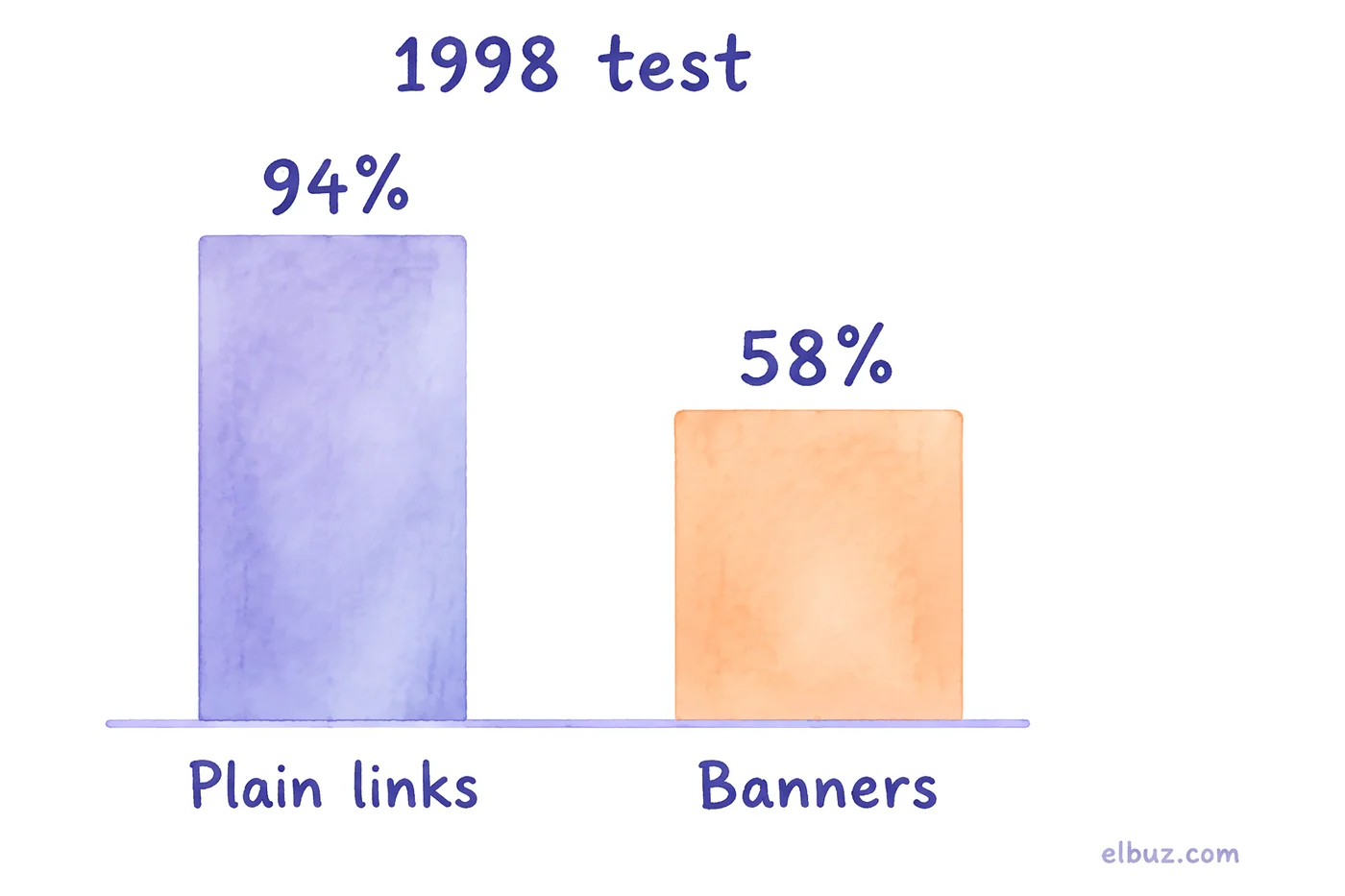
In the pilot study, six experienced users completed 24 search tasks on a test website. For four of the tasks the information was available only through a red banner link. Banners were found in about 58% of cases, plain text links in 94%. Even when people found the banner, they rated the task as harder and spent more time on it.
Twenty years later Nielsen Norman Group re-tested the effect with eye tracking (recording where people look) on desktop and mobile and concluded that banner blindness is still there. In one example, out of 132 fixations in the content area, one landed in the right-hand column, about 0.8%. On mobile a large ad block is harder to avoid, but people scroll past big ad-like images without looking at them.
What visitors take for an ad
Not only real ads but anything that resembles one. NN/g names three signals that make people classify a block as advertising, and each one works on its own.
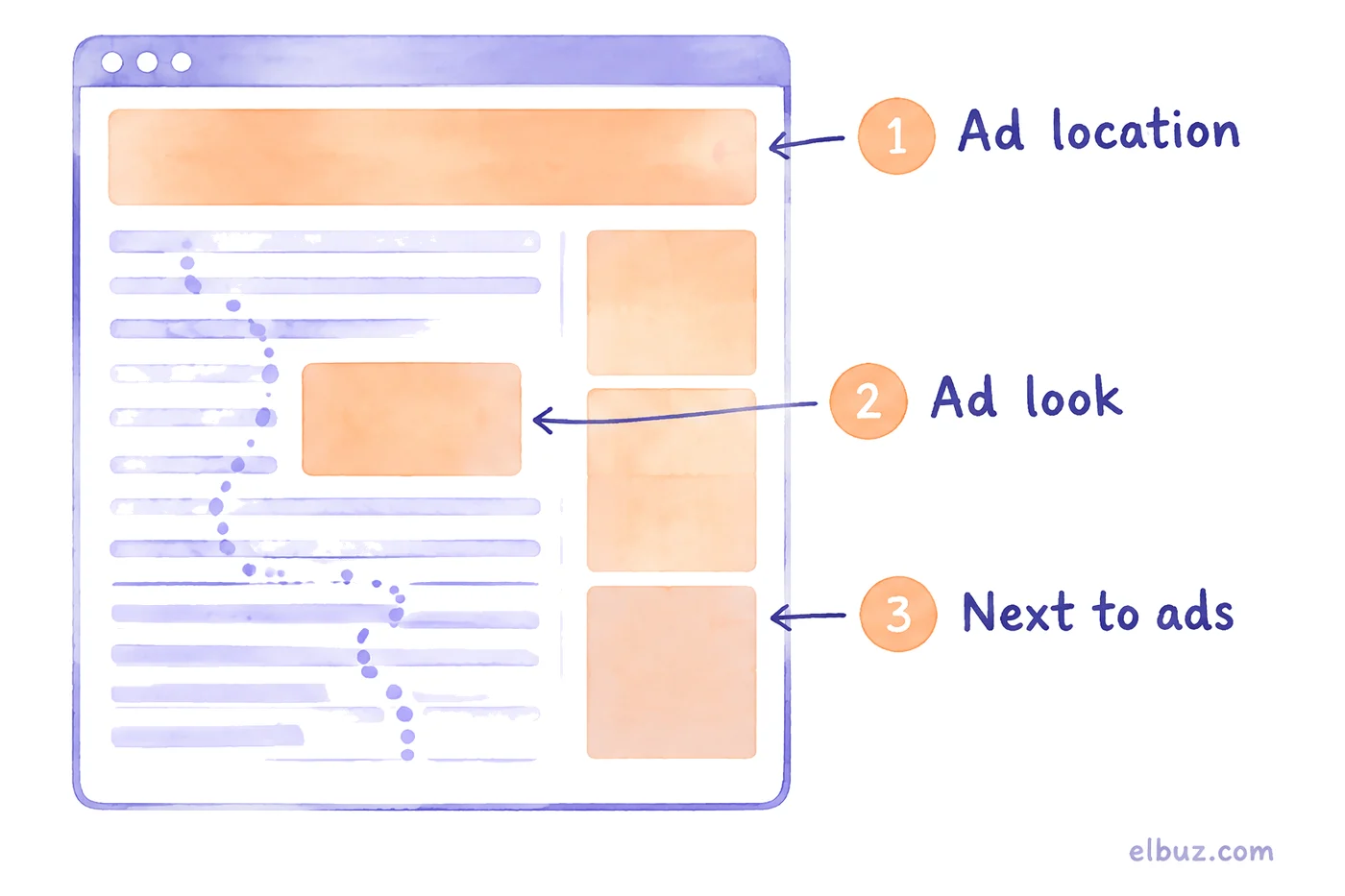
| Signal | What it looks like | Example in a store |
|---|---|---|
| Ad location | a wide strip at the top of the page, the right-hand column | a full-screen slider at the top, a "Deals" block beside the catalog |
| Ad look | a coloured box, animation, a decorative font, text set inside an image | a "Free shipping over €50" box with a bright background in the middle of the description |
| Next to ads | a useful block placed in the same section as ads | return terms in a column next to partner banners |
The third signal is the most treacherous: once a person has seen an ad in a section, they stop looking at the whole section, useful content included.
Where banner blindness hurts an online store
Wherever information that matters for the purchase has been designed as a banner. Walk through four page types.
| Page | What gets skipped | What to do |
|---|---|---|
| Homepage | the promo carousel, especially the 2nd slide onwards | repeat the promotion as a menu item or a catalog section; put a product and price on the slide, not only a slogan |
| Category | a banner above the product list, promo cards between products | make the promotion a filter or a badge on the product card visible in the list |
| Product page | coloured boxes about shipping, payment, warranty; "You may also like" blocks | terms as plain text next to the price and the "Add to cart" button |
| Cart | a banner "Add €N more for free shipping" | show the missing amount as text in the order summary |
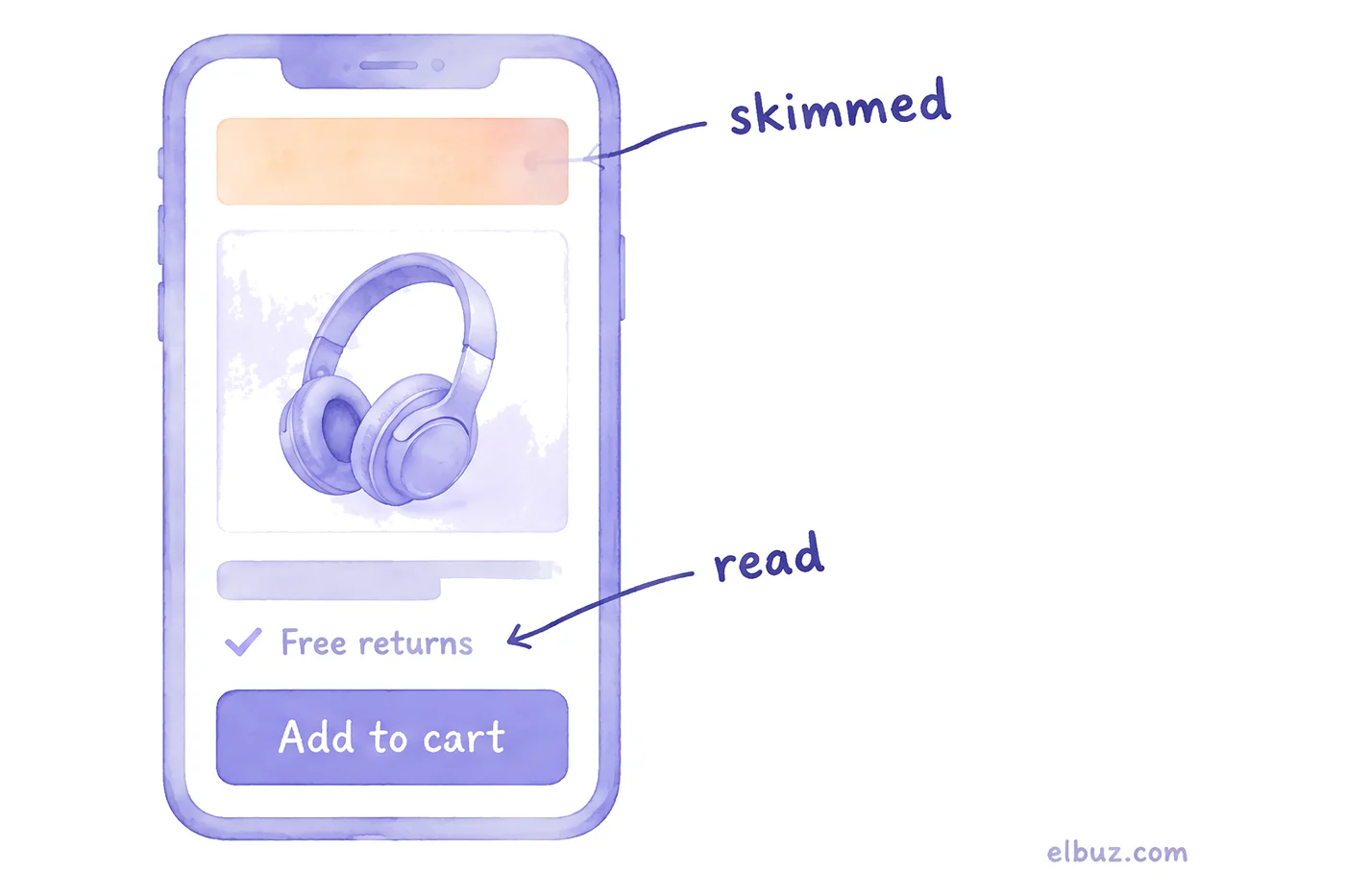
The general rule: whatever helps someone buy should be where they look while buying, next to the product name, price and button, in the menu and filters. Anything that looks like a shop window is read less than it seems on the mock-up.
What an unseen banner costs
As much as the sales that did not happen among people who looked for the promotion and did not find it. Calculate it with this formula:
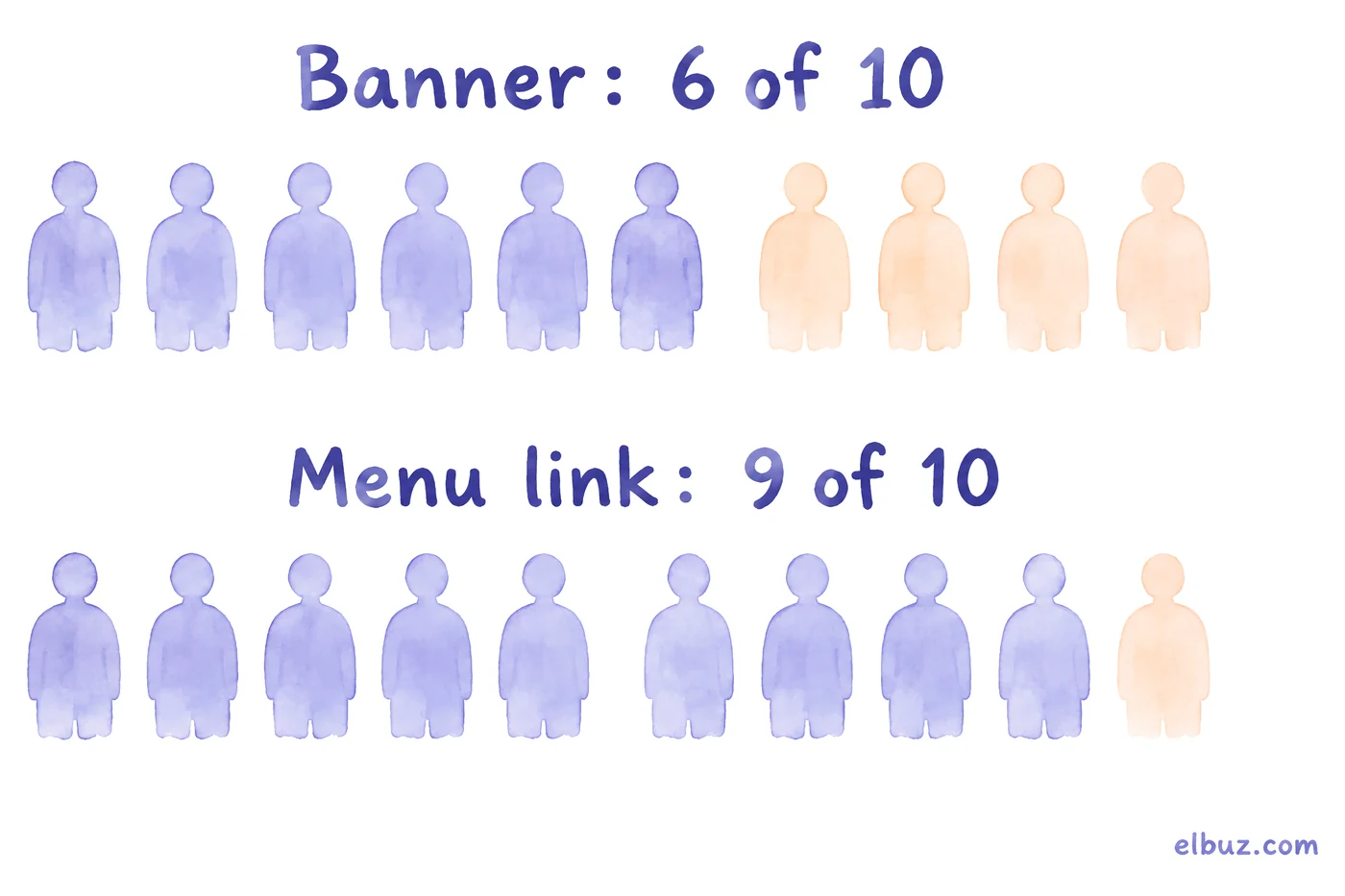
Illustrative example for the arithmetic, not market averages. In a month, 1,000 people come to the homepage specifically for the promoted product. The shares are rounded from the 1998 test: 6 in 10 find the banner, 9 in 10 find a text link. Of those who reach the product, 5% buy, and the average order is €60.
| Option | Found the promotion | Orders | Revenue, € |
|---|---|---|---|
| Banner only | 600 | 30 | 1,800 |
| Banner + menu item | 900 | 45 | 2,700 |
The difference is 15 orders and €900 of revenue a month from one line in the menu. Your own shares instead of the illustrative ones come from analytics: how many people saw the page, how many clicked the banner, how many reached the product another way.
How to make sure the important things get seen
Stop designing important information as advertising and put it where people already look. Five rules:
- Text, not a picture with text. Shipping terms, the discounted price, the end date of a promotion: plain page text.
- Next to the action. Whatever affects the decision goes beside the price and the "Add to cart" button, not above the photo or in a side column.
- A copy in the navigation. Every promotion from a banner gets a menu item, a catalog section or a filter.
- Keep it apart from ads. Useful blocks sit separately from partner banners and recommendations.
- Moderate emphasis. Bold text or an icon works better than a coloured, animated box.
There are three ways to check whether a block gets seen. Look in analytics at banner clicks as a share of page views. Turn on a click and scroll heatmap; there are free tools for this. And give five people the task "find the product on sale" on your site and watch silently: if three of them miss the banner, it does not work.
Banner blindness in advertising: what to take for your creatives
The same rule applies: less "ad look", more answer to what the person is looking for. That is why ads that resemble the platform's normal content tend to work better: a text search ad, a post in the feed, a product review. They can be skipped too (NN/g saw participants avoid even text ads in search results), but less often than a classic banner.
What works in the creative itself is a specific product, a price and a benefit for the person searching, not a slogan. How to write the ad headline is in the guide to ad headlines with formulas and character limits; the principles of an ad creative are in the article on ad creatives; how search and Shopping ads work and how to set the budget is in Google Ads for ecommerce.
Frequently asked questions
What is banner blindness in simple terms?
It is when people on a website do not notice banners or anything that looks like an ad, because they look only for what they came for. They miss even useful information if it is designed as a banner.
Who coined the term "banner blindness"?
Jan Panero Benway and David Lane of Rice University, in a 1998 paper. In their test, banner links were found in about 58% of cases and plain links in 94%.
What is ad blindness?
Another name for the same effect, often used for ads in feeds and search results rather than only for banners. The cause is the same: people skip what they recognise as advertising.
Does banner blindness happen on mobile?
Yes. According to Nielsen Norman Group, a large block is harder to avoid on mobile, but people often scroll past ad-like images without looking.
Do homepage carousels work?
It depends on the site; check the click share of each slide in analytics. Do not keep a promotion that drives sales only in the carousel: repeat it as a menu item or a catalog section.
How do I check whether people see my banner?
Compare banner clicks with page views, turn on a click heatmap and ask a few people to find the promotion on your site. If most of them do not find it, move the information into text and the menu.
How do I avoid banner blindness in ads?
Make the ad look like the platform's normal content and make it specific: product, price, benefit. Brightness and animation without substance only strengthen the "this is an ad" feeling.
Sources
- Benway J. P., Lane D. M. Banner Blindness: Web Searchers Often Miss "Obvious" Links. Internetworking, 1998 — pilot study: 6 participants, 24 tasks, banners found in about 58% of cases vs 94% — ruf.rice.edu.
- Pernice K. Banner Blindness Revisited: Users Dodge Ads on Mobile and Desktop. Nielsen Norman Group, April 22, 2018 — three ad signals, 1 of 132 fixations in the right-hand column, behaviour on mobile — nngroup.com.
Checked on October 31, 2026. The lost sales calculation is an illustrative example for the arithmetic.


