

To sell on Amazon, you open a seller account in Seller Central and pass identity verification, choose a plan — Individual at $0.99 / €0.99 per item or Professional at $39.99 / €39 a month — and decide who ships: you (FBM) or Amazon's warehouse (FBA). On every sale Amazon takes a referral fee, in most categories 8–15%, and in Europe you also owe VAT in the country where the goods are stored.
Sellers rarely fail at registration. They fail at the math: price minus purchase cost, with VAT, the referral fee, FBA and advertising forgotten. Below: what Amazon asks for at sign-up, the US or Europe choice, what the plans cost and when Professional pays off, one €30 sale on amazon.de worked through to what is left, the route of a shipment to Amazon's warehouse, and the tax side. Amazon's terms were checked on its official pages on October 31, 2026.
When people ask how to sell on Amazon
Usually it is a small business that already sells on its own website or on a local marketplace and wants a bigger audience, or a maker with a product and no store at all. The first searches are "how to sell on Amazon" and "is it free to sell on Amazon". Then come "how much does Amazon take from a sale", "FBA or FBM", "do I need an LLC" and "what should I sell".
"How much does it cost to sell on Amazon" is the smallest of these questions: the plan is a fixed €39 or $39.99 a month. VAT, the referral fee and fulfillment take far more, so work out one sale in full before you register.
What you need to register as an Amazon seller
Five things plus an email address and a phone number. According to Amazon's official seller registration guide, have ready:
- a government-issued ID — you pass identity verification with it;
- an internationally chargeable credit card — Amazon charges the plan and other costs to it;
- a bank account for payouts — it does not have to be in the US: Amazon Currency Converter pays proceeds to a bank account in another supported country;
- proof of address dated within the last 180 days, such as a bank or credit card statement;
- tax information and, if you register a business, its registration documents.
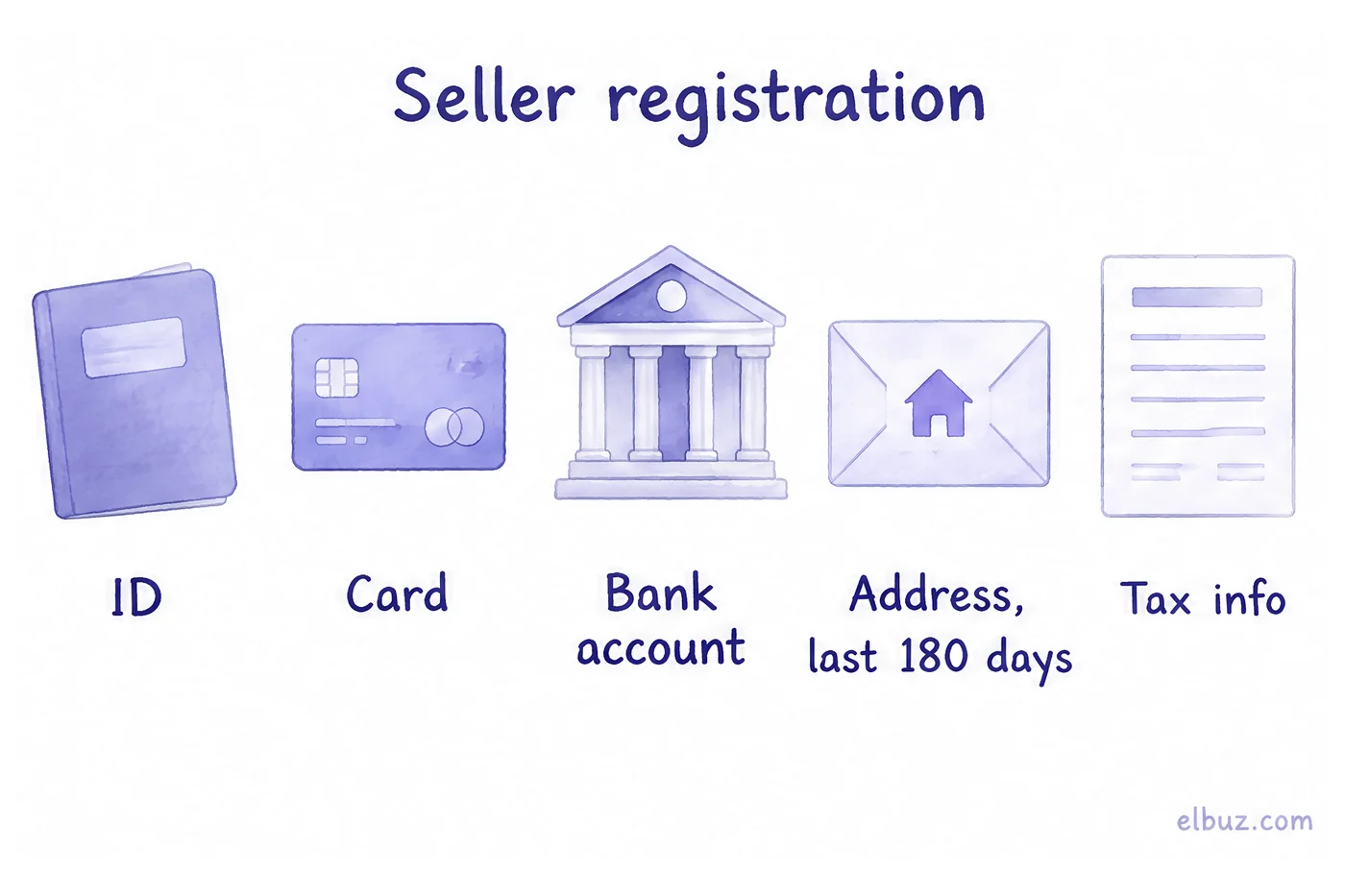
Amazon says the application itself often takes a few hours. Then comes identity verification: a photo of your face with your ID, or a video call with an Amazon associate. It usually takes three business days or less. Enter your details exactly as they appear in your documents: a different spelling of a name or address is the most common reason for extra requests. Creating the account is free; you pay for the plan.
US or Europe: which Amazon store to start with
Start where your goods already are. An account created on sell.amazon.com sells in the US, Canada, Mexico and Brazil; Europe needs a separate seller account, set up to sell across the European stores (amazon.de, .fr, .it, .es, .nl, .se, .pl and others).
| Europe (amazon.de, .fr, .pl and others) | US (amazon.com) | |
|---|---|---|
| Account | European seller account | sell.amazon.com account, also covers Canada, Mexico and Brazil |
| Tax on sales | VAT of the country where the goods are stored; you will likely need a VAT registration in each country you sell in | State sales tax; in states with marketplace facilitator laws Amazon collects and remits it |
| Professional plan | €39 a month excl. VAT | $39.99 a month |
| Listing language | The language of each country | English |
If you already sell in Poland, compare amazon.pl with Allegro and other local platforms — see Polish marketplaces.
How much it costs to sell on Amazon
You pay a selling plan and a referral fee on every sale: a percentage of the total price the buyer pays, including shipping, or a minimum amount, whichever is greater. The plans work the same way in every store; only the currency differs:
| Store | Individual | Professional | Referral fee |
|---|---|---|---|
| amazon.com | $0.99 per item sold | $39.99 a month | by category, 15% in most, $0.30 minimum |
| amazon.de | €0.99 per item sold | €39 a month excl. VAT | by category, mostly 8–15%, €0.30 minimum |
| amazon.pl | 4 zł per item sold | 165.91 zł a month excl. VAT | by category |
The number of sales decides the plan. On amazon.de Professional is cheaper from 40 sales a month: €39 ÷ €0.99 ≈ 39.4. On amazon.com it pays off from 41 sales ($39.99 ÷ $0.99 ≈ 40.4), on amazon.pl from 42. Professional also gives you Amazon Ads and bulk tools for listing and pricing.
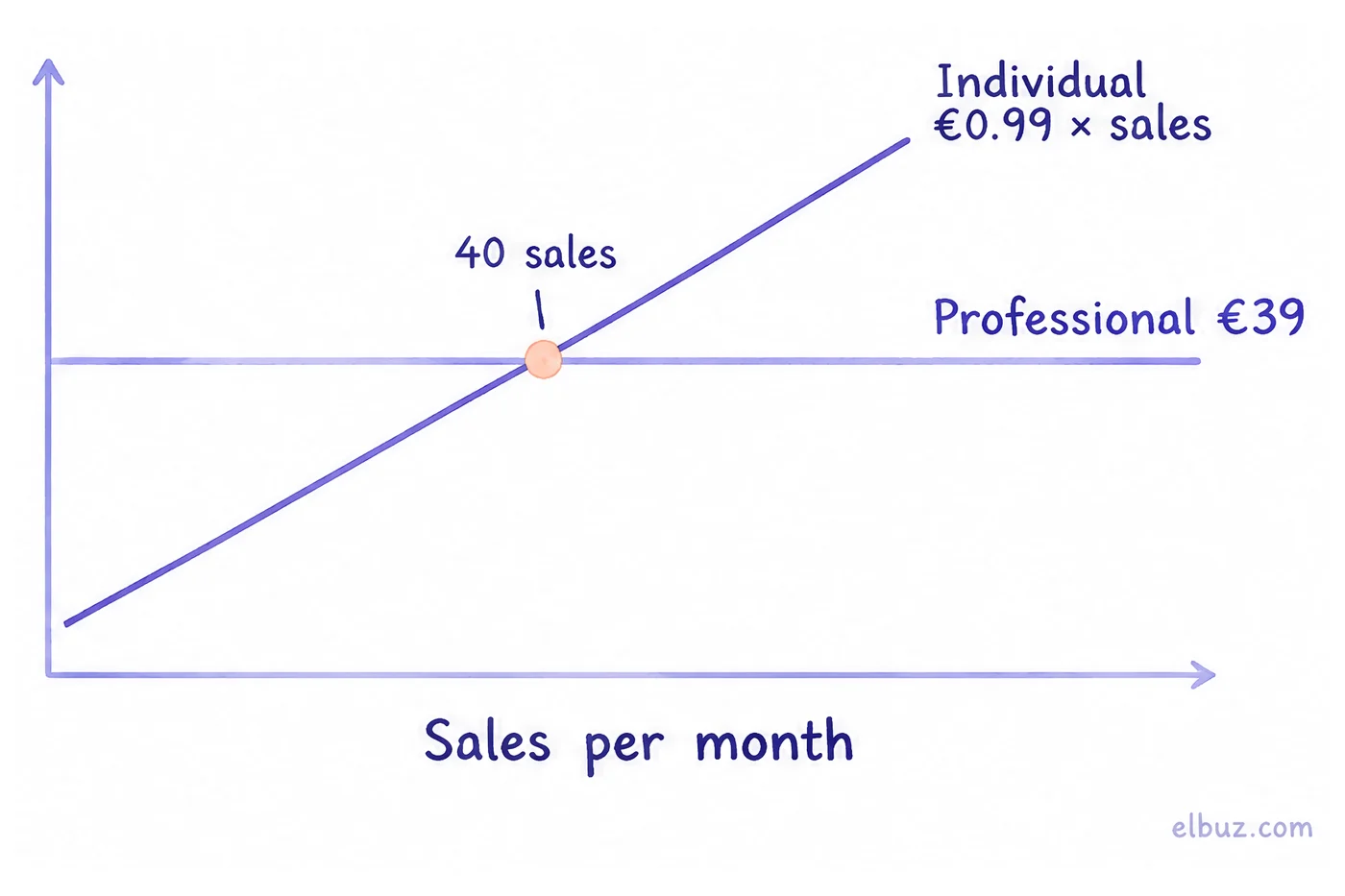
FBA (storage and shipping), advertising and, if you need one, a prep center are paid separately. Work out the exact FBA fees for your product in the Revenue Calculator in Seller Central: they depend on size and weight.
How much you keep from one sale
From an Amazon price in Europe, VAT comes off first, then the referral fee, FBA, the plan, the product and advertising — and what is left is often less than expected. Calculate your product with this formula:
You keep = price − VAT − referral fee − FBA − share of the plan − product cost delivered to the warehouse − advertising.
Illustrative example for the arithmetic: FBA, product cost and advertising are not Amazon rates — use your own. A kitchen product sells on amazon.de for €30 including VAT. The German VAT rate is 19%, the referral fee in Kitchen is 15% (both from Amazon's official pages). FBA is €4.50, the product delivered to the warehouse costs €9, advertising is €3 per sale, and the Professional plan is spread over 200 sales a month.
| Item | Calculation | Amount, € |
|---|---|---|
| Price paid by the buyer | 30.00 | |
| VAT 19% | 30 − 30 ÷ 1.19 | −4.79 |
| Amazon referral fee | 30 × 15% | −4.50 |
| FBA | illustrative | −4.50 |
| Professional plan | 39 ÷ 200 | −0.20 |
| Product delivered to the warehouse | illustrative | −9.00 |
| Advertising | illustrative | −3.00 |
| You keep, before income tax | 4.01 |
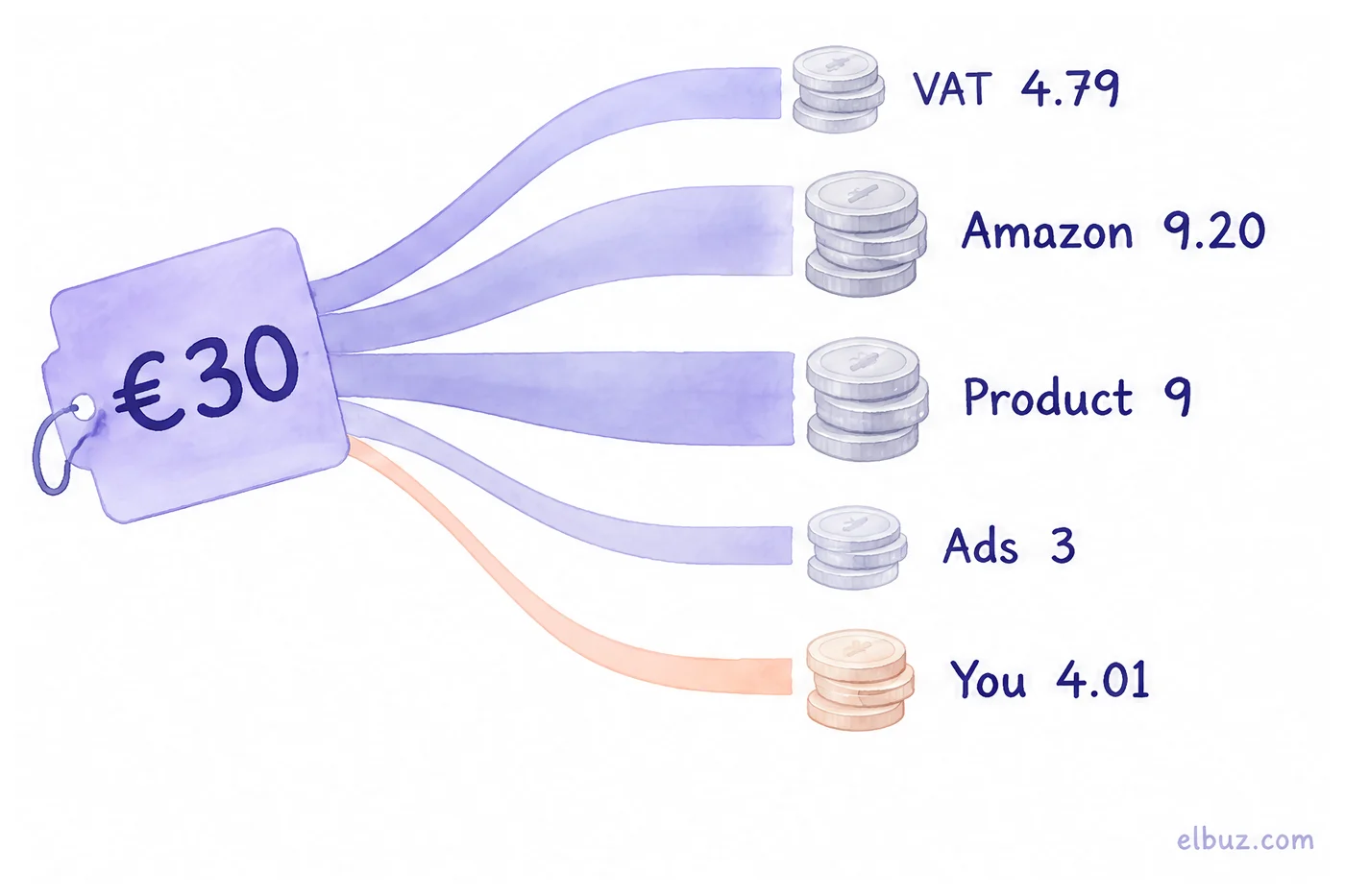
About €4 of €30 is left — 13% of the price. The referral fee, FBA and the plan together take €9.20, about as much as the product itself. Two conclusions follow: a cheap product rarely pays off on Amazon, and the price has to be built up from costs, not copied from your own website. How to build the fee into the price — how to calculate markup; VAT for your country — VAT calculator.
FBA or shipping orders yourself
It depends on where your stock is. FBA (Fulfillment by Amazon): you send stock to Amazon's warehouse, and Amazon handles packing, delivery to the buyer, returns and customer service. Your offer gets the fast delivery shoppers expect. FBM (Fulfilled by Merchant): you store and ship orders yourself. FBM works when you already have a warehouse and fast shipping in the same market; for a new seller without logistics, FBA is the usual start.
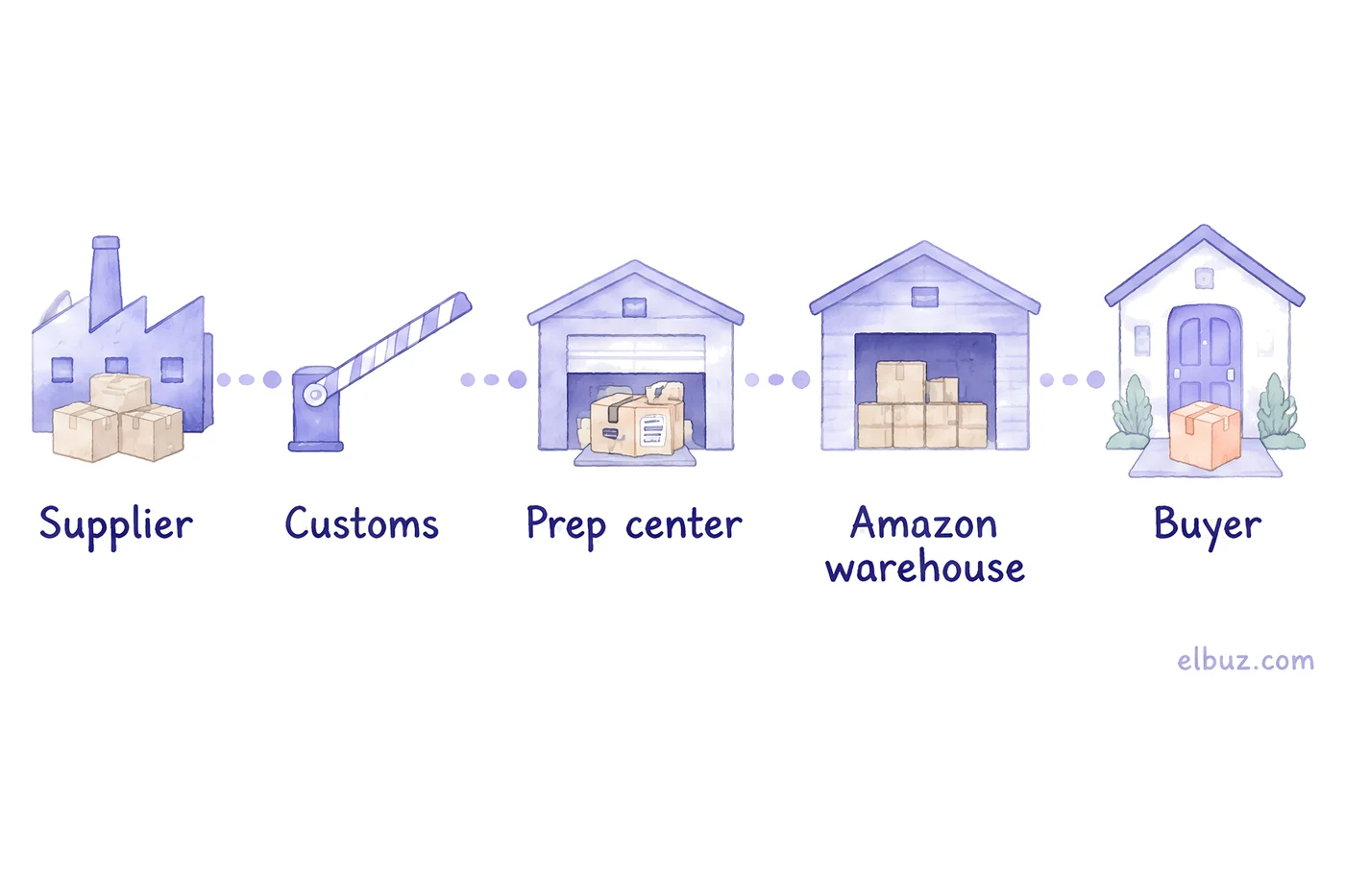
A shipment from an overseas factory to FBA passes five points:
- Supplier. The goods are packed and documented for export.
- Customs. Import duty and import VAT or taxes of the destination country are paid by you or your forwarder, as agreed.
- Prep center. A third-party warehouse receives the freight, labels and packs it to Amazon's requirements.
- Amazon warehouse. Stock is stored; you pay for space and for each order shipped.
- Buyer. Amazon handles delivery, returns and support.
If your goods are already in the same country, skip customs, and a prep center is only needed when you do not label and pack to Amazon's requirements yourself. Choose the carrier and customs broker before the first shipment, not after.
Taxes and paperwork: business, VAT, sales tax
Amazon does not require a company: you can register as an individual. Taxes are a separate matter and depend on where you sell.
- Business form. Amazon's registration guide says you do not need to be an LLC, a registered business or incorporated to sell; for an individual you choose "None, I am an individual". Whether to set up a company for liability or tax reasons is a question for your accountant, not for Amazon.
- Income tax. Amazon payouts are your business income in your country of residence.
- VAT in Europe. Amazon warns directly: selling in a European country, you will likely have to register for VAT in each country you sell in, and in some EU countries a seller from outside the EU needs a tax representative.
- Sales tax in the US. In states with marketplace facilitator laws Amazon calculates, collects and remits sales tax on your orders. Check with your accountant which obligations remain yours in your state.
What to sell and why a brand helps
Pick a product for Amazon by three checks: demand in the category, how many competitors with reviews there are, and what is left after VAT, the referral fee and FBA (the formula above). For a first shipment, a light, unbreakable product that needs no certification is the safest choice. Demand and competitors are checked in Amazon analytics tools such as Helium 10 or Jungle Scout.
Many new sellers sell under their own brand (private label). To protect the listing from other sellers and unlock brand tools, the brand is enrolled in Amazon Brand Registry, which is free. It needs a pending or registered trademark from the trademark office of a country with an Amazon store, and a logo with the brand name permanently affixed to the product or packaging (sell.amazon.com).
How to start selling on Amazon: step by step
- Calculate one sale with the formula above. Check: a meaningful amount is left with honest advertising and FBA fees from Amazon's calculator.
- Choose the store: Europe or the US. Check: you know how stock will reach the warehouse and who clears customs.
- Decide on the business form and a bank account for payouts. Check: your accountant has confirmed how the income will be taxed.
- Register in Seller Central and pass identity verification. Check: the account is active, the plan matches your sales volume.
- In Europe, register for VAT in the country where the stock will be. Check: the VAT number is entered in Seller Central.
- Create listings in the store's language: title, bullet points, photos on a white background, a GTIN barcode or an exemption for your own brand.
- Send a test shipment and launch Sponsored Products ads. Check: actual FBA and advertising costs match your calculation.
When Amazon is one of several sales channels
If you also sell on your website or on other marketplaces, the main work is keeping stock and prices right everywhere: a sale in one place has to reduce stock in the others. In Elbuz, Amazon connects through the official Selling Partner API, each Amazon marketplace as its own template, and all of them work from one catalog: Amazon orders arrive in the same list as your website orders, and price and quantity go back to Amazon by seller SKU. A product with an EAN or UPC becomes an offer on the existing Amazon product page; a product without a barcode is created as a new listing, in the language set in the export template's Description language field and with the required attributes of its product type, which you match once in the category mapping window. The template calculates the Amazon price separately, for example with a markup that covers the referral fee, without changing the price on your website. How it works — on the Amazon integration page.
Who it is not for: if Amazon is your only channel and all your stock is on FBA, Seller Central is enough. FBA stock is counted by Amazon in its warehouses; Elbuz updates quantity only for offers you ship yourself.
Amazon and your store from one catalogOrders, prices and stock in Elbuz, 14 days free
Frequently asked questions
Is it free to sell on Amazon?
Creating a seller account is free, but selling is not. On the Individual plan you pay $0.99 or €0.99 per item sold, on Professional $39.99 or €39 a month, plus a referral fee on every sale on both plans.
How much does Amazon take from a $100 sale?
It depends on the category: in most categories on amazon.com the referral fee is 15%, so $15 from a $100 sale. FBA fees, the plan and advertising come on top if you use them.
Do you need an LLC to sell on Amazon?
No. Amazon's registration guide says you do not need an LLC or a registered business; you can register as an individual. Whether a company makes sense for taxes is a question for your accountant.
How much do beginners make selling on Amazon?
It depends on the product: in the illustrative example, about €4 is left from a €30 sale after VAT, the referral fee, FBA, product cost and advertising. Run the formula with your own numbers before buying stock.
Individual or Professional: which plan to choose?
By the number of sales: Professional is cheaper from about 40 sales a month in Europe and 41 on amazon.com. It also gives you Amazon Ads and bulk listing tools.
What is Amazon FBA?
Fulfillment by Amazon: your stock sits in Amazon's warehouse, and Amazon handles packing, delivery, returns and customer service. You pay for storage and for every order shipped.
Do I pay taxes if I sell on Amazon?
Yes. Payouts are business income in your country; in Europe you will likely need VAT registration in each country you sell in, and in US states with marketplace facilitator laws Amazon collects sales tax on your orders.
Sources
- Amazon, seller registration guide — sell.amazon.com.
- Amazon, plans and referral fees in the US — sell.amazon.com/pricing.
- Amazon, plans, referral fees and FBA in Europe — sell.amazon.de; plans in Poland — sell.amazon.pl.
- Amazon, VAT for sellers in Europe (rates, registration, tax representative) — sell.amazon.de.
- Amazon, Marketplace Tax Collection in the US — sellercentral.amazon.com.
- Amazon Brand Registry, requirements — sell.amazon.com.
Checked on October 31, 2026.


