

To sell on Allegro, register a business account, verify a bank account for payouts, set your returns and delivery terms, list your first offer in Polish and pass the identity and company check. Listing is free; Allegro charges a commission on each sale — 1% to 17% net depending on the category. Companies from the EU and the UK register like Polish sellers; sellers from outside the EEA, such as the US, get one account with up to 500 offers.
Most mistakes at the start are in the math: sellers calculate the commission from the item price, while Allegro takes it from the price including delivery, and they count on the Smart! badge, which offers shipped from outside Poland and six other EU countries do not get. Below: who can register and how, the calculation of one sale down to what you keep, where to ship from, and what to prepare for your first offer.
When sellers ask how to sell on Allegro
Usually the seller already sells on Amazon, eBay or their own website and looks at Poland as the next market, or they have moved to Poland and want to sell there. The first searches are "how to sell on Allegro" and "Allegro seller registration". Right after them come "can I sell on Allegro from abroad", "Allegro fees", "what is Allegro Smart" and "what sells best on Allegro".
Put the last question aside: first decide which company the account belongs to and where the parcels will ship from. That decides the documents, the account limits, the cost of delivery and whether your offers get the Smart! badge — and with it a large share of buyers.
Who can sell on Allegro
To sell goods as a business, you need a business account (konto firmowe). Allegro points entrepreneurs who want to sell to the business account; the ordinary account is for buying. What registration requires depends on where your company is registered:
| Where the company is registered | What Allegro requires |
|---|---|
| Poland | Registration as a Polish seller, documents from Polish registers |
| Another EEA country, the UK | Registration for sellers from the EEA: bank account, identity and company documents; a UK company registers the same way |
| Outside the EEA (for example, the US) | Only one account on the same company details and no more than 500 offers on it; Switzerland and Ukraine are not covered by this rule |
If the person who confirms their identity lives outside the EEA, they send a video of their face instead of a photo. Company documents must be issued within the last 4 months and be available in English and your native language, or come with a professional English translation. Sellers from outside the EEA receive payouts to an account that accepts transfers in PLN: Allegro lists Payoneer, WorldFirst, LianLian Global, PingPong or a bank account. Get a fresh register extract before you start, not after your first sale.
Registering a business account: five steps
Registration takes five steps, and you can start selling after the third. Allegro shows at the top of the seller account which steps are still open.
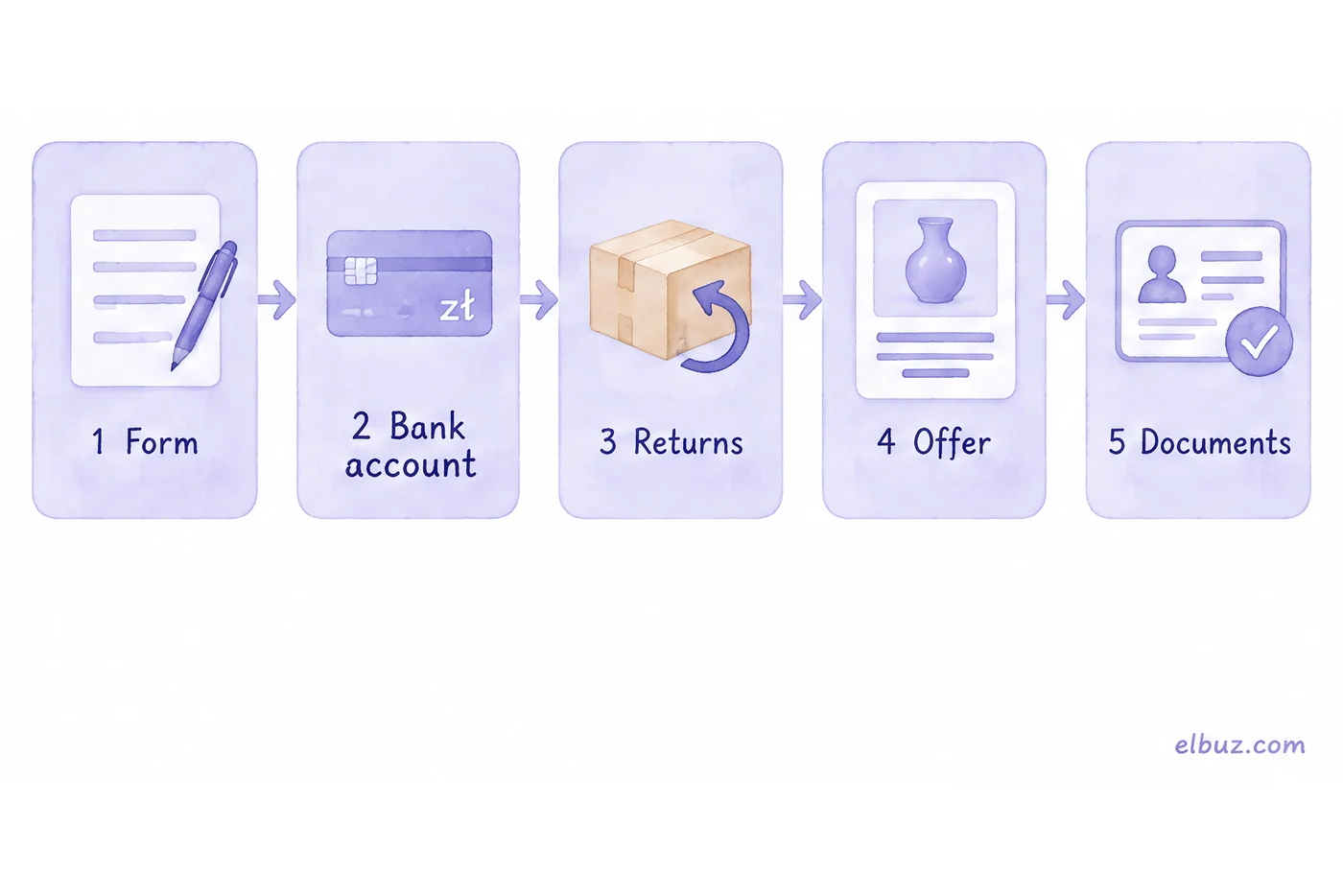
- Registration form. Fill in the business account form and confirm it with the link in the email. The link is valid for 24 hours; after that you fill in the form again.
- Bank account. Choose the business type (sole trader or another type) and verify the payout account. A bank outside Poland, Czechia and Slovakia is verified with a standard transfer of the equivalent of 1 PLN, 10 CZK or 1 EUR to the account Allegro gives you, or with a bank statement issued no earlier than 4 months before you submit it.
- Sales policy. Add returns terms (address, who pays for return shipping), complaint terms and delivery settings.
- First offer. List a product — through the form, a file or the API.
- Identity and company check. Confirm the identity of the owner or representatives and upload the company documents. Without this step you cannot withdraw money from sales.
How much Allegro charges
There is one mandatory fee: the commission on a sale. Listing an offer is free, and everything else — promotion and subscriptions — is optional. Allegro states commissions net and calculates them on the price including the delivery cost the buyer pays.
| Category | Rate |
|---|---|
| Electronics | 2.5–8% |
| Home and garden | 4.5–11% |
| Kids | 5–11.5% |
| Fashion | 11.5% up to 110 zł, 7.5% on the part of the price above 110 zł |
| Beauty | 8–10% |
| Sports and outdoors | 8–11.5% |
| Automotive | 4.5–16% |
| Health | 1–13% |
| Other and accessories | 13–17% |
Check the exact rate for your subcategory in Allegro's fee calculator: it calculates the commission for one unit sold, delivery included. Optional fees: a featured offer ("Wyróżnienie") costs 19.90 zł gross for 10 days plus an extra commission on sales of the featured offer; a subscription costs 49, 199 or 3,000 zł gross for 30 days; Allegro Ads are paid per click. How Allegro's fees compare with Amazon.pl, Empik and Kaufland is in the overview of marketplaces in Poland.
The math of one sale on Allegro
What you keep = price + delivery paid by the buyer − cost of goods − commission on the price with delivery − your real shipping cost − ads. Do this calculation before your first offer, not after the first month.
Illustrative example for the arithmetic, not market prices. A home product is listed at 150 zł, delivery for the buyer is 15 zł. Allegro prices are in złoty, so the example is too. The product costs you 80 zł, the category commission is 10% (within the 4.5–11% range for home and garden), real shipping costs 15 zł and ads take 10 zł per order.
| Item | Calculation | Amount, zł |
|---|---|---|
| Paid by the buyer | 150 + 15 | 165.00 |
| Cost of goods | −80.00 | |
| Allegro commission | 165 × 10% | −16.50 |
| Shipping | −15.00 | |
| Ads | −10.00 | |
| You keep before taxes | 43.50 |
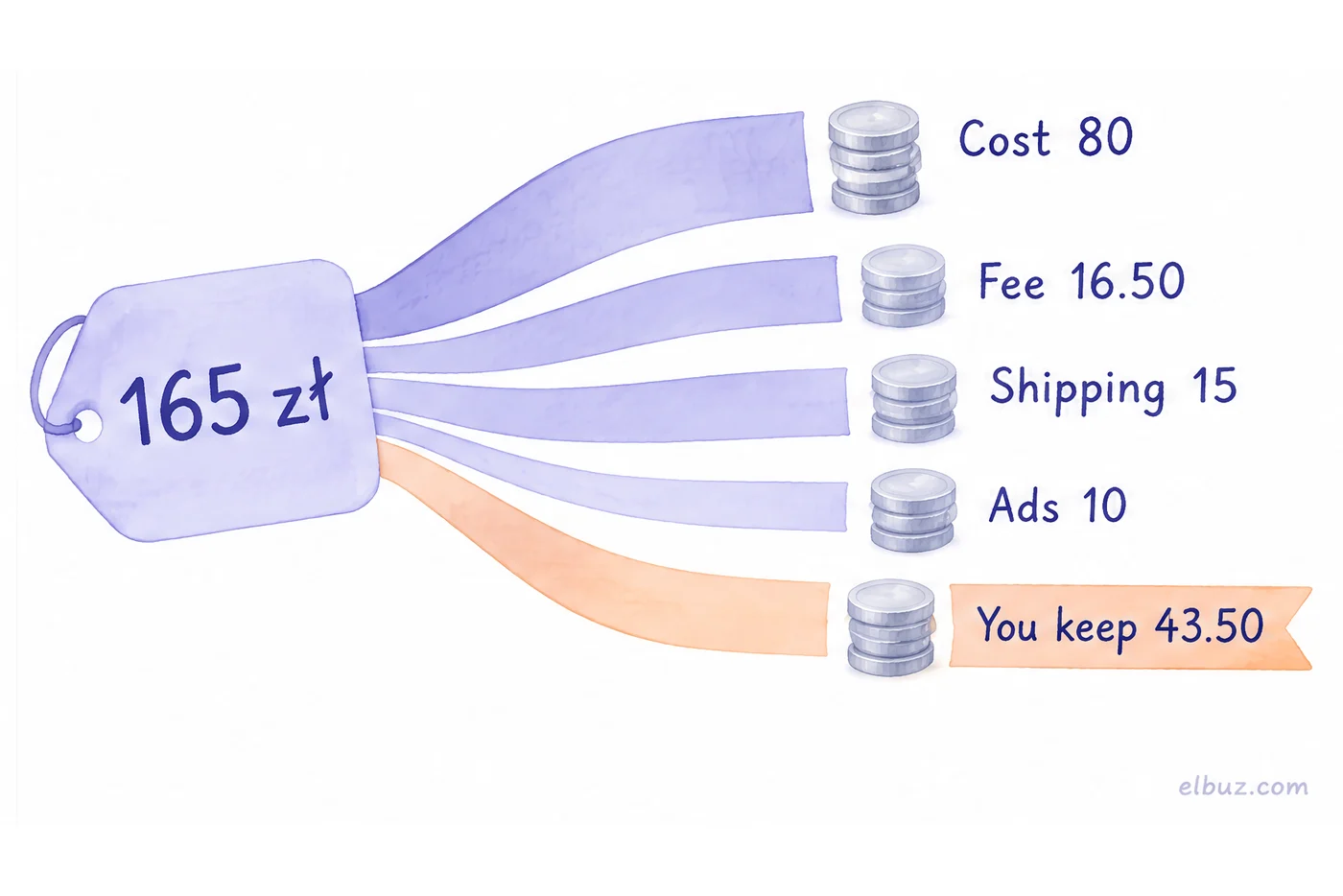
Out of a 70 zł markup, 43.50 zł reaches you. If you calculate the commission from the item price only, you get 15 zł instead of 16.50 — an error of 1.50 zł on every order, and on cheap products with expensive delivery it eats a visible part of what you keep. Plan for returns separately: a buyer in the EU can withdraw from an online purchase within 14 days without giving a reason. To build fees into the price itself, use the markup calculator.
Allegro Smart!: where to ship from
The Smart! badge goes to offers shipped from Poland or from Germany, France, the Netherlands, Czechia, Slovakia or Hungary. Offers shipped from anywhere else — the UK, the US or the rest of the EU — do not get it, so the buyer pays for delivery.
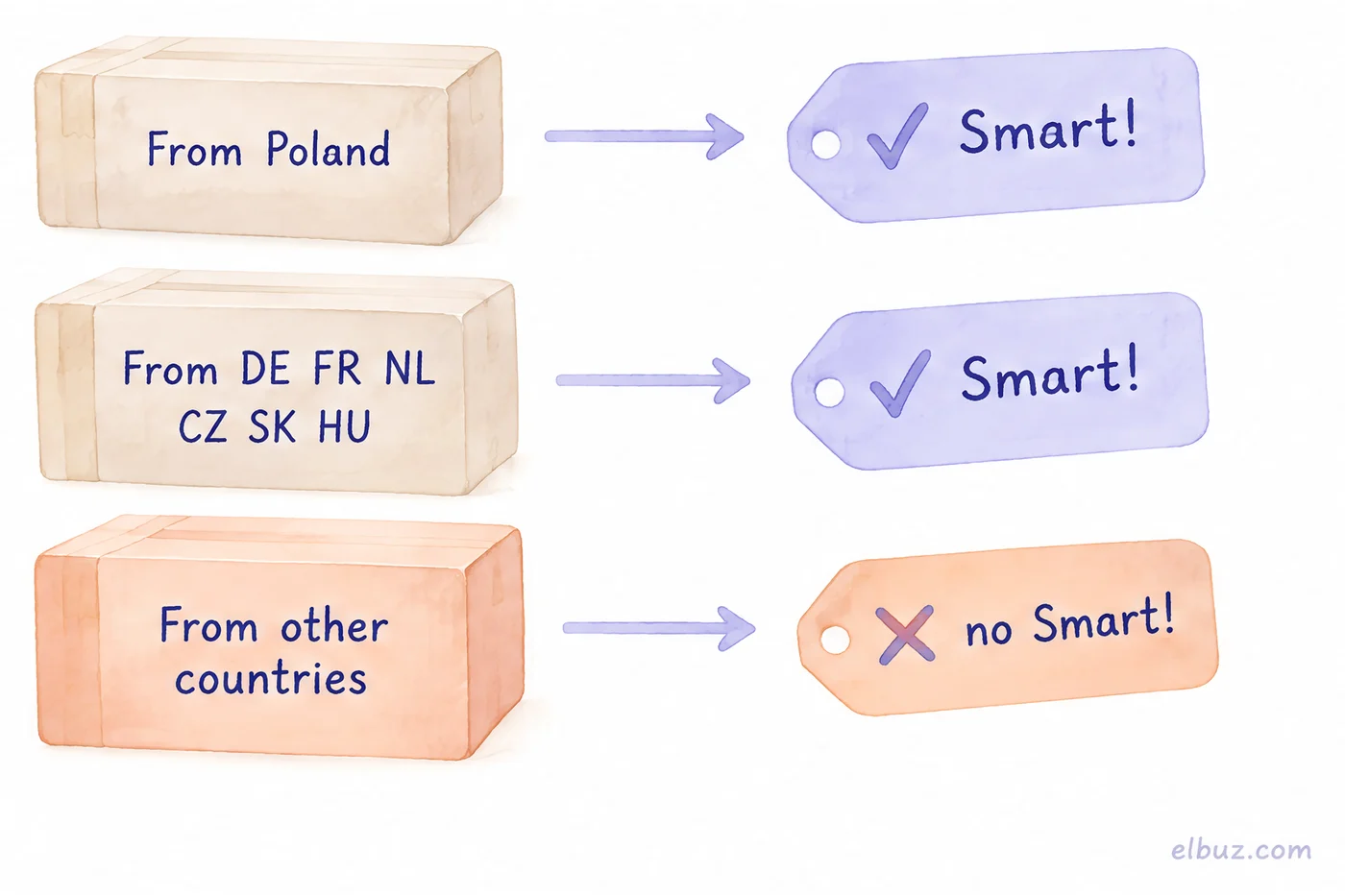
Smart! is a buyer subscription: free delivery and free returns on offers with the badge when the order from one seller is at least 49.90 zł. You settle Smart! shipping with Allegro by a fee table that depends on the order value, and Allegro pays for the free returns. For parcels sent from Poland, Allegro requires:
- a sales quality rating higher than "Neutral" (or at least "Neutral" on all your accounts);
- the full set of Allegro Delivery methods available where you ship from and for the size of your product;
- returns terms with a return address in Poland;
- Allegro invoices paid on time.
For shipments from Germany, France or the Netherlands the rules are different: at least one DPD, UPS or DHL courier option on your own contract and a delivery price in the offer from 0.00 to 24.99 zł; tracking numbers for at least half of your orders. Hence the practical choice: if your warehouse is in one of these countries, ship from it; if it is in the UK or the US, test demand with direct shipping and, once sales grow, move stock to a warehouse in Poland — your own, a partner's or a fulfilment center. Which carriers deliver across Poland — in the overview of courier services in Poland; importing a batch into the EU from outside requires an EORI number.
What to prepare for your first offer
An offer goes live when the title, price, the category's required parameters and photos that follow Allegro's rules are filled in. Prepare them for the whole range in advance, not product by product:
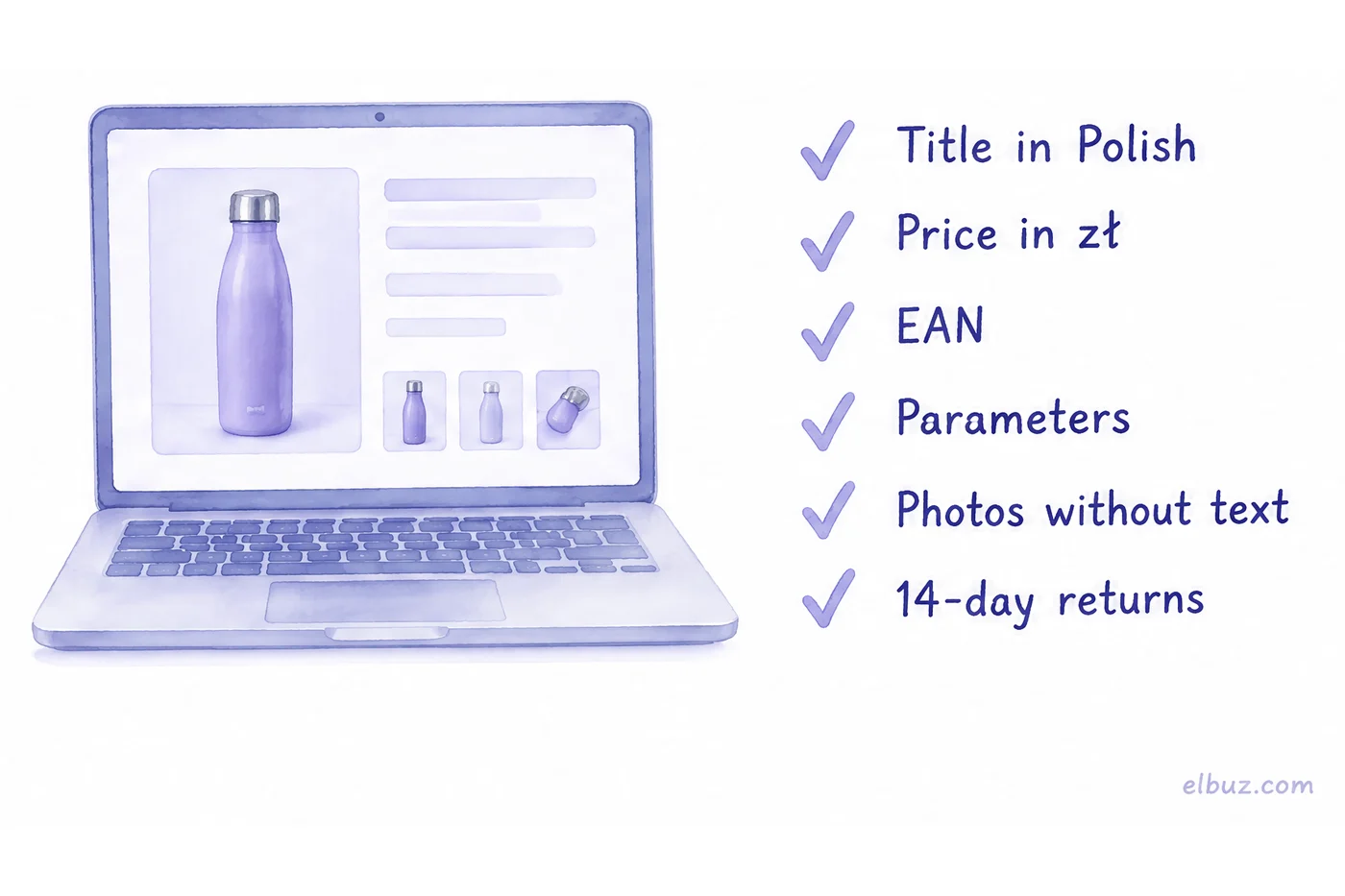
- Title and description in Polish. Unedited machine translation shows at once: buyers search with the Polish words used in the category parameters.
- Price in złoty that includes the commission on the price with delivery (see the calculation above).
- EAN and category parameters. Brand, manufacturer, EAN and other required fields depend on the category; without them the offer is not published.
- Photos. The longer side at least 500 pixels, no text and no logos added on the image (the product's own brand and labels are allowed). A business account can add up to 16 photos per offer.
- Returns, complaint and delivery terms — added once and applied to every offer.
Where sellers go wrong at the start
- Registering an ordinary account instead of a business one. To sell as a business you need a konto firmowe, and the company details have to be verified anyway.
- Calculating the commission without delivery. Allegro takes it from the total with delivery — build that into the price.
- Counting on Smart! while shipping from the UK, the US or a country not on the list. The badge goes only to shipments from Poland and six EU countries.
- Planning 2,000 offers on a US company. Outside the EEA, one account carries no more than 500 offers.
- Postponing the documents. Without the identity and company check you can sell but not withdraw money; documents must not be older than 4 months.
- Buying a subscription and featured offers before the first sales. Only the commission is mandatory; paid promotion makes sense once you know what you keep from a sale.
When your catalog already sells elsewhere
If your products are already on your website, Amazon or eBay, Allegro is one more channel, and the hard part is not registration but keeping the offers up to date: Polish titles, prices in złoty and stock that drops after a sale on any channel.
Elbuz keeps one catalog for every channel: offers go to Allegro through the API with the category parameters and EAN, prices are calculated by your rule, for example base price plus a markup that covers the Allegro commission, Allegro orders arrive in your common order list, and prices and stock go back to Allegro on a schedule. How it works is on the Allegro integration page.
Who it is not for: if you list a few dozen products on Allegro and sell nowhere else, Allegro's own seller account and its file upload are enough.
Allegro from the same catalogOffers, prices, stock and orders in Elbuz, 14 days free
Frequently asked questions
How do I sell on Allegro?
Register a business account, verify a bank account for payouts, set your returns and delivery terms and list your first offer in Polish. To withdraw money from sales, confirm your identity and company documents.
Can I sell on Allegro from outside Poland?
Yes. Companies from the EEA and the UK register the same way as sellers from the EU; a company from outside the EEA, such as the US, can have one account with up to 500 offers and must receive payouts in PLN.
Is it free to sell on Allegro?
Listing is free; the only mandatory fee is the sales commission — 1% to 17% net depending on the category, calculated on the price including delivery. Promotion and subscriptions are optional; see the example calculation.
What is Allegro Smart for sellers?
It is a badge on offers where a buyer with a Smart! subscription gets free delivery and returns. You settle the shipping with Allegro by its fee table, and the badge goes only to shipments from Poland, Germany, France, the Netherlands, Czechia, Slovakia and Hungary.
Do I need an EAN to sell on Allegro?
It depends on the category: EAN, brand and manufacturer are required parameters in many categories, and without them the offer is not published. Check the fields of your category in the listing form.
Do I need to list in Polish on Allegro?
For allegro.pl, yes in practice: buyers search in Polish and category parameters are in Polish. Prices are in złoty, so set them with the commission and delivery included.
Sources
- Allegro, fees for sellers (commissions, Wyróżnienie, subscriptions, Smart!) — help.allegro.com/pl/fees.
- Allegro, registration for sellers from the EEA outside Poland (steps, bank account check, documents) — help.allegro.com.
- Allegro, registration for sellers outside the EEA (one account, 500 offers, payouts) — help.allegro.com.
- Allegro, how to create an account (ordinary and business) — help.allegro.com.
- Allegro, Smart! for shipments from abroad — help.allegro.com; Smart! on allegro.pl for business accounts — help.allegro.com.
- Allegro, rules for photos in the gallery and description — help.allegro.com.
- Directive 2011/83/EU on consumer rights, Art. 9 (14-day right of withdrawal) — eur-lex.europa.eu.
Checked on October 31, 2026.


